
Simplify Salesforce Integrations with Declarative Webhooks
How I Easily Set Up Inbound and Outbound APIs with Salesforce - No Code Required

Salesforce continues to invest in tools that simplify integration tasks for administrators. Low-code set up for integrations are possible on the Salesforce platform today. However, the functionality still seems to be dispersed all over the platform utilizing several tools, and keeping the difficulty of setup relatively high. This is where Declarative Webhooks comes in. This platform makes inbound and outbound integrations easy, and keeps all your configurations together in one single app.

What is Declarative Webhooks?
Declarative Webhooks is a native Salesforce application developed by Omnitoria. It allows admins to build significant, scalable integrations with external platforms without writing code. Built to work with REST APIs that use JSON or x-www-form-urlencoded data, the app makes it possible to configure both outbound and inbound connections from within Salesforce. It’s ideal for admins, developers, and operations teams looking to connect Salesforce to third-party tools quickly and securely.
Declarative Webhooks currently holds a 5-star rating on the AppExchange, with positive feedback from users across industries.
Key Declarative Webhooks Features
Declarative Webhooks enables bidirectional integrations. You can send data out of Salesforce (outbound) by triggering callouts through Flow, Process Builder, Apex, custom buttons, or scheduled batches. You can also receive data from external systems (inbound) by defining endpoints within Salesforce that respond to external webhooks.
Unlike standard Salesforce tools, Declarative Webhooks actually creates and hosts inbound URLs—eliminating the need for middleware, and enabling real-time sync with external systems directly from your org.
The interface is entirely point-and-click, making setup approachable even for non-developers. The app includes template-based configurations that streamline implementation without the need for custom Apex. Help and guidance is provided throughout the UI each step of the way.
Security and flexibility are top priorities. Declarative Webhooks supports a variety of authentication methods, including OAuth and Basic Authentication, and allows you to configure secure handling of credentials and external tokens.
For more advanced use cases, the app includes features like retry logic, callout sequences, and detailed error handling. You can tailor integrations to your needs using scheduling tools or triggering logic from inside Salesforce.
Real-World Use Cases
Slack Webhook
Now granted, this can also be achieved with Salesforce-Slack actions, however, I wanted to take this opportunity to trigger Slack workflows with Webhooks, and demo the Declarative Webhooks functionality with a simple use case.
I set up a Slack workflow that triggers based on a webhook. This workflow posts a message to a channel and adds the name of the person that is passed into the workflow via the webhook to a list of contacts.
You can see the configuration of the Slack workflow and the Slack output results below.
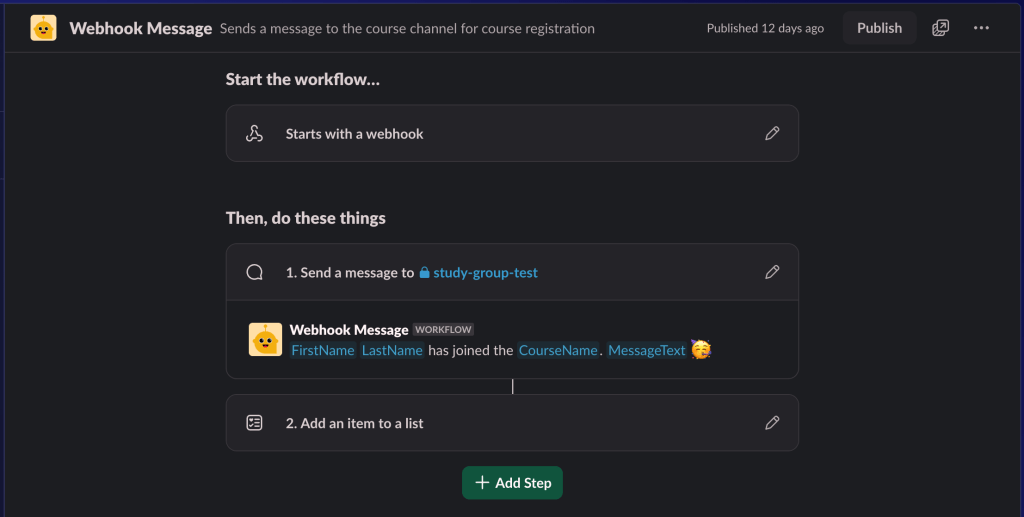


How Did I Configure Declarative Webhooks to Achieve This Result?
First you need to install Declarative Webhooks from Salesforce AppExchange. I will give you the link further down on this post. This app is free to install and try.
- Complete the Slack configuration of the workflow. Slack will give you a webhook URL.
- Configure Declarative Webhooks and add the URL to the configuration page. Make sure you add the domain URL to Salesforce Remote Site Settings.

- Test and activate your callout
- Use one of the many methods available in Declarative Webhooks to trigger the callout from Salesforce.
Inbound Call Template for Zoho Campaigns
How Did I Configure Declarative Webhooks and Zoho Campaigns to Achieve This Outcome?
- Set up an Inbound Call Template on Declarative Webhooks. The magic on this platform is that it generates an external endpoint URL for you. You can chose to authenticate or not.
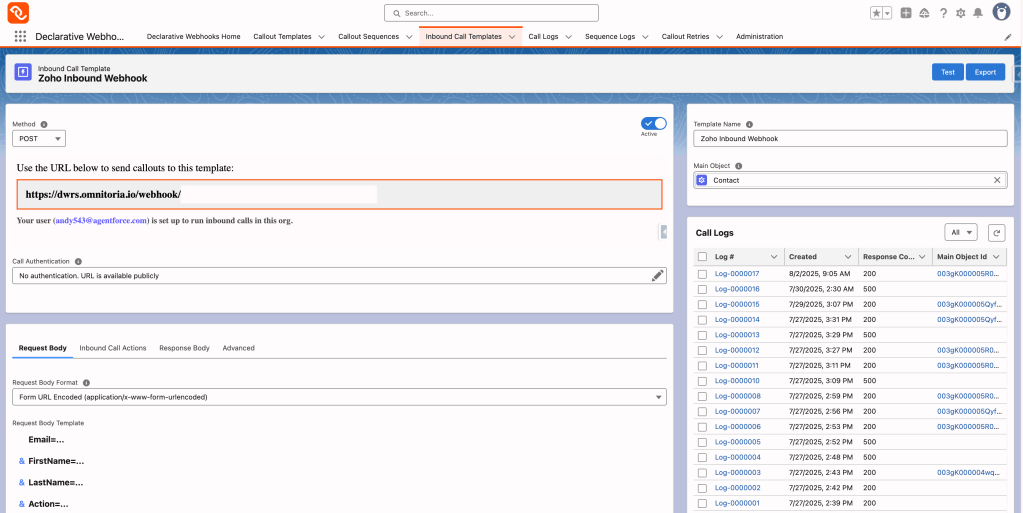
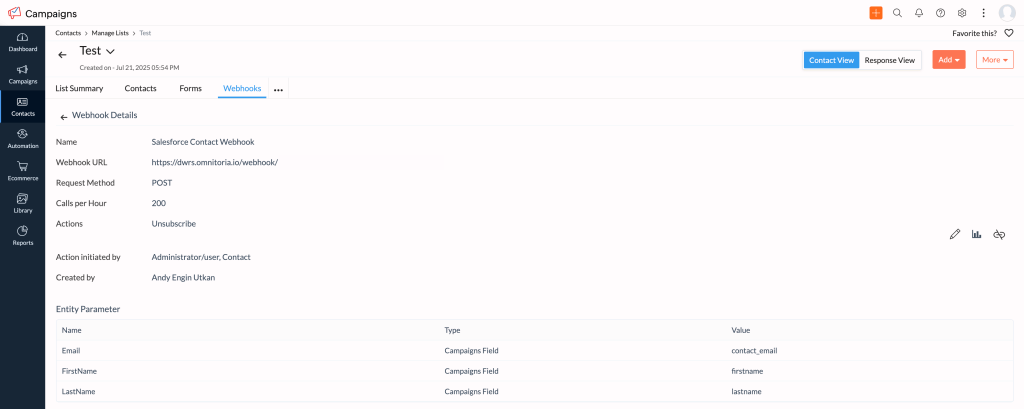
- Create a webhook on the Zoho Campaign side and pass the Name and Email of the contact to Salesforce. Enter the URL generated by Declarative Webhooks here.
- Build an autolaunched flow to update the checkbox on the matching record.

- Test and activate your flow and Declarative Webhooks template.
- Unsubscribe the contact from the list on the Zoho Campaigns side and see the magic unfold.
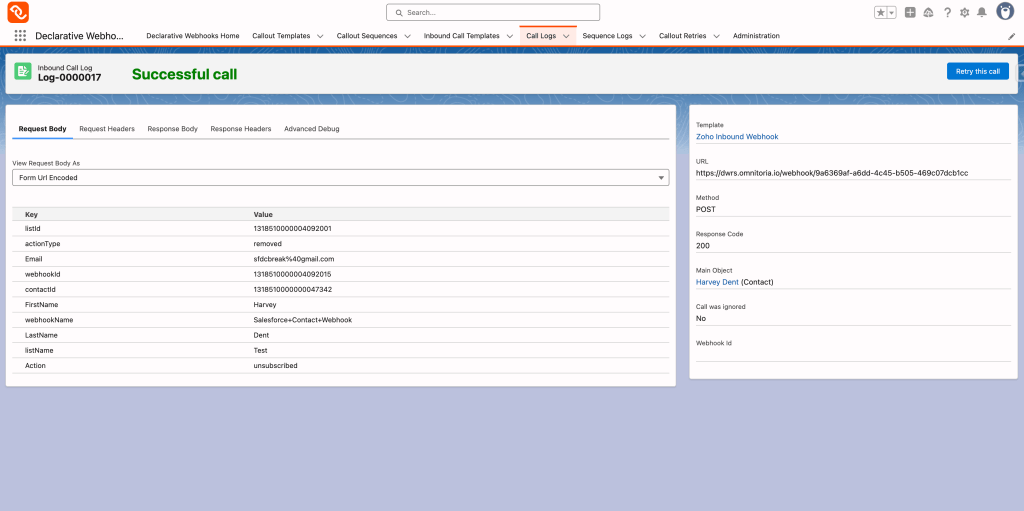
I really liked this functionality. The logs show whether the flow executed successfully. For future enhancements, I would like for the Declarative Webhooks logs to also show output variable values coming from the flow.
Pricing Overview
Declarative Webhooks is free to install and use in Salesforce sandbox environments indefinitely. In a production or developer org, users get a 30-day free trial. After that, the app remains free for basic use, up to 100 inbound and 100 outbound calls per month, using one outbound and one inbound template.
For organizations that need more capacity or advanced functionality, paid plans are available. These plans scale with usage and support additional templates, retries, and enhanced features. Nonprofit discounts are available, making the app accessible to mission-driven organizations.
Follow this link to find out more about the product and try it yourself.
Why Declarative Webhooks?
This app removes the need for manual data entry and reduces the likelihood of human error. It lets teams centralize their business operations within Salesforce, replacing disconnected workflows with streamlined automations. Whether you’re connecting to popular SaaS tools or custom-built systems, Declarative Webhooks empowers teams of all skill levels to build reliable integrations that scale with their business.
How to Get Started
You can install Declarative Webhooks directly from the AppExchange. The installation process is quick, and the setup guide walks you through each step. Start experimenting in a sandbox or production trial, and configure your first outbound or inbound connection using the built-in templates. Whether you’re an admin looking to eliminate duplicate entries or a developer needing a fast integration framework, this tool provides the support you need to get started quickly.
Final Thoughts
I liked how Declarative Webhooks brought various integration methods together in one app. I especially like the inbound call functionality. Ease of setup, flexible pricing, and native integration with Salesforce automation tools are attractive features for Salesforce Admins. If you are in the market for integration solutions, I recommend you check out Declarative Webhooks by Omnitoria here.
This post was sponsored by Omnitoria.
Explore related content:
Getting Started with Salesforce Data Cloud: Your Roadmap to Unified Customer Insights
How To Use Custom Permissions In Salesforce Flow


2 Comments