
What Is Vibe Coding? And What’s New in Agentforce Vibes for Developers?


The term “Vibe Coding” started to become popular after computer scientist Andrej Karpathy introduced it in February 2025. Since then, so many people across different programming languages, using all kinds of tools, started talking about it and exploring what it means for their day-to-day development, not just in Salesforce.

Also, if you have been following Salesforce updates after Dreamforce 2025, I am sure you’ve already heard of Agentforce Vibes for vibe coding!
If you know me at all, you know I’m the kind of person who starts with a million questions—it’s how I really wrap my head around something new! So I’m willing to bet that when you first heard the terms “Vibe Coding” and “Agentforce Vibes,” the exact same thoughts popped into your head as mine:
“Okay… hold on. What on earth is vibe coding? Is Agentforce Vibes just Agentforce for Developers (A4D) with a fancy new name? And, most importantly, are we developers about to be out of a job?” Sound familiar? Keep reading, because I’m going to answer every single one of those questions (and a few more you probably have too).
In this blog, I’ll walk you through everything you need to know, in a simple, friendly way, and I’ll also share what actually changed for us as Salesforce developers. And yes, I’ll give you my point of view on whether or not developers would lose their jobs.
We will focus on the what, why, and where so you fully understand the concept before jumping into the hands-on part in future blogs. Let’s start from the beginning.

What Is Vibe Coding?
Vibe Coding a new approach to software development. The old way of building software is: you pick a programming language to learn and master, you get requirements to implement, and then you start typing every line and character in the code until something is finally up and running.
With Vibe Coding, we now have a totally different way of development. You can “code” using your own English words (Natural Language). We call it an utterance or a prompt. Your prompt is sent to the Large Language Model (LLM) and it will generate the code for you! So your role as a developer using Vibe Coding will shift from writing code line-by-line, to guiding the LLM using your own words, then testing and refining the AI-generated output.
Quick note: your coding skills are still needed! I’ll share why later in the blog.
What Is “Agentforce Vibes”? Is it just a rebrand of Agentforce for Developers (A4D)?
A4D was an AI-powered coding companion. It was a conversational assistant meant to help Salesforce developers write, understand, and debug code faster using natural language. But it wasn’t performing any actions or creating any files for you.
Agentforce Vibes, on the other hand, is Salesforce’s AI-native vibe-coding Agent powered by the DX MCP Servers. It’s more than just an assistant; it has the capability to actually perform actions and create or update files. In my opinion, it is definitely more powerful!
What is the Salesforce DX MCP Server?
The Salesforce DX MCP Server acts as a bridge between Agentforce Vibes and your local Salesforce development environment. It allows Agentforce Vibes, through natural language, to use real Salesforce tools like running SOQL queries, deploying metadata, creating components etc., all directly from VS Code. Instead of just suggesting code, Agentforce Vibes can now perform real, hands-on actions in your project through this connection.
Here is an example:
I have a MathUtility class and the following method, which I know is not written with the best syntax and needs to be refactored:
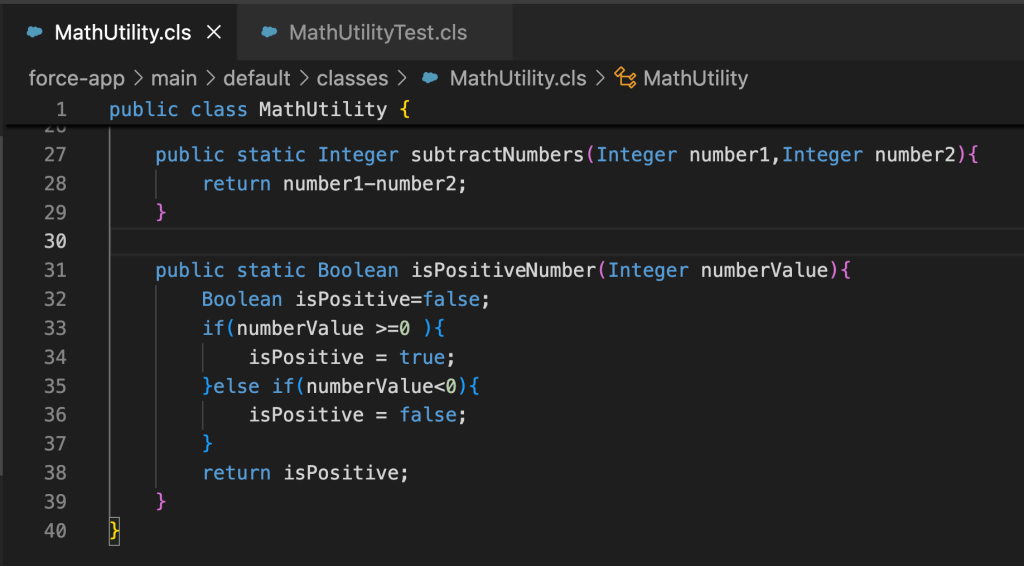
I will use the following utterance to refactor it and show you the difference between what we used to get with Agentforce for Developers vs. what we are getting now with Agentforce Vibes:
“Refactor isPositiveNumber method please and create unit test method for it as well.”
Using this Utterance in Agentforce for Developers
It used to give us the suggested code inside the chat in the Dev Assistant window (as shown below), and it was up to us to manually copy and paste those code suggestions into our Apex classes.

Using the Same Utterance Now with Agentforce Vibes
Agentforce Vibes will update the files directly with the suggested code.
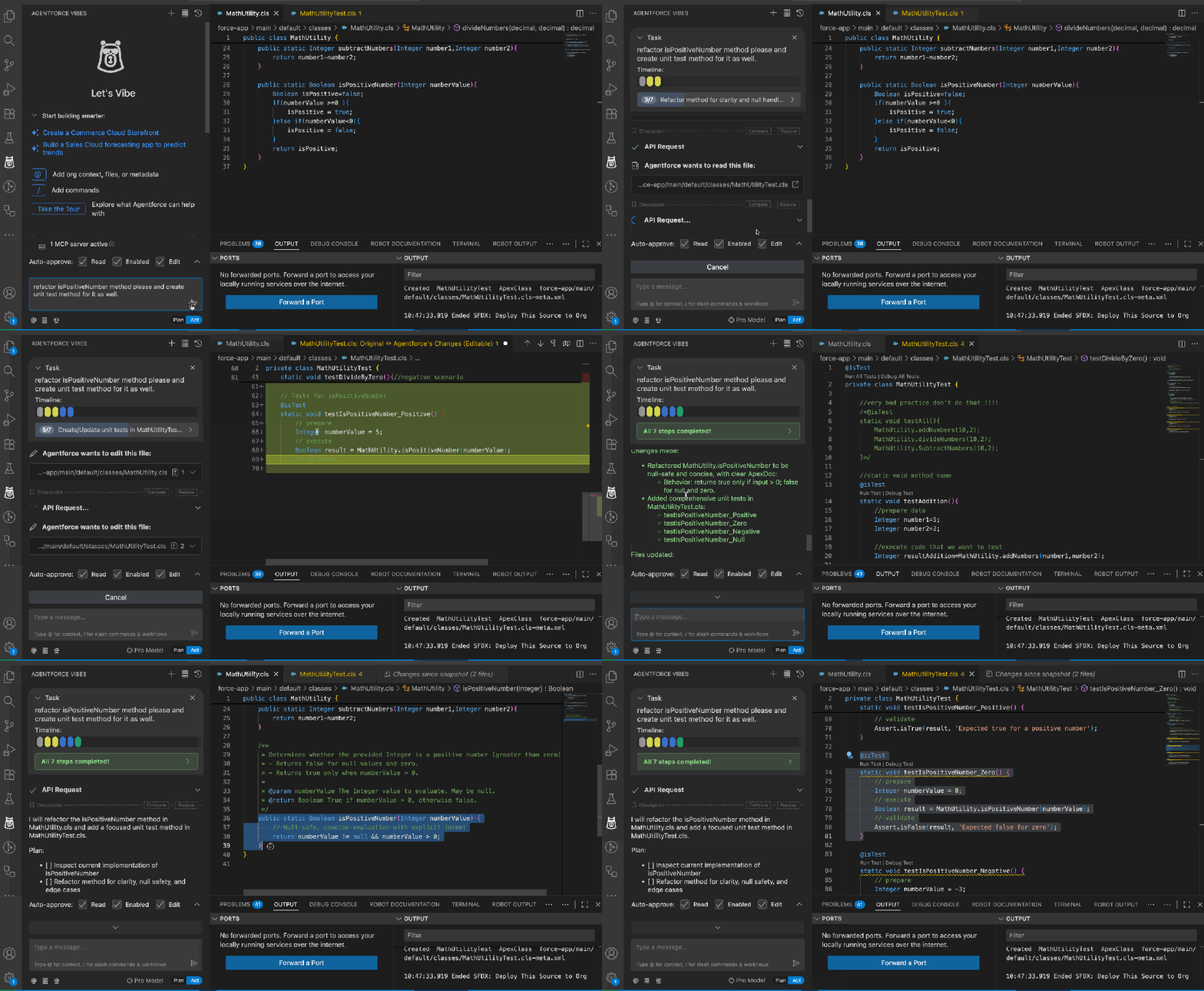
Some people have already been using ChatGPT and other tools for code generation, but now instead of writing long prompts or switching back and forth between VS Code and ChatGPT (or any standalone LLM), you can stay inside your VS Code and work with your trusted AI agent, which knows your entire codebase and is governed by the Salesforce trust layer.
Where Can You Access Agentforce Vibes?
Agentforce Vibes is available through two options: Agentforce Vibes IDE, and the VS Code Extension.
Agentforce Vibes IDE (Browser Version)
It is the same as Code Builder (Web Based IDE) but rebranded, and it comes with Agentforce Vibes configured inside it. It is available in certain supported org types. You can open it directly inside your Salesforce environment and start vibe coding immediately. This is a perfect choice for non-developers who want to try it out but don’t have VS Code set up.


Supported Editions
Agentforce Vibes IDE is available in Lightning Experience for the following Salesforce editions:
–Enterprise Edition
-Performance Edition
-Professional Edition (with API Access add-on)
-Unlimited Edition
Please note, you won’t see it in the Setup menu if you have “Show the Quick Settings Panel” enabled in the user interface.
What about Developer Orgs?
Regular developer orgs you may already have will not include the Web Agentforce Vibes IDE. So what if you want to test it and play with it, but you don’t want to use it with your work Salesforce orgs? You have some options:
-you can use only the VS Code extension, or
-if you specifically want the Web IDE on a developer org, you need to create a new special Developer Org from HERE.
The VS Code Extension
This is my favorite way to use it, and it is not limited to any edition or org type. Setting up Agentforce Vibes is simple and quick:
-
-
- Make sure you have the latest version of VS Code.
- Confirm you have the latest version of Node.js
- Agentforce Vibes is part of ‘Salesforce Extension Pack (Expanded) . Make sure to get its latest version
- Enable Salesforce DX MCP Server
-

What is the Cost of Agentforce Vibes?
Agentforce Vibes is completely free to use—no additional licenses, credits, or subscriptions are required. The only thing to keep in mind is that it uses a Pro Model for up to 50 API requests daily. (As of today, this limit may change in the future, so we should keep an eye on Salesforce announcements.) After those 50 API requests, it will automatically switch you to the Core Model. Both models give great output based on my testing so far.
When Agentforce Vibes is working to perform your request, it may consume more than one API request, depending on what it needs to analyze or execute. Additionally, as of today, there is no way to find out how many API requests you have consumed. I am hoping Salesforce will expose this number in the future so users can be aware of their consumption. Once you hit the limit, Agentforce Vibes immediately notifies you that you’ve consumed your Pro model requests and automatically switches you to the Core Model.
Is Agentforce Vibes a Developer Replacement?
Agentforce Vibes is not by any means replacing developers. It is meant to empower developers and help them deliver faster while focusing more on design, creativity, and enhancing their products.
The output quality you get from Agentforce will rely 100% on the quality of your utterance and how much detail you provide to Agentforce Vibes. That’s how you get the output you are looking for faster. You need to know how you would do it yourself without vibe coding so you can express yourself correctly to Agentforce Vibes.
Sometimes you will see Agentforce Vibes produce results that are not quite right; it is a generative AI tool, after all. This is why you still need strong development skills, especially right now, to spot issues and fix the code properly yourself.
Final Thoughts and Use Case Examples
My advice for any experienced developer who is hesitant about Vibe Coding: embrace the change and start exploring it. Learn how to write a good prompt so you don’t get left behind. Vibe Coding is not stealing your job, but developers who know how to use Vibe Coding will definitely move faster than those who don’t.
So start today and experiment at least in your developer org. Once you feel comfortable and happy with this amazing tool, start using it step by step in your real projects. My advice for any new developer: don’t give up on learning! You still need to learn the basics and understand coding. Imagine Agentforce Vibes and other vibe-coding tools do not exist — learn how you would build things yourself first, then start using Vibe Coding. Believe me, the more you know, the better you will use it.
If you are currently using Agentforce Vibes and would like to join Code With Sally in one of our “From the Community to The Community” sessions, message me on LinkedIn to become a guest speaker and share your use case with the community. We will grow stronger together!
More blogs are coming next on Code With Sally: including exploring the full VS Code extension, actual use cases, tips for better prompts, and the new updates in Agentforce 3.3.0. I will leave the full list for another blog on Code With Sally, but for now you can check out some of these use cases on the Code With Sally channel:
If you enjoyed this blog and want to keep learning with me, make sure to subscribe to my YouTube channel, Code With Sally, for weekly sessions, tutorials, and Salesforce developer content.
I’d love to see you there!
Stay tuned 💙
Explore related content:
Demystifying Code for Salesforce Admins
Stop Agentforce Dev Orgs From Expiring
How to Get Your AI-Powered Enhanced Developer Org with Agentforce and Data Cloud


5 Comments