
Salesforce Optimizer Is Retired: Meet Org Check

Change is a constant in the Salesforce ecosystem. Admins are now navigating another transition: the retirement of a core org management tool. Optimizer is officially retired, which means it is essential to adopt a community-driven successor: Org Check.

Optimizer’s Final Chapter: Understanding the Retirement Status
The Salesforce Optimizer app was originally developed to help customers successfully migrate to Lightning Experience. With that goal largely achieved, Salesforce has officially retired the feature.
If your organization has an org created after August 4, 2025, you cannot access the legacy Optimizer tool. For existing orgs, access was removed during the Winter ’26 Release upgrade for Hyperforce instances. It will be removed during the Spring ’26 Release for the remaining non-Hyperforce instances. If you are an administrator, incorporating an alternative auditing tool is now a critical step in maintaining continuous org health. The only remaining exception for a short period is the Hard Coded URL report, which remains available for non-Hyperforce orgs to assist with migration planning (source).
Your New Org Health Partner: Org Check
The open-source community has stepped up to offer an auditing solution in the form of Org Check. Available for free through Salesforce Labs, Org Check is an easy-to-install, comprehensive tool. It is designed to help administrators and developers continuously monitor and reduce technical debt. Its core philosophy is simple: provide a 360-degree, in-org view of your metadata quality, security vulnerabilities, and automation efficiency, all without complicated setup or external connections.

Why Org Check is the Admin’s Secret Weapon
Unlike the retired Optimizer, which primarily generated a static report focusing on a subset of features and licenses, Org Check provides a dynamic, interactive dashboard right inside your Salesforce environment. It does not evaluate customer data or records; like Optimizer, its focus is purely on the technical health of your metadata and configuration. The true power of Org Check lies in its ability to drill down into the core components that dictate org performance and user experience. Furthermore, because Org Check is a free, open-source tool, it benefits from rapid, community-driven development, allowing it to adapt to new platform features and best practices far quicker than a traditional enterprise tool.
A Comprehensive Audit of Key Org Areas
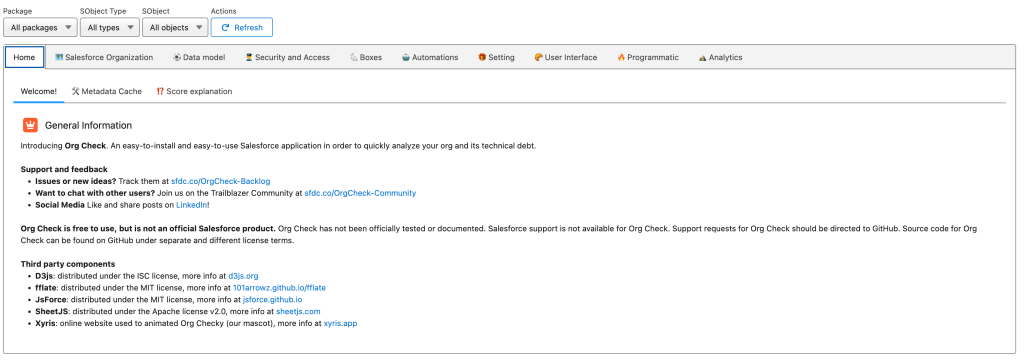
Org Check segments your org into sections that provide insights into its health and maintainability. For example, below is what they have listed as (very detailed) audit options for Security and Access:

-
- 👥 Active Internal Users: List all the internal active users and see who has critical system permission and why (includes Api Enabled, View Setup, Modify All Data and View All Data).
- 🚓 Profiles: List all your profiles, see if they are assigned, how many FLS, CRUD and Critical Permission are set up in them
- 🚔 Permission Sets: List all your permission sets and permission set groups and see if they are assigned, how many FLS, CRUD and Critical Permission are set up in them
- 🚸 Profile Restrictions: Check the IP Range restrictions and the Login Hour Restrictions for all your profiles and detect restrictions that are unnecessary
- ⛖ Profile Password Policies: Check password policies that are not secure enough
- 🚦 Object Permissions: Get the matrix of the CRUDs for all objects per profiles and permission sets
- 🚧 Field Level Securities: Get the matrix of the FLSs for all fields of a sepcific object (use the global filter to select one) per profiles and permission sets
- ⛕ Application Permissions: Get the matrix of the application access per profiles and permission sets
- 🌐 Browsers: Get the browsers that were used to log into Salesforce
See the image below to see all audit options including Data model, Automations, User Interface and more.
Org Check vs. Other Alternatives
While Org Check is the top free replacement for Optimizer, it is important to note that the market for org health tools is diverse. The retirement of the native Optimizer has opened the door for many solutions to compete, including paid and specialized tools:
-
Paid/Freemium Solutions: Tools like Metazoa Snapshot and Elements.cloud offer comprehensive org management suites, often including change management, data dictionary generation, and complex dependency analysis. Large enterprises with dedicated budgets typically use these tools.
-
Specialized Salesforce Labs: Other free Labs products, such as Happy Soup, focus on specific functions like impact and dependency analysis for deployments.
Org Check’s Advantage: For the average Salesforce Admin or smaller organization looking for a direct, free, community-supported, and open-source replacement that focuses solely on technical debt and org health without adding custom objects or external complexity, Org Check is the most accessible and recommended solution.
The Non-Negotiable Disclaimer: A Salesforce Labs Product
While Org Check is a powerful replacement, its adoption comes with an important caveat: it is a Salesforce Labs product.
Salesforce Labs is a program for Salesforce employees to share apps they create with the community. This means:
-
It is free, open-source, and created entirely without adding custom objects or external connections to your environment.
-
It is NOT an official Salesforce product.
-
Salesforce Support is NOT available.
Admins must rely solely on the community for assistance. You gain a free, dynamic tool, but you must know where to turn when issues arise.
Proactively Secure Your Org’s Future
The shift from Optimizer is complete. By proactively adopting Org Check now, you are ensuring your administrative practice is always ready to meet the demands of the platform’s future. Making this change proactively will secure your org’s health and ensure a smooth operational audit process moving forward. For an easy to follow and detailed video of the app, click HERE.
Start Using Org Check
The transition is straightforward. Here are the necessary links to install, use, and contribute to the future of Org Check:
-
Install Org Check: Find the free application and install it directly into your environment via the AppExchange Listing: https://appexchange.salesforce.com/appxListingDetail?listingId=a0N4V00000HA0X2UAL
-
Contribute and Report Bugs: As an open-source tool, community contribution is vital. View the code, file issues, and submit enhancements on the official GitHub Repository: https://github.com/SalesforceLabs/OrgCheck
- Find Community Support: Connect with other users, ask questions, and share best practices in the Trailblazer Community Group: https://trailhead.salesforce.com/trailblazer-community/groups/0F94V0000002E6cSAE?tab=discussion&sort=LAST_MODIFIED_DATE_DESC
Explore related content:
Salesforce Launches Free CRM: How It Stacks Up Against HubSpot and Zoho in 2025
How To Build Inline Editing for Screen Flow Data Tables in Salesforce


2 Comments