
Trailhead GO: The Complete Guide to Salesforce Mobile Learning in 2026


If you’re serious about building your Salesforce skills but struggle to find time at your desk, Trailhead GO might be exactly what you need. This mobile app brings Salesforce’s acclaimed learning platform to your phone. Earn badges and build expertise during your commute, lunch break, while waiting at your kids’ sports practice, or anywhere else life takes you.

But is it actually worth downloading? Let’s get into everything you need to know about Trailhead GO, including what works brilliantly, what falls short, and whether it’s the right fit for your learning journey.
What Is Trailhead GO?
Trailhead GO is Salesforce’s official mobile learning app, available free on both iOS and Android. It’s essentially a mobile-optimized version of Trailhead, Salesforce’s gamified education platform that has helped millions of people build careers in the Salesforce ecosystem via hands-on learning.
The app launched in September 2020 as an iOS-exclusive through Salesforce’s partnership with Apple, but has since expanded to Android and received significant updates. This includes a major redesign in early 2024 that introduced personalized learning recommendations and an improved interface.
The Good: What Trailhead GO Does Well
-
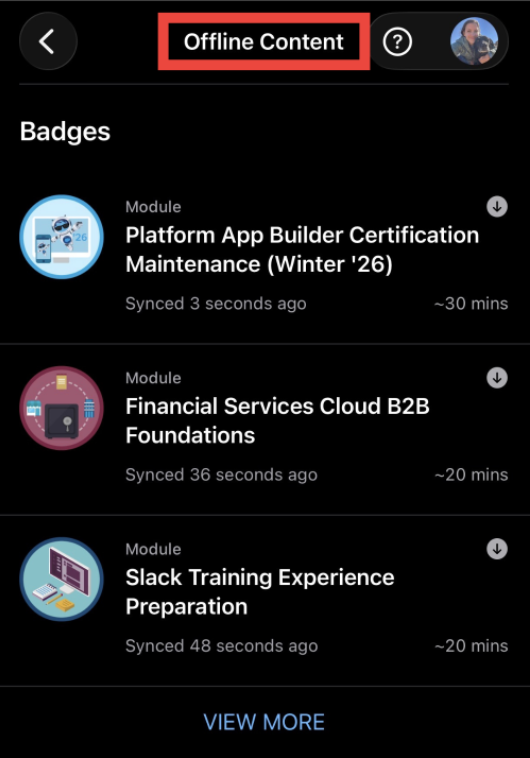
Offline Learning Capability The standout feature of Trailhead GO is offline access. You can download modules, trails, and content to your device and learn without an internet connection. This is great for anyone with an inconsistent commute, frequent flights, or limited data plans. Once you’re back online, your progress syncs automatically to your Salesforce account.
-
Personalized Learning Experience The app’s “Today” page uses Einstein AI to recommend content based on your learning history, career goals, and skills you’re working toward. Rather than browsing endless catalogs, you get curated suggestions that actually align with where you’re headed. The recommendations get smarter the more you use the app.

-
Bite-Sized Learning Format Trailhead GO excels at microlearning. Modules are broken into digestible chunks perfect for 10-15 minute learning sessions. The mobile interface is designed for quick wins, making it easy to complete a unit while waiting for a meeting or during your coffee break. This format keeps you progressing even when you can’t commit to hour-long study sessions.

-
Agentblazer Status and Modern Skills With Salesforce’s push into AI and agents through Agentforce, Trailhead GO now tracks your “Agentblazer Status,” helping you build relevant AI skills. This recognition system highlights your progress with agentic AI capabilities, which are increasingly important in the Salesforce ecosystem as the platform evolves beyond traditional CRM.
-
Community Integration The app connects you directly to the Trailblazer Community, where you can ask questions, share achievements, and network with other learners. You can also access Salesforce Help documentation right from the app, making it a comprehensive resource when you’re stuck.
-
Gamification That Actually Motivates Like desktop Trailhead, the app uses points, badges, and ranks to keep you engaged. Watching your Trailblazer Rank climb from Scout to Ranger to Adventurer provides real motivation. The satisfaction of earning a new badge after completing a module taps into that achievement-driven part of your brain that keeps you coming back.
The Bad: Where Trailhead GO Falls Short
-
No Hands-On Challenges This is the big one. Trailhead GO does not support hands-on challenges or Superbadges, which are critical components of Salesforce learning. These practical exercises, where you configure actual Salesforce orgs to meet specific requirements, are essential for certification preparation and skill validation. You can read the content and watch videos on Trailhead GO, but when it’s time to do the hands-on work, you’ll need to switch to a desktop browser. This disrupts the learning flow and limits how far you can actually progress on mobile alone. Trailhead GO automatically filters out hands-on challenges and projects from search results, so you only see modules you can actually complete on mobile. This keeps the experience focused and prevents the frustration of starting content you can’t finish in the app.
-
Limited Screen Real Estate Complex topics with detailed diagrams, architecture drawings, or multi-step processes can feel cramped on a phone screen. While the app does a decent job optimizing content for mobile, some technical modules are simply easier to absorb on a larger screen where you can see the full context.
-
Not Ideal for Deep Technical Content If you’re tackling advanced developer topics, complex data models, or detailed system architecture, the mobile format may not provide the focus you need. These topics often benefit from note-taking, multiple reference windows, and sustained concentration that’s easier to achieve at a desk.
-
Sync Delays Occasionally Occur While most users don’t experience issues, some learners report occasional delays in progress syncing between the mobile app and desktop. This is usually resolved by logging out and back in, but it can be frustrating if you’re tracking completion toward a deadline.
Who Trailhead GO Is For
- Commuters and Travelers
If you spend significant time on public transit, planes, or as a passenger in a car, Trailhead GO turns dead time into productive learning sessions. Download a trail before your trip and make progress without worrying about connectivity. - Visual Learners Tackling Theory
The app is excellent for video-based content and conceptual learning. Modules covering Salesforce concepts, business processes, soft skills, or high-level architecture work beautifully on mobile. - Career Changers Building Foundational Knowledge
If you’re transitioning into Salesforce from another field, Trailhead GO helps you build baseline knowledge in small, manageable chunks. You can learn what Salesforce actually does, understand key terminology, and explore different career paths without committing to long study sessions. - Current Salesforce Professionals Staying Current
The app is perfect for keeping up with new releases, features, and best practices. Trailhead GO makes it easy to stay informed about what’s new without blocking out dedicated study time. - Anyone Preparing for Certifications (With Caveats)
Trailhead GO can supplement certification study by helping you complete non-technical modules and reinforce conceptual knowledge. However, you’ll still need desktop access for hands-on challenges, practice exams, and working in actual Salesforce orgs.
Who Should Skip It?
- Developers Who Learn by Coding
If you’re pursuing developer certifications or need to write Apex, work with APIs, or build complex integrations, you’ll be frustrated by the mobile-only experience. These skills require hands-on practice in an IDE or developer console that Trailhead GO simply can’t provide. - People Who Need Uninterrupted Focus
If you’re someone who needs deep, distraction-free concentration to absorb technical material, you’re better off scheduling dedicated desktop study time. The mobile format encourages quick sessions that may not work for your learning style. - Those Solely Pursuing Superbadges
Since Superbadges are entirely hands-on, Trailhead GO can’t help you complete them. If this is your main goal, stick to desktop learning.
How Trailhead GO Fits Into Your Learning Strategy
The key to maximizing Trailhead GO is understanding its role in a broader learning approach. Think of it as supplementary rather than comprehensive.
Use Trailhead GO for: Theory, concepts, videos, staying current with releases, building soft skills, exploring new topics, and maintaining momentum between deep study sessions.
Use desktop Trailhead for: Hands-on challenges, Superbadges, complex technical modules, practice exams, and anything requiring configuration in an actual Salesforce org.
Many successful learners follow a hybrid approach. They consume content on Trailhead GO during downtime, then dedicate focused desktop sessions to hands-on work. This strategy maximizes learning efficiency without sacrificing practical skill development.
Tips for Getting the Most from Trailhead GO
- Download content strategically. Before a trip or your weekly commute, download entire trails rather than individual modules to ensure uninterrupted learning.
- Set small daily goals. Commit to completing just one or two units per day. Consistency beats intensity when it comes to building skills.
- Use notifications wisely. Enable streak reminders if they motivate you, but disable them if they create pressure that backfires.
- Join Community Groups through the app. Connecting with other learners provides accountability and helps you discover new trails or career paths you hadn’t considered.
- Pair with desktop sessions. Schedule at least one or two desktop sessions per week to tackle hands-on challenges and keep your practical skills sharp.
The Bottom Line
Trailhead GO is ideal for commuting, staying current with Salesforce releases, building foundational knowledge, and keeping momentum in learning. The offline capability, personalized recommendations, and bite-sized format make it genuinely useful for busy professionals.
Download Trailhead GO as part of your learning toolkit, but don’t expect it to replace focused desktop study sessions. Use it to build theoretical knowledge, while reserving desktop time for the practical work that truly solidifies your skills.
The app is free, well-designed, and genuinely useful. For anyone pursuing Salesforce skills, it’s worth trying to see if it fits your learning style and schedule. Just know its limitations going in, and you’ll be able to leverage it effectively without frustration. Click HERE to get the app.
Explore related content:
The New Slackbot Is Here: What Salesforce Just Shipped, Why It Matters, and How Teams Should Use It
Spring ’26 Release Notes: Highlights for Admins and Developers
Profiles and Permissions in Salesforce: The Simple Guide for Admins
What Nonprofits Taught Me About Building Salesforce for Humans, Not Just Systems

