
Flow Orchestration is Free Now! What It Is and How It Transforms Your Processes


On February 18, 2026, Salesforce made a quiet change: Flow Orchestration is now a standard Flow type.

Previously, Flow Orchestration required a paid add-on. All organizations received 600 runs free, and after that they had to buy bundles of runs (executions) from their Account Executive. Now, it’s included for Salesforce customers, subject to edition limits for all Flows. For admins, this change significantly expands what can be designed and managed without writing code, opening the door to more sophisticated, multi-step processes built entirely within Flow.
If you’ve ever managed a multi-step, multi-user process by stringing together record-triggered flows, screen flows, approval processes, and a handful of “In Progress” checkboxes, this announcement should have your attention. Let’s unpack what Flow Orchestration is, how it differs from standard Flow, and why all of this matters right now.
What Is Flow Orchestration?
Flow Orchestration is a framework for coordinating complex business processes that span multiple users, teams, and timeframes. Standard Flow is best for automating discrete actions. You can update records automatically, send notifications, collect information through screen flows, and react to data changes. Many processes can be handled entirely within a single flow, but not all processes are that simple.
When workflows involve multiple handoffs between departments, built-in pauses for approvals, parallel workstreams, or different possible outcomes, they can become difficult to manage. Delays start to surface, visibility into progress fades, and it becomes harder to tell who owns the next step.
The new Flow Approval Processes are based on Orchestrations. They are built similarly. To learn Flow Approval Processes, visit Flow Canvas Academy to get the self-paced course.


Flow Orchestration Brings Structure to Complexity
Instead of thinking about automation as isolated flows, Orchestration allows you to:
-
Break large processes into coordinated work items
-
Define stages that represent major milestones
-
Combine automated and manual steps
-
Run parallel activities where appropriate
-
Clearly map out handoffs between teams
It turns what might otherwise feel like a maze of automation into a clearly defined roadmap.
How Is Flow Orchestration Different from Flow?
Both Flow and Flow Orchestration use the same underlying automation engine. They are closely related, but they solve different types of problems.
Salesforce Flow is focused on automating specific tasks or creating guided user experiences. It responds to triggers, updates data, and presents screens for user input.
Flow Orchestration, on the other hand, operates at a higher level. It coordinates multiple flows and organizes them into stages. It defines how and when those flows execute, who completes which steps, and what happens next.
Think of it this way:
-
A screen flow might power an online credit card application form.
-
A record-triggered flow might update the applicant’s status.
-
But the end-to-end approval process, including risk review, compliance checks, and final approval, requires coordination across teams.
That coordination layer is where Orchestration shines. Orchestration allows you to convert flows into structured steps, group them into stages, and define the lifecycle of a record across departments. It provides more flexibility for approvals, clearer task assignment, and better visibility into where a process stands.
Why This Announcement Matters
Now that Orchestration is a standard Flow type, more admins can access it immediately.
This means you can replace tangled webs of automation with clearly structured orchestration maps, reduce reliance on custom code for multi-user workflows, move away from manual status tracking to manage handoffs, and design processes that more accurately reflect how your business actually operates. For many organizations, this lowers the barrier to solving complex process challenges. Instead of seeking budget approval for a premium feature, admins can begin building orchestrations immediately. It represents a meaningful expansion of the admin toolkit.
What Flow Orchestration Can Do
Connect Siloed Teams
Many processes require collaboration across departments. Sales hands off to Finance. Finance hands off to Operations. Operations loops back to Sales.
Orchestration makes those transitions explicit and trackable within a single framework. You define where handoffs occur and who owns each step. The process becomes visible from beginning to end.
Manage Human-in-the-Loop Tasks
Automation moves fast, and sometimes it’s hard to keep up.
Flow Orchestration allows you to pause a process while waiting for manual input. Approvals, reviews, or document submissions can take hours or days. The orchestration remains active and resumes automatically once the assigned user completes their step. This eliminates human delays.
Support Parallel Processing
Not every step needs to wait on the previous one. With Orchestration, you can assign tasks to multiple users at the same time. For example, Legal and Finance could review a contract simultaneously instead of sequentially. That alone can shorten process timelines significantly.
Parallel steps also reduce bottlenecks that often slow down record progress. Instead of one team finishing before another can even begin, work can move forward across departments in tandem. This is especially helpful for processes like onboarding, approvals, or case resolution where several stakeholders need to weigh in. By allowing tasks to run concurrently, you improve turnaround times, keep records moving, and give teams a clearer view of shared responsibility across the process.
Improve User Clarity with the Work Guide
One of the most practical features is the Orchestration Work Guide.

When a user is assigned an interactive step, they can see exactly what needs to be completed directly on the record page. Instead of hunting for tasks or relying on email reminders, users are guided in context.
Provide Visibility and Control
Admins gain a clear view of where a process is currently active, who owns the step, and what happens next.
Instead of troubleshooting scattered flows, you can analyze the orchestration as a whole. That visibility strengthens your ability to support stakeholders and refine workflows over time.
A Practical Example: Case Management
Trailhead’s “Build a Simple Orchestration” module walks through a case management example using a fictional solar company. The business needed to improve how incoming service cases were classified, routed, escalated, and resolved. The existing approach involved multiple manual handoffs and limited visibility. Here’s how Orchestration solved it.
The Anatomy of a Flow Orchestration
- Trigger/Start
The orchestration begins with a trigger. In the example below, it launches automatically when a new Case record is created, though orchestrations can also be started without a record trigger - Steps and Flows
The process is made up of multiple flow-driven steps. Some run in the background without user involvement, while others are interactive and assigned to users who complete specific tasks. - Decision
A decision element evaluates the outcome of the triage step and determines what happens next. Based on the case status, the process either moves toward closure or escalation. - Stages
The orchestration is organized into three stages. The first handles triage and routing, the second manages case closure and sends a follow-up survey, and the third routes escalated cases to a higher level of support.
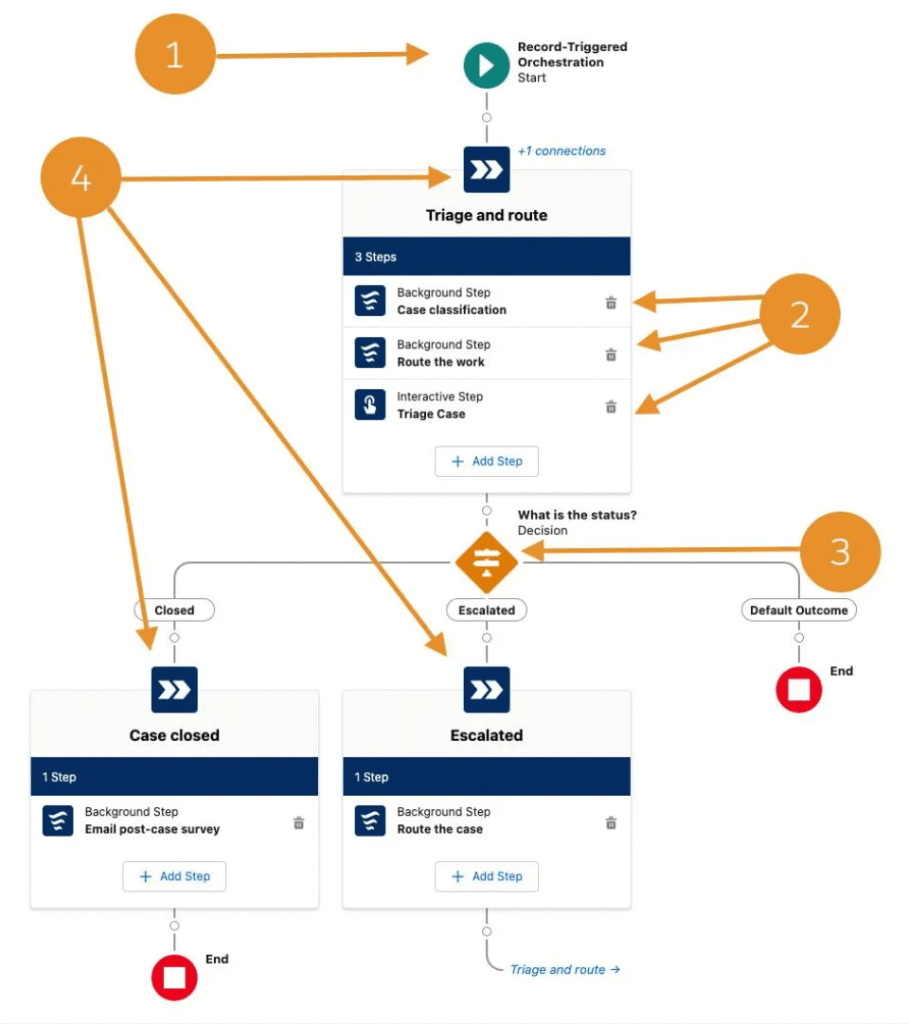
Much of this orchestration runs automatically in the background, from classifying the case to routing it to the right agent and sending notifications. When user input is required, the assigned agent completes their step directly from the Work Guide on the record. The outcome of that step determines whether the case closes with a follow-up survey or moves into escalation. Once activated, the orchestration handles every new case consistently from start to finish.
Industry Use Cases
Flow Orchestration is not limited to service teams. Its flexibility makes it valuable across industries.
-
Incident Management (Service or IT): Coordinate response across support, engineering, and communications during outages.
-
Claims Processing (Insurance): Manage inspections, reviews, quality checks, and payments across adjusters and approvers.
-
Sales Quote to Contract (Sales): Coordinate qualification, proposal, approval, billing, and fulfillment across departments.
-
Return Merchandise Authorization (Retail): Validate warranties, dispatch field service, and manage repair or replacement workflows.
-
Mortgage Approval (Financial Services): Run underwriting and document collection in parallel while coordinating multiple reviewers.
Anywhere there are structured handoffs, approvals, and parallel tasks, Orchestration can provide order.
From Task Automator to Business Architect
Flow Orchestration shifts the admin role. Instead of simply automating individual tasks, you can design full business journeys. You move from reacting to requests to architecting how work flows through the organization.
Now that Orchestration is a standard Flow type, this capability is no longer limited to organizations with additional licensing. If you want to get started, begin with a small process that involves at least two users and a clear handoff. Map it out. Identify stages. Separate automated actions from interactive steps. Then build your first orchestration. The theory is important, but building one will make the concepts click. See the Salesforce documentation for more information HERE.
Explore related content:
Unleashing the Power of Editable Data Tables in Salesforce Screen Flows
Identify and Manage Page Errors with the New Error Console in Spring ’26

