
Einstein Conversation Insights Gets Smarter in Spring ’26
What sales teams and admins need to know

Spring ’26 is a big release for teams using Einstein Conversation Insights (ECI). Salesforce is tightening the connection between call data, generative AI, and the core CRM so that conversations don’t just get recorded and summarized. They become usable intelligence that can trigger automation, coaching, and reporting through the sales cycle.

This post walks through the major updates to Einstein Conversation Insights in Spring ’26 and what they mean in practice. If you’re responsible for Salesforce configuration, reporting, or sales enablement, there’s a lot here that changes how conversation data flows through your org.
Generative ECI Brings Summaries and Insights Together
One of the biggest updates is the consolidation of call summaries and generative conversation insights into a single experience called Generative ECI. Instead of treating summaries and insights as separate features, Salesforce now combines them into one generative layer that works across voice and video calls.

For organizations already using Einstein generative AI features, this capability turns on automatically. Once enabled, every recorded call processed through Einstein Conversation Insights can generate a standard summary that includes:
-
A concise recap of the discussion
-
Customer impression or sentiment

-
Identified next steps
Beyond the standard call summary, admins can configure custom generative insights tailored to their sales process. This allows teams to automatically surface patterns like customer sentiment trends, references to pricing or competitors, specific contract or deal terms discussed, and objections raised during the conversation, all without requiring manual review.
The limit for generative insights has also expanded, allowing up to eight custom insights per call. That makes it easier to capture more nuanced signals from conversations without manual review.
From a configuration standpoint, there’s little to set up. Organizations already using call summaries or generative insights will see the combined experience automatically. Admins can enable Generative ECI from Salesforce Go under Einstein Conversation Insights features.
Faster Processing with Vendor Transcript Support
Processing time for call transcripts has always mattered. If insights arrive too late, they’re less useful for coaching or deal support. To address this, Salesforce is introducing vendor transcript processing for Einstein Conversation Insights.

Instead of relying solely on Salesforce’s native transcription service, organizations can use transcripts from supported vendors to speed up processing. New customers have this option enabled automatically. Existing customers can switch it on, but once enabled, it can’t be turned off.
Calls get processed more quickly, which means summaries and insights appear sooner. Managers can review conversations faster and provide timely coaching, while reps can act on insights before deals move forward.
More Licenses for Enterprise Edition Customers
Spring ’26 also expands access to Einstein Conversation Insights for Enterprise Edition customers. Many Enterprise Edition orgs will automatically receive up to 2,000 ECI standard licenses.
Each license includes up to 60 processed call hours per year. That means more reps and managers can access call recordings, keyword tracking, and conversation analytics without needing additional purchases right away.
This change lowers the barrier for organizations that want broader visibility into customer conversations. Instead of limiting access to a small subset of users, teams can extend ECI coverage across more of the sales organization. If your org needs more than the included licenses, you can still work with your Salesforce account team to expand capacity. But for many Enterprise Edition customers, this update provides a significant increase in coverage out of the box.
Opportunity Closing Recaps Add Structured Deal Intelligence
Another notable addition is Opportunity Closing Recaps, which use generative AI to capture why deals are won or lost. Instead of relying on manual notes or inconsistent fields, Salesforce automatically compiles insights from conversations, activities, and opportunity data into a structured recap.
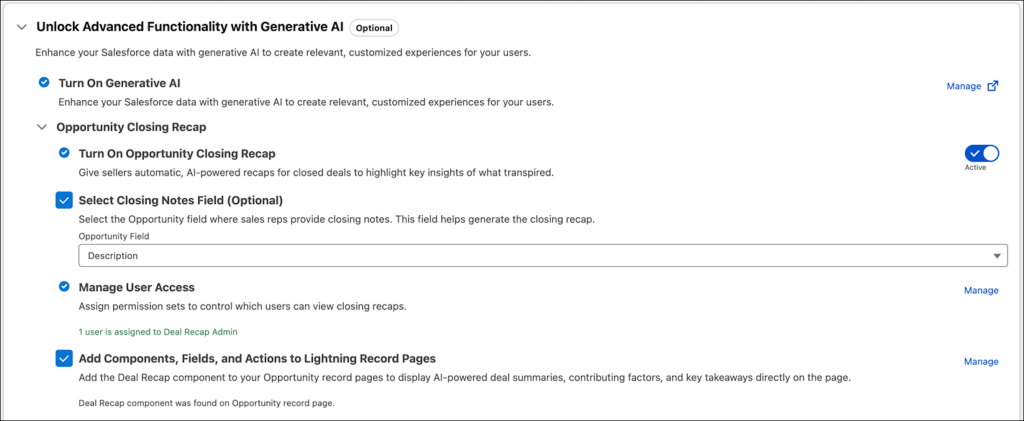
These recaps highlight key drivers behind deal outcomes, such as:
-
Pricing concerns
-
Competitor mentions
-
Product gaps
-
Decision factors
For reps, this reduces time spent documenting outcomes. For managers, it provides consistent summaries across deals. And for leadership, it creates a structured dataset that can be analyzed for trends.
Over time, these recaps can reveal patterns across your pipeline. For example, you might identify recurring objections in late-stage deals or see which competitors appear most frequently in lost opportunities.
Opportunity Closing Recaps are available to organizations turning on Einstein Conversation Insights for the first time starting in Spring ’26.
Conversation Data Becomes Native to Salesforce
One of the most impactful architectural changes is that Einstein Conversation Insights data is now stored directly on the Salesforce platform for new customers. Existing customers will begin migrating to this model starting in Summer ’26.
Storing conversation data in standard Salesforce objects changes how it can be used. Instead of being siloed in a separate analytics environment, conversation insights can now:
-
Trigger automation through Flow or Apex
-
Feed reporting and dashboards
-
Support prompt-based AI experiences
-
Update records or create alerts based on call content
For example, a Flow could automatically flag an opportunity if a competitor is mentioned during a call. Or it could update a field when a customer expresses strong buying intent.
This shift also means conversation data counts toward your organization’s data storage. Admins should plan accordingly as adoption grows. At the same time, Salesforce has announced that the standalone Analytics for Conversation Insights dashboards are scheduled for retirement in Summer ’26.
Better Microsoft Teams Matching and Syncing
For teams using Microsoft Teams, participant matching and record syncing have improved. Previously, matching often depended on exact email alignment between systems. Now Salesforce uses calendar and meeting data more effectively to identify participants.
That means call records are more likely to match the correct contacts, leads, or opportunities automatically. Admins will need to reconnect their Microsoft Teams accounts to activate the updated matching logic.
Salesforce also added the ability to request syncing of video calls from the previous 30 days. If recordings were missed due to outages or connection issues, support can backfill them so they appear in Einstein Conversation Insights.
This helps maintain continuity in conversation data, especially for organizations that rely heavily on Teams meetings.
Gong Transcript Integration Expands Flexibility
Organizations using Gong can now bring Gong transcripts into Einstein Conversation Insights. Once connected, those transcripts feed into ECI features such as:
-
Call summaries
-
Keyword detection
-
Objection tracking
-
Next-step identification
The transcripts also work with Salesforce AI experiences across the platform, including out-of-the-box agents for lead nurturing and sales management.

After connecting Gong through Salesforce Go and installing the managed package, new transcripts process daily. Teams can also request to import historical transcripts created before the integration was set up.
What This Means for Admins and Sales Teams
In Spring ’26, conversation data is becoming a core part of Salesforce. For admins, that means more automation based on call content, new generative features to manage, expanded license access, and updated reporting as legacy dashboards retire.
For sales teams, insights arrive faster and documentation becomes more consistent, giving reps better visibility into pipeline trends and next steps. If you’re already using ECI, review your settings in Salesforce Go to see what’s enabled. If you’re new to it, this release makes adoption more seamless. Conversation intelligence is now built to power action across your CRM, not just replay calls.

