
Is Your Salesforce Flow Too Big?


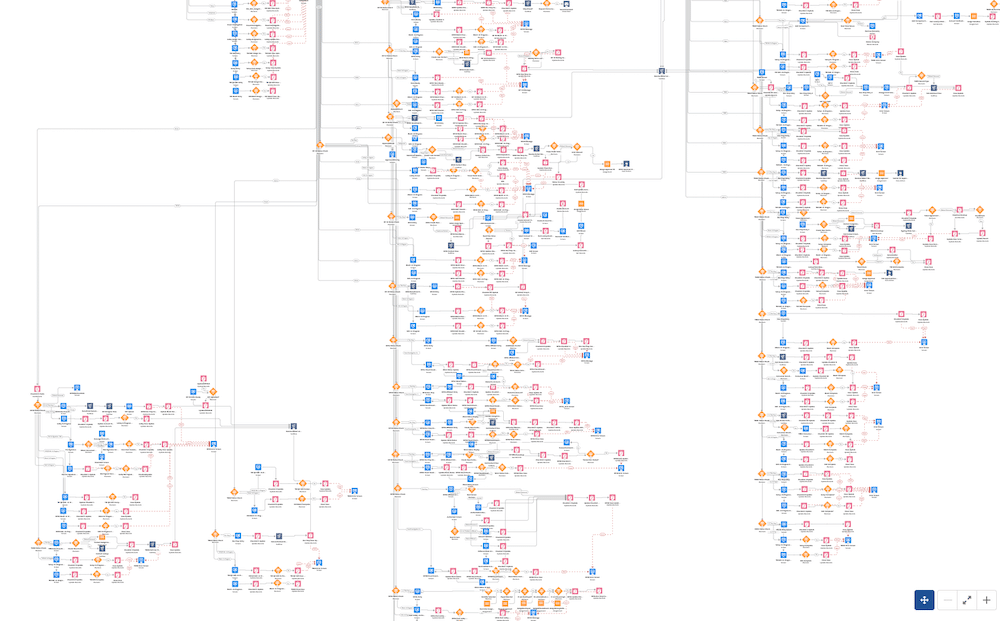
When building complex business processes into Salesforce flows, it’s easy for them to become too big, making them harder to manage and maintain. To avoid issues with your long flows, adopting modular development principles can help improve your flows. Modular development breaks down large flows into smaller, manageable components that are easier to test, maintain, and update. In this post, we’ll explore strategies like using subflows and splitting flows to improve your flow’s scalability, performance, and readability.

How do you know your flow is too big?
Some symptoms are:
1. UI: You need to scroll your canvas too frequently to navigate your flow.
2. Testing: Your debug log is too long. Testing your flow with full coverage becomes very difficult.
3. Readability: When debugging and making changes, it takes a long time to locate an element related to a certain step. Your resource and element lists get too big.
4. Performance: Loading and saving your flow takes a long time. Depending on your particular Salesforce flow type, this could also affect execution performance.
Flows are low-code development tools. You can leverage many of the best practices of code development when building flows. One of these best practices is modular development.
Modular Development
Modular code development is a software development approach that involves breaking down a program into smaller, self-contained, and reusable components, called modules. Each module is designed to perform a specific task or function and can be independently developed, tested, and maintained.
Key Characteristics of Modular Code
- Independence:
- Modules are independent units of code, meaning changes to one module have minimal impact on others.
- Reusability:
- Modules can be reused across multiple programs or projects, reducing redundant code.
- Encapsulation:
- Each module contains its own logic, data, and functionality, often hidden from other parts of the program.
- Interchangeability:
- Modules can often be replaced or updated independently as long as they conform to a defined interface.
- Separation of Concerns:
- Each module is responsible for a single aspect or function of the program, improving clarity and maintainability.
Benefits of Modular Code Development
- Improved Maintainability:
- Smaller, focused modules are easier to debug, update, and test.
- Scalability:
- Adding new features or functionality becomes easier by integrating new modules.
- Collaboration:
- Teams can work on different modules simultaneously without interfering with each other’s work.
- Reusability:
- Modules can be reused in different parts of the same project or in entirely new projects.
- Readability:
- Modular code is easier to read and understand due to its organized structure.
Read Jen W. Lee’s Embrace Modular Flows to Build Smarter Automation for Agentforce post linked below this article for modular flow examples.
What to Do When Your Flow is Too Big
There are two strategies that help you improve your low code design when your flow gets too big:
- Subflows: Subflows are flows that are called from other flows. They can receive input variable values, and return output variable values to the parent flow.
- Splitting flows: For record-triggered flows, subflows may not be the most effective solution in some cases. Before-save record-triggered flows do not support subflows. Even for after-save flows, splitting your flow into multiple flows could bring you better overall system execution performance than using subflows.
Subflows
Subflows are either autolaunched flows or screen flows. Autolaunched flows can be subflows for any flow type that supports subflows. Screen subflows can only be subflows for another screen flow because it is the only flow type that supports the screen element.
You can use subflows for the reasons mentioned earlier in this article, but more importantly, I recommend that you use them whenever you have logic that repeats in your Org’s low code. You don’t want to repeat the same logic in multiple places in your Org, because keeping track of where this is used can be a nightmare. When the logic changes, you will have to make changes in multiple places, debug, test, and deploy multiple flows.
When working with subflows, it’s easy to identify the subflow in the parent flow. The subflow element links directly to the subflow, allowing you to open and review it in the canvas.
When you see a subflow in your Salesforce flow list view, you cannot identify where this subflow is called from. This is a challenge. Use clear naming conventions, and document dependencies in your description. Your description is searchable in the new Automation Lightning App list views.
Splitting Flows
A big flow with subflows still brings complexity to your low-code maintenance. If you have a big screen flow, that fulfills multiple missions, you should consider splitting the flow into multiple flows and having the user launch them separately.
But splitting flows becomes even more important when dealing with record-triggered flows. First of all, This is the only strategy that you can leverage when dealing with before-save flows. Subflows are not supported for before-save.
For after-save flows, you need to remember that your flow will execute every time your flow entry conditions evaluate true. When you have complex business processes built on the back of a high-volume standard object like Opportunity or Case, it becomes a difficult task to tighten your start element conditions so that your flow does not execute every time. When your flow executes it will go through most of the elements in the canvas, potentially also through decision elements, consuming valuable resources. If you don’t pay attention to your consumption against the execution governor’s limits, you could also cause a fault.
In these scenarios, splitting your complex logic into multiple record-triggered flows can improve overall system optimization. Start by reviewing your large flow and focusing on the decision elements. These are key areas where splitting the flow will be most effective. For each outcome path, consider creating separate flows. The entry criteria for these new flows should be based on the decision outcomes from your main flow. This approach will help ensure that some of the new record-triggered flows don’t execute in certain scenarios, thereby improving system performance.
Managing Multiple Record-Triggered Flows with the Flow Trigger Explorer
When you have multiple record-triggered flows on the same object, you have two challenges:
- Finding and managing record-triggered flows
- Adjusting the execution order of record-triggered flows
Flow Trigger Explorer addresses these two challenges very well.
Go to this tool either by clicking the button on your Flow Setup page, or by clicking the link in your record-triggered flow start element.
Once you adjust the pulldowns to select the object, you can view your flows on the object and adjust the execution order of record-triggered flows. To learn more about the flow trigger explorer read this page.
Conclusion
In conclusion, when dealing with large and complex flows, modular development principles are essential to ensure maintainability, scalability, and performance. Strategies like leveraging subflows and splitting flows enable you to simplify design, reduce redundancy, and optimize system resources. By using tools like Salesforce Flow Trigger Explorer and adopting clear naming conventions and documentation practices, you can manage dependencies and execution order effectively. Embracing these best practices ensures that your Salesforce automation remains efficient, readable, and adaptable as your business processes evolve.
This post is the 3rd installment in our Best Practices series, offering key insights for optimizing your Salesforce flow. Read the other posts in the series here 👇🏼
Can You After-Save When You Can Before-Save?
Can You Use DML or SOQL Inside the Loop?
Embrace Modular Flows to Build Smarter Automation for Agentforce (Salesforce Admins)


One Comment