
Can You After-Save When You Can Before-Save?


The order of execution in Salesforce is a systematic process that governs how operations are carried out when a record is created, updated, or deleted. It begins with loading the original values of the record and validating any rules associated with the data. Next, before triggers are executed, allowing for modifications before the record is saved. After the record is saved, after triggers run, followed by the evaluation and execution of workflow rules, processes from Process Builder, assignment rules, auto-response rules, and escalation rules as applicable. Finally, any after-save flows are triggered to perform additional actions. This structured sequence ensures data integrity and adherence to business logic throughout the record manipulation process. There are 20 steps in the order of execution sequence.

A sales representative has been working on a big deal. After a successful meeting with the potential client, the sales person decides to update the opportunity stage in Salesforce from Prospecting to Negotiation to reflect progress in the sales pipeline.
Order of Execution Steps Applied to the Use Case:
- Load Original Values: Salesforce loads the original data for the opportunity record. This includes the previous stage, Prospecting, and other pertinent information like deal size and expected close date.
- Validation Rules: The system checks validation rules that may require specific fields to be filled out before progressing to the Negotiation stage, such as ensuring a primary decision maker is listed on the opportunity.
- Before Triggers: A before trigger is executed to log the stage change in a custom field called “Stage Change History.” This trigger appends the current date and new stage to this field, providing a historical account of stage changes.
- Save the Record: The updated opportunity record is saved in the database with the new stage, but the transaction is still open to further processes.
- After Triggers: After the record is saved, an after trigger is initiated to check if the stage has been updated to Negotiation. This trigger activates a series of automated tasks:
-
-
- Notify the sales manager via email about the stage change.
- Create a follow-up task for the sales representative to prepare a detailed proposal.
-
- Workflow Rules and Process Builder: They are executed if not migrated to flow already (Hurry up 🤣).
- Assignment, Auto-response, and Escalation Rules: These are not particularly applicable in this scenario as they mainly concern case management. However, if related, an escalation rule might increase the priority of associated support cases to ensure customer queries are handled swiftly in critical deal stages.
- After-Save Flows: An after-save flow executes that performs additional validations and initiations:
-
-
- A flow checks if all necessary legal documents are attached to the opportunity and initiates additional actions.
- Another flow might start a sequence to schedule a negotiation meeting with all stakeholders.
-
- Commit to Database: All changes, including the stage update and any other modifications made by triggers, workflows, and processes, are permanently committed to the database.
Before-Save Flows: Enhancing Efficiency
Before-save flows in Salesforce are process automation tools that allow users to execute specific logic before a record is saved to the database. These flows are designed to manipulate record data directly. They enable users to update field values or perform actions based on changes to that record. Since they operate before the record is saved, before-save flows can enhance performance. They streamline data processing and avoid additional database calls. This feature is particularly useful for validation, data transformation, and ensuring data integrity at the point of data entry.
After-Save Flows: Extending Functionality
After-save flows in Salesforce are automation tools that execute actions after a record has been successfully saved to the database. These flows are ideal for handling tasks that involve creating, updating, or deleting related records based on the saved record’s data. Since they run after the record is saved, after-save flows can be used for processes like sending notifications, integrating with external systems, or performing calculations that require the final record state. This feature is particularly beneficial for creating seamless business processes and ensuring that downstream actions reflect the latest updates made to the data.
Before-Save Flows are much faster than After-Save Flows:
According to the benchmarks published on Salesforce Architects website, they are approximately 85 times faster than their After-Save counterparts. Before-Save flows are almost as fast as Before-Save Apex triggers (less than one millisecond difference in processing time). While the operations you can perform are very limited in Before-Save flows, capabilities overlap. You can perform an update to the field values of the record that triggered the flow in both types of record-triggered flows.
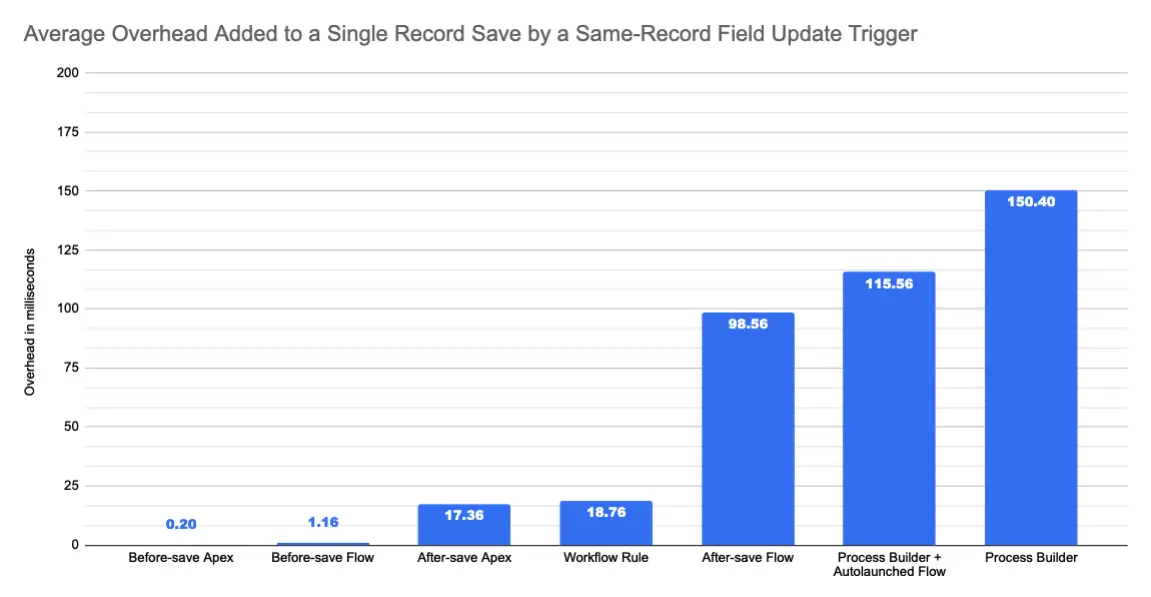

Why are the same record updates possible both before and after save? Sometimes, you prefer keeping all your actions on an object in a single flow. Some of the operations performed may not be allowed in before-save. Popular examples are sending an email and creating a task. In these situations, you may prefer combining your same record update into one single after-save flow.
Besides this scenario, you should always question when you see the same record update in an after-save flow. When you can do something before-save, you should do it before-save.
Please comment and add your questions below.
Read posts in this series, plus related content:
Salesforce Flow Best Practices
Can You Use DML or SOQL Inside the Loop?
Keep Salesforce Data Clean With Before Save Flows
Popular Validation Rules for Salesforce Flows including Phone, Email and Address Fields
How to Use the Action Button Component in Screen Flow
Fast Field Updates or Actions and Related Records in Record-Triggered Flows


2 Comments