
My Inaugural Agentforce-Assisted Flow Building Experience


In the vast realm of Salesforce, I, a curious novice armed only with a developer org and some reckless hope, embarked on an intriguing adventure. My mission? To explore whether Agentforce could transform my natural-language instructions into effective Salesforce automations without my fumbling through the Flow Builder. Think digital LEGO but more complex, and admittedly, I’m no LEGO master.

The Experiment
My experiment involved three mock flows: two guided by Agentforce and another where AI took full control. I fueled this mission with copious amounts of caffeine and a blend of skepticism and intrigue. Could Agentforce be the aid it promises to be, or would it merely babysit my flow-building attempts? Not to spoil the ending, but, I landed somewhere in the middle.
Initial Setup
Right off the bat, Agentforce sets expectations: know your way around the Object Manager. It’s not for absolute beginners. If you’re unsure about setting picklist values or other Salesforce basics, Agentforce will gloss over these details, assuming you’re already clued in.
The First Challenge: A High-Value Opportunity Flow
I tasked Agentforce to give me step-by-step instructions to carry out the following:
Implementing High-Value Opportunity Alerts
1.Setup and Trigger: Navigating to Flow Builder and starting a new flow was straightforward. However, the initial hiccup arrived early: Agentforce’s guidance mismatched the actual UI steps, causing confusion right from the start. While setting up the Opportunity trigger was intuitive, the tool faltered in guiding the configuration correctly, misstating button labels and overlooking crucial steps.
2. Adding Logic and Actions: Here’s where things truly went awry. Agentforce’s directions on setting conditions for the Opportunity’s amount were correct, albeit vague. The advice didn’t include necessary steps like defining constants or using correct logical operators, leaving me to patch up the process with correct information sourced from helpful online forums and other LLMs. Fair enough, I need to know these basics anyway. Dragging and dropping elements to create tasks was interactive, yet the specifics of configuring fields and formulas were daunting without precise, beginner-friendly guidance from Agentforce.
For reference, here’s what Agentforce gave me for this particular part:
“Add a Decision Element:
– Drag the ‘Decision’ element onto the canvas.
– Label it ‘Check Opportunity Amount.’
– In the ‘New Outcome’ section, set the label to ‘High Value.’
– Set the condition to ‘Opportunity Amount \> 50000.'”
3. Finalizing the Flow: Connecting elements and activating the flow went smoothly, thanks largely to my growing familiarity with the system rather than clear instructions from Agentforce.
Here’s an image of the Start Element in the flow.
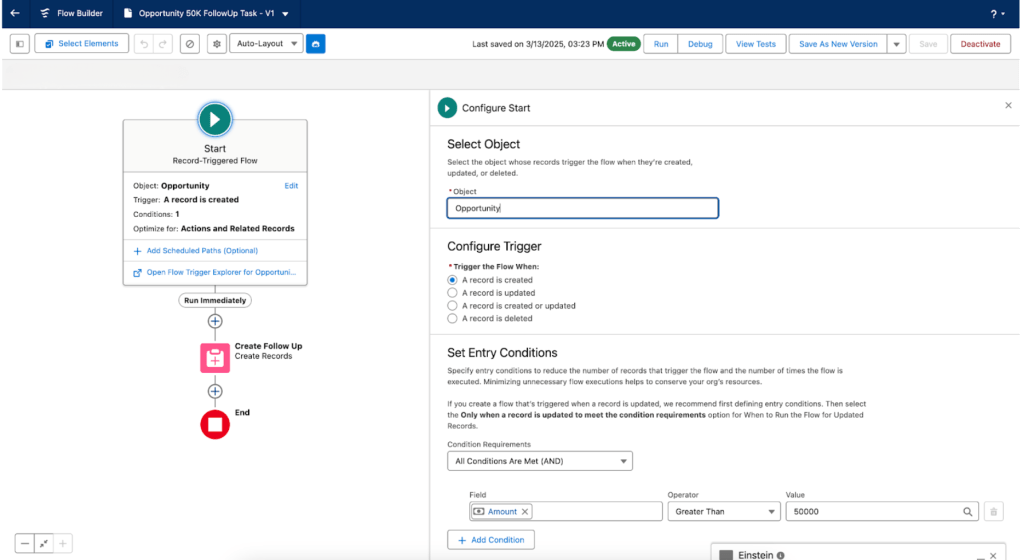
Below is the configuration of the Create Records element.

The Verdict on High-Value Opportunity Flow
Agentforce’s initial guidance felt like a rough draft needing significant revisions. For beginners, this experience could be frustrating, akin to herding cats with a keyboard. The tool’s potential shines through, but it requires a foundational understanding of Salesforce to truly benefit from its capabilities.
The Second Challenge: A New Contact Flow
Discouraged by initial missteps, I simplified my next test. Here’s my new prompt:
Automatically Updating a Contact’s description When their Email is Added
- Setup and Trigger: Setting up the flow was smoother this time, with clearer steps from Agentforce on selecting triggers based on record creation.
- Adding Logic and Actions: Implementing the logic to check if an email was present and then updating the description was more straightforward. Agentforce provided clearer guidance, perhaps due to the simpler nature of the task.
- Finalizing the Flow: With less complexity, the flow was easier to save and activate, bolstering my confidence in handling simpler Salesforce automation.
I put the prompt into Agentforce and this is what it gave me:
“From Setup:
In the Quick Find box, enter ‘Flow’, select Flows, and then click New Flow.
Select Flow Type:
Select Start From Scratch, and click Next.
Select Record-Triggered Flow, and then click Create.
Configure Start:
In the Object field, select Contact.
For Trigger the Flow When, select A record is created.
From the Condition Requirements dropdown, select All Conditions Are Met (AND).
Add the condition:
Field: Email
Operator: Is Null
Value: False
Add an Update Records Element:
Click on the + icon to add an element.
Select Update Records.
For Label, enter ‘Update Description’.
For API Name, enter ‘Update_Description’.
In How to Find Records to Update and Set Their Values, select Use the contact record that triggered the flow.
In Set Field Values for the Contact Record, set the following:
Field: Description
Value: ‘Email added: {!$Record.Email}’
Save and Activate:
Click Save.
Enter a Label and an API Name for the flow.
Click Activate.
This flow will now automatically update the Description field with the email address whenever a new Contact is created and the Email field is populated. Do you have any other questions or need further assistance?”
Following the instructions, here are some screenshots of what my flow looked like. The first image shows the final configuration of the start element. 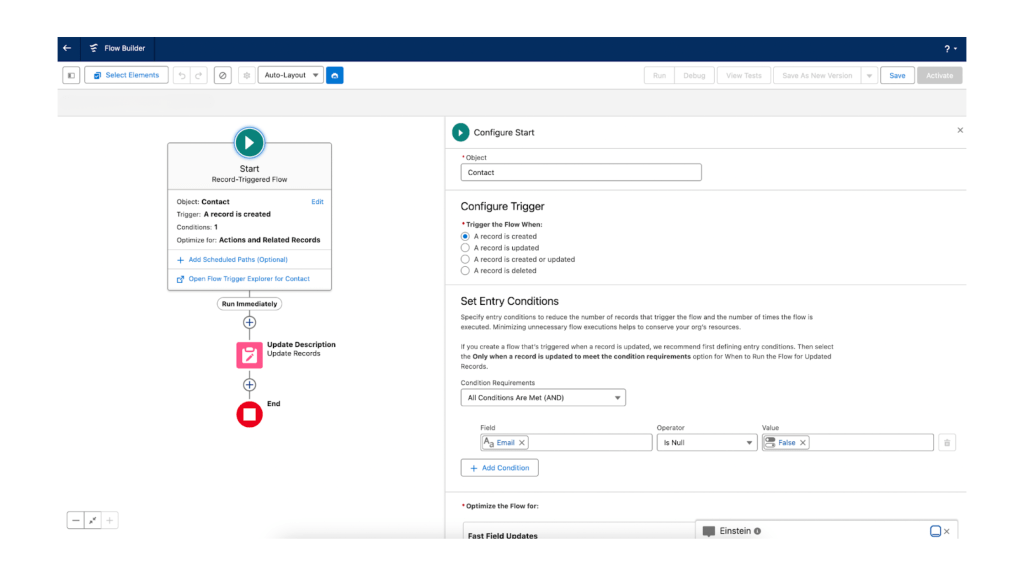
The second image shows the Update Description element in my record-triggered flow.
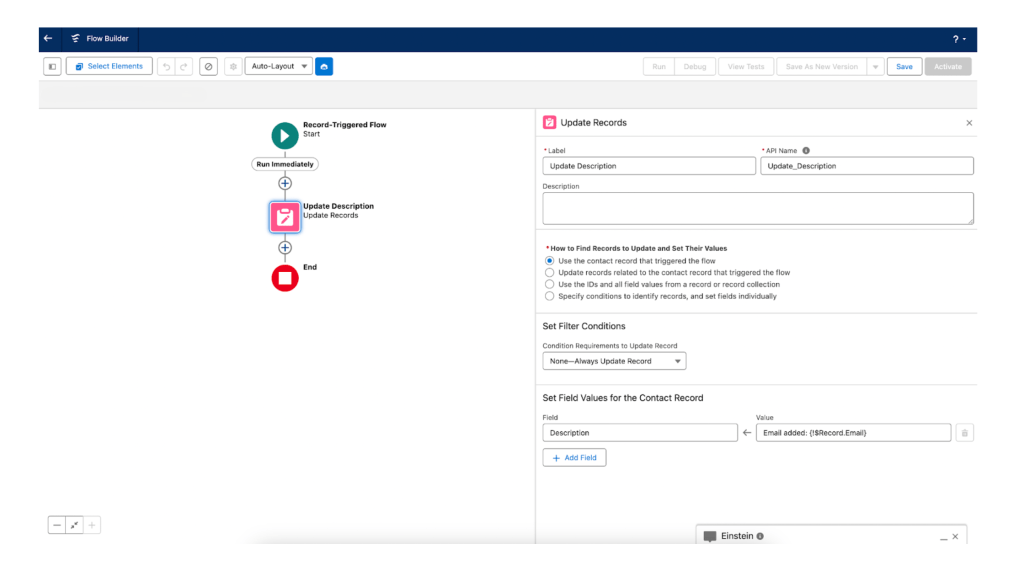
The setup and trigger configuration went smoothly, with clear and accurate instructions from Agentforce that aligned perfectly with the actual Salesforce interface. The logic implementation to verify the presence of an email and update the contact’s description was straightforward, supported by Agentforce’s improved guidance. The simplicity of the task likely contributed to the clearer instructions.
The activation process was also effortless, demonstrating that with less complexity involved, Salesforce flows could be efficiently managed and executed. This successful execution bolstered confidence in handling basic Salesforce automation tasks, suggesting that while Agentforce may require users to have a foundational understanding of the platform, it can effectively assist in creating functional workflows when that knowledge is applied. This positive outcome indicates that Agentforce, despite its initial shortcomings, can be a valuable tool for those familiar with Salesforce’s intricacies.
Final experiment: Handing a Case Over Entirely to Einstein
Now let’s see whether Agentforce can autonomously execute the flow creation process. Here’s my final prompt:
Creating a Record-Triggered Flow
- Setup and Trigger: Einstein configured the flow to trigger when a record is created or updated and it set the correct entry conditions.
- Adding Logic and Actions: Einstein applied the Create Records element and assigned all field values autonomously.
- Finalizing the Flow: When I attempted to activate the flow, which I believed was complete, I encountered an error.
Below, you’ll see the flow created by Einstein.

You can see in the screenshot that the Stage field is being assigned both a Closed Won and Closed Lost value inside the create element. That’s why the flow throws an error saying “The field StageName is being assigned more than one value”.

My conclusion on this example goes back to my original point: AI is good at making drafts, but it’s not going to be a perfect error-free solution. In other words, don’t expect Agentforce to build your flows for you without any obstacles. It is still very necessary to know how to build flows, and how to fix them.
Einstein Summarize Flow Feature
There is another AI feature in Flow Builder worth mentioning. Einstein gives an option on the bottom right of the canvas to summarize the flow.
First, I asked it to summarize the simple flow where I created a new contact. The summary breaks down the prompt and explains the end result well.
Here is the Einstein-provided summary:
“This is a record-triggered flow. This flow is triggered after a record is created on the contact object. It checks if the Email field is not null. If the condition is met, it updates the Description field with the value from the Email field.
Several objects and their fields worth mentioning: Below are the details (the format is given as: subject_name – field_name: interaction)
*Contact – Email: Checks is not null
*Contact – Description : Updates with Email Value”

I also tried this out with the AI-produced flow, and the summary is below. It essentially just provides the prompt all over again, and doesn’t mention the error or how to fix it.
Here is the Einstein-provided summary:
“This is a record-triggered flow. This flow is triggered after a record is created or updated on the Lead object. It checks if the Lead Source is “Websites” and the Annual Revenue is greater than $1,000,000. If the conditions are met, it creates a new Opportunity with specific field values. The flow uses a formula to calculate the Close Date as 30 days from Today. Several objects and their fields worth mentioning. Below are the details (the format is given as: object_name – field_name: interaction)
*Lead – LeadSource: The flow checks this field to determine if the lead was generated from websites.
*Lead – Annual Revenue: The flow compares this field to $1,000,000 to decide if an opportunity should be created.
*Opportunity – CloseDate: The flow sets this field using the formula that adds 30 days to the current date.”

Overall, the summary feature is adequate for providing an overview of the prompt when needed. However, it should not be relied upon for comprehensive or entirely accurate details, as demonstrated above.
Reflections and Moving Forward
The second, simpler flow restored some of my faith in Agentforce, highlighting that with the right level of complexity and some foundational knowledge, the tool could indeed simplify the flow creation process for a beginner.
Agentforce stands as a promising tool for those with intermediate Salesforce knowledge, capable of translating natural language into functional flows. It is capable of providing a solid flow draft (emphasis on “draft.) However, for true beginners, I would not recommend relying on it to do your work for you. The experiment underscored the importance of understanding Salesforce’s basics before utilizing AI tools, which can sometimes amplify rather than alleviate the complexities of automation.
As I wrap up this journey, I’m left with mixed feelings. Salesforce Agentforce holds potential and could be a valuable flow ally for the experienced, but it’s not quite the beginner-friendly wizard I hoped for. Even basic step-by-step instructions fall short in some big ways. In other words, yes, we will all need to know flow. We can’t fix something if we don’t know what’s wrong. Nonetheless, the journey through Salesforce’s automation landscape, guided by AI, was an enlightening adventure, offering lessons in patience and persistence. Now, back to my flow foundations learning.
Explore related content:
TDX 2025 News: Salesforce Agentforce 2dx and AgentExchange
How to Get Your AI-Powered Enhanced Developer Org with Agentforce and Data Cloud


One Comment