
When Your DMLs Have Criteria Conditions Other Than Id


The Update Records element in Salesforce Flow is a powerful tool that allows you to modify existing records without writing any code. It’s commonly used to change field values and update statuses. You can configure it to update a specific record (like a record from the trigger or a record you’ve retrieved in a prior element), or you can set conditions to update multiple records that meet certain criteria. Best practice is to keep your updates efficient. Limit the number of records updated when possible, and always ensure that your flow logic avoids unnecessary updates to prevent hitting governor limits or creating infinite loops. Use it thoughtfully to streamline processes and maintain clean, accurate data.

Update Records
When you update records, there are three ways you can configure the update element:
- Update using Id(s): Your update element can point to one record Id or multiple record Ids using the IN operator when executing the update. This is an efficient alternative, as the record(s) are uniquely identified. This alternative consumes one DML against your governor limit.
- Update using a collection: This method is efficient, because the update element always consumes one DML against your governor limit, regardless of how many records your are updating in one show. You can update up to 10K records in one update element.
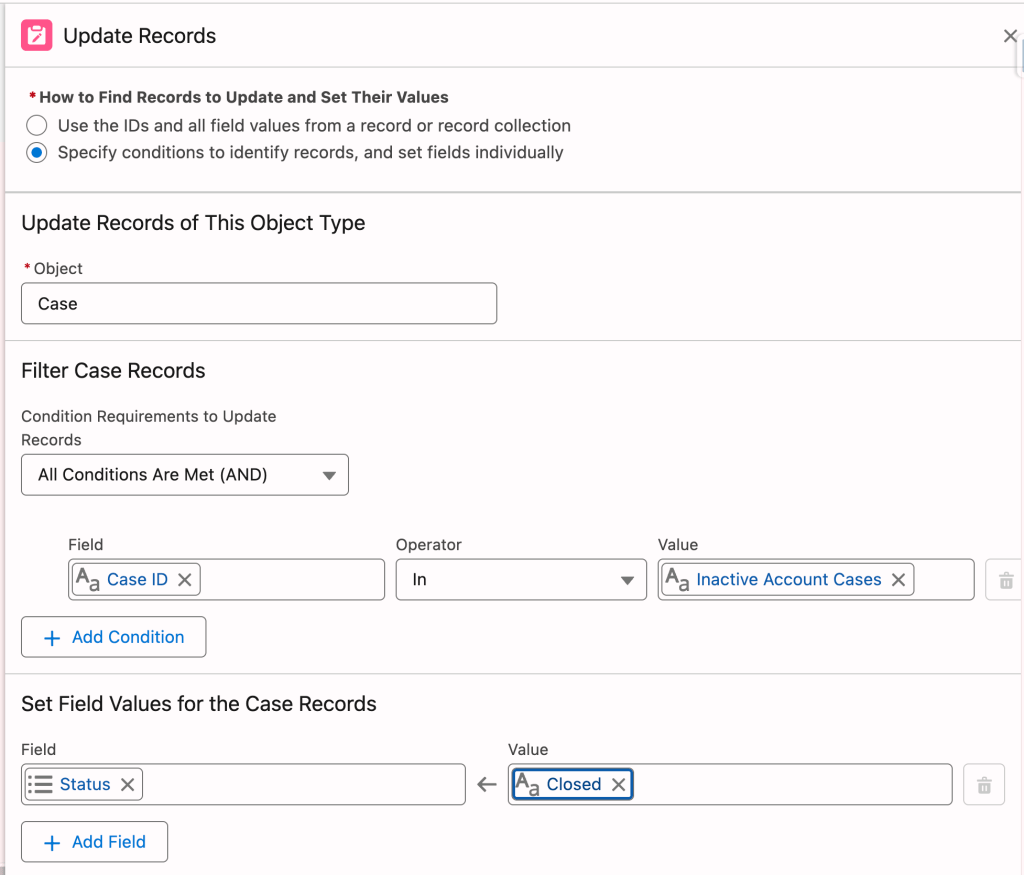
- Update using criteria conditions for field values other than Id: When updating multiple records, we can also set conditions and update all the records that meet the conditions. In this case, Salesforce queries the database and gets the records that will be updated, and performs the update. This method therefore consumes one SOQL and one DML against your governor limit. It is possible that one or no record meets the conditions, as well.
Update Using Criteria Conditions For Field Values Other Than Id
Let’s expand on the last method. For an inactive account, you may want to update all open cases to closed status. In a flow we could configure the update element with the following conditions:
- AccountId = Inactive Account
- Closed = false (case status is not closed)
And for these accounts the field update that will be performed is as follows:
Status = Closed (set status to closed)
In this scenario, what Salesforce will do is query and find the records using the two conditions listed above (SOQL) and set the Status field on these records to Closed (DML).


Now, is this a bad thing? Not necessarily. This is a little known fact, that you should keep in mind when optimizing your flow for governor limit usage.
What is the alternative? I guess you could perform an update using one of the other alternatives listed above. Let’s look at these alternatives in detail:
Update Using Id(s)
If you wanted to use this method you could get the records according to the criteria conditions, and extract the Ids and put them into a text collection using the transform element, and do the update using the IN element. This alternative is more complicated. It does not bring any efficiencies.
Update Using a Collection
You could get a collection of records using the conditions, loop through each item to update the case status, or possibly use the transform element to update the status in one shot – depending on your use case – then go to update using the processed collection. Too complicated. This alternative still uses one SOQL and one DML.
Conclusion
Updates that include conditions beyond specifying the Id of the record consume one SOQL and one DML against your execution governor limits; make sure you check and control your governor limit usage.
Explore related content:
Salesforce Flow Best Practices
Can You Start With a Decision Inside Your Record-Triggered Flow?


3 Comments