
Architectural Decisions in the AI Era: Flow, Apex, and Agentforce

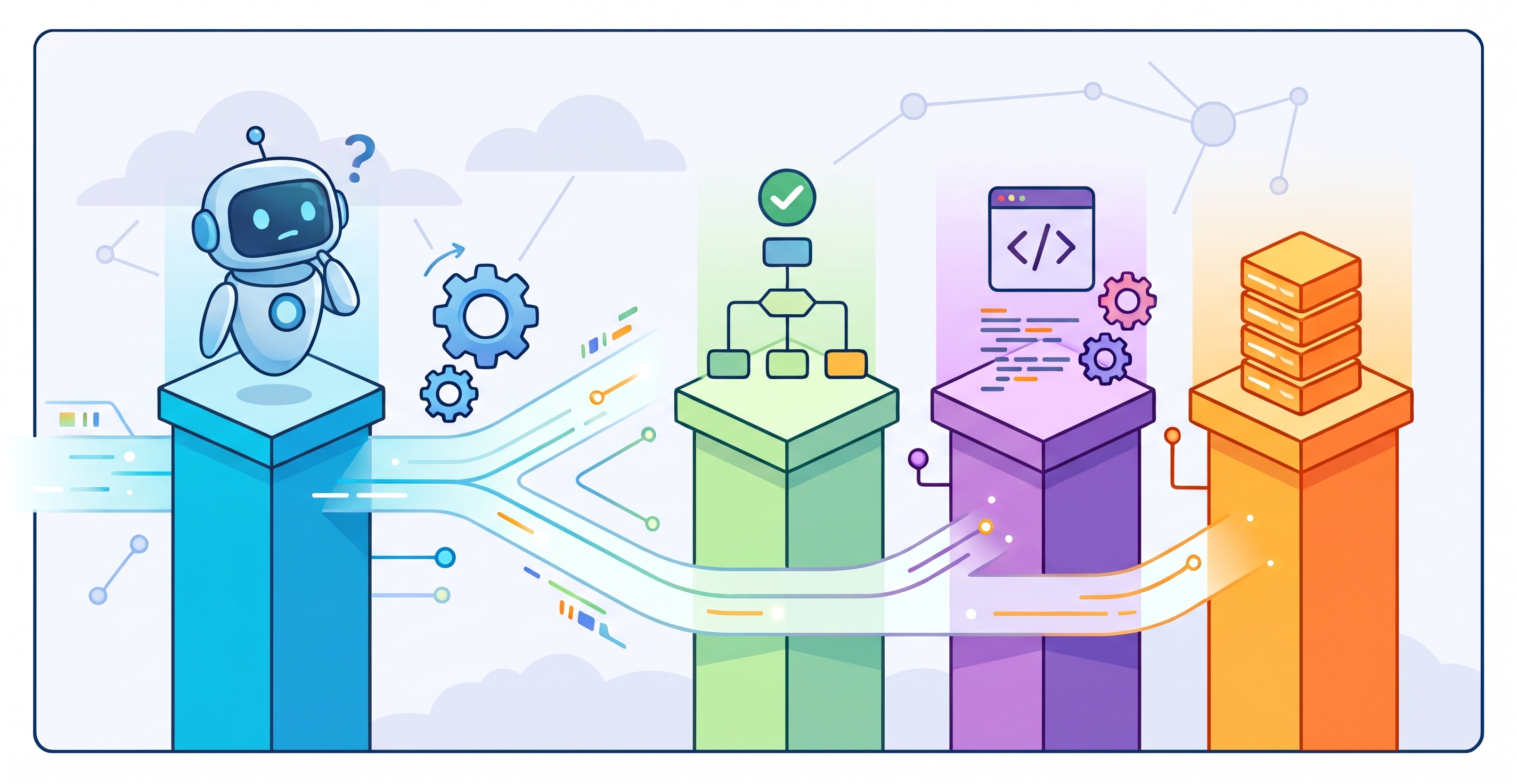
Architects have too many topics on their mind nowadays: Flow, Apex, APIs and AI agents (Agentforce). How should they decide what part of the logic goes where? That is the problem.

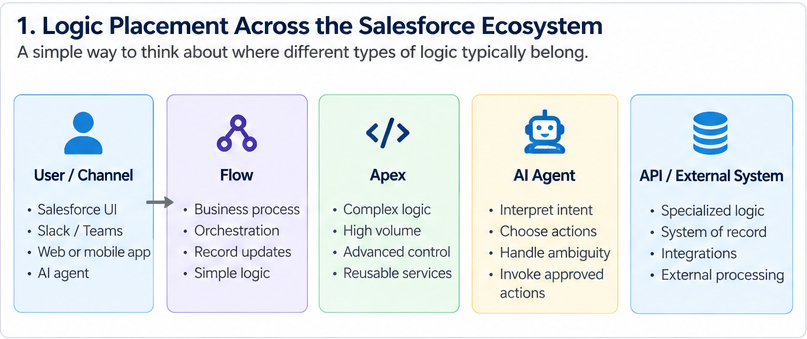
Flow can handle processes that would have required Apex years ago. Developers can combine declarative and programmatic automation instead of treating them as competing camps. APIs connect Salesforce to an increasingly large technology stack. AI agents can interpret requests, select actions, invoke automation, and interact with other systems.
AI is making the implementation side more accessible for more people. The recent developments transformed the skill gap in the market. The current challenge is less about “Can you build this?” and more about “Where should this logic actually live?” The fact that a requirement that can be solved using either Flow, Apex, AI agent, or an external system should not dictate the architectural design for Salesforce implementations. There is always good and bad decisions when it comes to architecture.
Salesforce Flow vs. Apex: Choosing the Right Automation Layer
Here is a scenario most Salesforce professionals will recognize: A support case is created. The system needs to check whether the account has an active SLA, calculate whether the response window has been breached, update the case priority, notify the right team, and log the event to an external ticketing system.
There is a good chance you could build much of that in Flow. You could also build it in Apex. You could split the process between Flow and Invocable Apex. And the ticketing part, may live entirely outside Salesforce.
This is where architecture becomes more important than capability.

Salesforce Architects’ current Record-Triggered Automation Decision Guide makes this distinction directly. Flow and Apex share substantial functional overlap, but Salesforce does not treat them as interchangeable. The guide recommends evaluating automation density across automation quantity, record volume, and dependency sprawl:
-
Low-Density Automation: Generally points toward Record-Triggered Flow.
-
Medium-Density Automation: Points toward a hybrid Flow + Invocable Apex pattern.
-
High-Density Automation: Points directly toward Apex triggers.
“Flow can do this” and “Flow should own this” are two different statements. A solution that works perfectly today may become difficult to maintain when transaction volume increases, and more automation is added to the object while downstream dependencies grow. The same is true in the opposite direction: being able to write something in Apex does not automatically make code the better architecture.
Combining Flow with Invocable Apex in Salesforce
I don’t think Flow versus Apex is a particularly useful debate anymore. There are plenty of cases where the answer involves both.
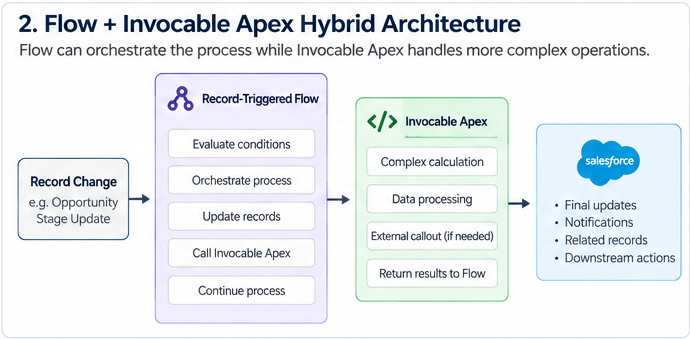
Imagine a Case process: A record change starts the automation. The process needs to determine whether an SLA calculation is required, calculate elapsed business hours, update the Case, and potentially route it somewhere else.
Flow may be a good orchestration layer because the process and routing remain visible to declarative builders. The calculation itself may be better encapsulated in Apex when it requires programmatic capabilities or more sophisticated processing.
Salesforce Architects documents this hybrid pattern directly: Record-Triggered Flow can retain the process choreography while Invocable Apex handles high-complexity operations. That separation also makes the code reusable from other entry points instead of burying the entire business process in one layer.
The important skill is not proving that one tool is better, but rather, recognizing the boundary between them.
Balancing Agentforce Reasoning and Deterministic Business Rules
Now add an AI agent. Suppose a sales rep says, “This customer is pushing back on pricing. See what we can do.” There is ambiguity in that request. Does the rep want a discount, different payment terms, a different package, or simply guidance on what options are available? Understanding the intent is a great use for an AI agent (such as Agentforce).
But imagine the company’s policy says that discounts above a defined threshold require approval. That rule is not ambiguous. We do not need an LLM to reinterpret the policy on every run. We need the rule to execute consistently.
Use reasoning for ambiguity. Use deterministic automation for rules. This does not mean every agent architecture must use Flow, Apex, and an external API. It means the agent should not automatically be involved in decisioning simply because conversational interaction is the entry point.

Designing Governed Agent Actions as Architectural Boundaries
Salesforce’s agentic integration guidance makes this especially important. Agents can infer parameters from context and select actions dynamically, which means integrations have to tolerate ambiguity, support safe repetition, and return failures in a state the agent can recover from.
That changes the design conversation. We now have to ask both what actions the system can perform and who or what decides when those actions run. A Flow may be completely deterministic once invoked. But if an agent decides whether to invoke it, there is still a reasoning boundary earlier in the process.
This is also why narrow, well-described actions matter. An agent should receive a set of governed capabilities, not an unlimited toolbox with business rules scattered through prompts and actions. The more important an operation is, the clearer its inputs, outputs, permissions, failure behavior, and ownership.
Some of the Logic Shouldn’t Live in Salesforce at All
There is another boundary that gets little attention. Sometimes the decision is not Flow versus Apex versus an agent. It is whether Salesforce should own the logic in the first place.
Imagine Salesforce needs a pricing value from an external billing platform. One option is to reproduce the pricing calculation inside Salesforce. That may make the initial implementation convenient, but now the same business rule exists in two systems.
Someone changes the pricing logic in the billing platform. The Salesforce implementation does not change. Nothing necessarily crashes. Instead, the system starts producing inconsistent answers.
If the billing platform is supposed to be the source of truth for pricing, Salesforce may be better off asking that system for the answer through an API rather than recreating the answer itself.
Which system should own the decision? That is a systems architecture question rather than a Salesforce configuration question.
Working Automation Can Still Be Bad Architecture
One of the harder lessons in platform work is that bad architecture does not always fail immediately.
-
A Flow can work perfectly at today’s volume.
-
An Apex implementation can work while creating unnecessary maintenance overhead.
-
An Agent can complete a task successfully while owning a decision that should have remained deterministic.
-
An Integration can work while duplicating business logic that another system is supposed to own.
All four can pass a proof of concept. The problems often appear later: more records are handled, another automation is added, a second integration needs the same logic, a business rule changes, an API times out halfway through a process, or a different team needs to understand why a decision was made.
That is when where the logic resides starts to matter. Salesforce’s automation guidance emphasizes performance, scalability, maintainability, dependency sprawl, transaction behavior, governance, documentation, and source control. Those concerns are a useful reminder that technical possibility is only the first test of a design.
The Skill Gap Is Moving
For a long time, one of the clearest Salesforce skill boundaries was implementation: Can you configure it? Can you build the Flow? Can you write the Apex? Can you build the integration?
Those skills still matter. But AI is lowering some of the friction involved in implementation. Someone who does not write Apex every day can get help understanding a class. A developer can get a first working draft for an unfamiliar Salesforce functionality. An Admin can understand an API payload faster.
That does not eliminate technical depth. If anything, it makes architectural judgment more important, because when more people can build, more people can also generate technical debt.
The questions start to look different:
-
Should this be Flow?
-
Does this need Apex?
-
Is this actually a reasoning problem?
-
Should an agent make this decision?
-
Does Salesforce own the rule?
-
Should another system be the source of truth?
-
What happens when the process runs at scale or fails halfway through?
Those questions require more than knowing where a button is in Setup or knowing Apex syntax. They require understanding how the pieces fit and execute together.
The Next Big Salesforce Skill Might Be Knowing What Not to Build
As Salesforce professionals gain access to increasingly powerful tools, the natural instinct is often to build more: more Flows, Apex, integrations, and AI agents. Yet, mature platform ownership frequently demands the discipline to do the exact opposite. True architecture means resisting the urge to duplicate external business rules, avoiding Apex when a clean Flow suffices, refusing to cram high-density processing into Flow just because it is technically possible, keeping AI agents away from deterministic decisions, and pausing before layering new automation onto an already crowded object.
While technical implementation remains valuable, the ability to discern what to build, where it belongs, and what to leave untouched is rapidly becoming the ultimate skill. Ultimately, the next Salesforce skill gap will not be defined by the divide between Admins and Developers, but between those who understand where each piece truly belongs in the broader system ecosystem.
Explore related content:
Using Record Type Developer Name in Flow Start Criteria

