
9 Ways to Use Dynamic Forms in Salesforce


Dynamic Forms in Salesforce revolutionize how you build user-friendly and adaptive page layouts, enhancing the overall user experience by displaying the right data when it’s most needed. Let’s explore how dynamic forms can help improve interactions and advance data management across your Salesforce environment.

1. Enhanced Field Visibility Control
Dynamic Forms offer comprehensive visibility rules that let you tailor the visibility of individual fields based on specific conditions. For instance, fields can be shown or hidden depending on whether another field is completed or a particular option is selected. This capability is pivotal for creating guided data entry experiences that save time, especially in fast-paced environments like service centers.
Guided Data Entry: Guide users through a form by progressively revealing fields as they complete previous sections. For example, a service technician at a dealership can select the type of vehicle service you brought your car in for. They can then only populate the fields that are relevant to the job, saving them time as they swivel the chair between addressing the customer and using Salesforce.
2. Customizable Record Pages for Every Need
Forget rigid layouts! Dynamic Forms enable you with the flexibility to place fields anywhere on the page, allowing for more intuitive designs that resonate with users. Group related fields into collapsible sections that appear only under certain conditions, maintaining a clean and organized interface.
Imagine a consulting firm that manages multiple projects across various industries and needs a way to manage how project details are recorded and accessed by team members. By utilizing Dynamic Forms in Salesforce, they can create highly customized record pages tailored to the specific needs of each project type, enhancing both the clarity and efficiency of their record-keeping.
Scenario:

The consulting firm handles projects in both the IT and Marketing sectors, each requiring different data sets:
- IT Projects require fields like “Software Requirements,” “Development Tools,” and “Project Milestones.”
- Marketing Projects need details such as “Campaign Objectives,” “Target Audience,” and “Expected ROI.”
Implementation using Dynamic Forms:
1️⃣ Customizable Layouts:
-
- For IT Projects: Admins can design a page layout that places technical fields like “Software Requirements” at the forefront, ensuring that technical managers input and access pertinent information quickly.
- For Marketing Projects: The layout can prioritize fields like “Campaign Objectives” and “Target Audience,” tailored to the needs of marketing managers who require quick access to these details.
2️⃣ Conditional Visibility:
-
- Fields related to “Expected ROI” can be set to appear only if the “Campaign Budget” is above a certain threshold, making the form adapt dynamically based on the input values.
- For IT projects, “Development Tools” can be shown or hidden based on the type of software being developed.
3️⃣ Collapsible Sections:
-
- Group fields into collapsible sections such as “Budget Details” or “Technical Specifications,” which can be expanded or collapsed based on the user’s needs or the project phase. This keeps the page neat and focused, reducing cognitive load and enhancing usability.
- Configure sections to display only when relevant, such as showing “Project Milestones” only after approving the “Project Plan.”
3. Simplified User Experiences
Dynamic Forms make it possible to create simplified layouts that only present the fields necessary based on user actions or choices, improving both the speed and accuracy of data entry. This is particularly beneficial for mobile users, who will appreciate the simple interface on smaller screens.

4. Upgraded Page Management and Related Lists
Replace multiple page layouts with a single, adaptable layout that changes based on user interactions. This not only cuts down on redundancy but also simplifies the maintenance of your Salesforce environment. Dynamic related lists further enhance user navigation by displaying related records based on defined conditions.

5. Build Dynamic Forms with Discovery Framework Data Capture Flow
Create responsive and dynamic forms using the Discovery Framework Data Capture Flow type in Flow Builder. This framework allows you to construct mobile-friendly forms, designed to perform well even in areas with low connectivity. Incorporate assessment questions from the Discovery Framework to tailor the forms. Enhance these forms with conditional logic and hierarchical (parent-child) questions to present only essential queries to mobile workers. Additionally, streamline form management and maintain a transparent audit trail by reusing and versioning questions across various forms.

6. Integration with Flow
Fully integrated with the Lightning App Builder, Dynamic Forms allow for seamless design of personalized pages. Integration with Salesforce Flow also enables the collection of data dynamically, based on user responses, enhancing both functionality and interactivity.
A nonprofit organization regularly hosts community events, workshops, and fundraisers that require participant registration and real-time interaction. They need a better, more efficient way to manage registrations, collect participant feedback, and update event details dynamically based on attendee interactions.
Implementation using Dynamic Forms Integrated with Salesforce:
1️⃣ Event Registration Customization:
Personalized Registration Pages: Using the Lightning App Builder, the organization customizes event registration pages for different types of events (e.g., workshops vs. fundraisers). Each event type has unique fields relevant to the specific needs of the event. For example dietary restrictions for a fundraiser dinner or interest areas for a workshop.
2️⃣ Dynamic Data Collection with Salesforce Flow:
-
-
- Real-Time Feedback Collection: During events, attendees can provide real-time feedback via mobile-friendly forms created with Dynamic Forms. This feedback can trigger Salesforce Flows that immediately update session content, speaker choices, or activities based on attendee preferences or concerns.
- Conditional Logic for Enhanced Interactivity: Conditional logic dynamically shows or hides questions based on previous responses, making the registration process more interactive and less overwhelming for participants. For example, if an attendee indicates they are interested in volunteering, additional fields appear to capture their availability and areas of interest.
-
3️⃣ Seamless Data Integration:
-
- Automated Updates to Event Records: As participants fill out the registration and feedback forms, Salesforce Flow automatically updates related event records. This integration ensures that all team members have up-to-date information, facilitating better coordination and event management.
- Participant Tracking and Engagement: The organization uses the integrated system to track participant engagement across multiple events, allowing for personalized follow-up communications based on the participants’ interests and past feedback.
4️⃣ Outcome:
The nonprofit organization improves registration, adjusts events in real-time, and manages participant data efficiently. This leads to more personalized, engaging events, enhancing community satisfaction and retention.
7. Improve Sales and Services Processes
Dynamic Forms can guide sales teams through tailored steps and show service agents only the relevant fields for a case, focusing their attention and reducing distractions. This targeted approach not only speeds up processes but also enhances the effectiveness of your sales and support teams.
- Guiding Sales Teams: Sales representatives can be guided through the necessary steps, with fields being shown only when required (e.g., based on the type of product or service a customer is purchasing).
- Customer Support Efficiency: Service agents can be shown only the fields relevant to a specific case, reducing distractions and focusing on the issue at hand.
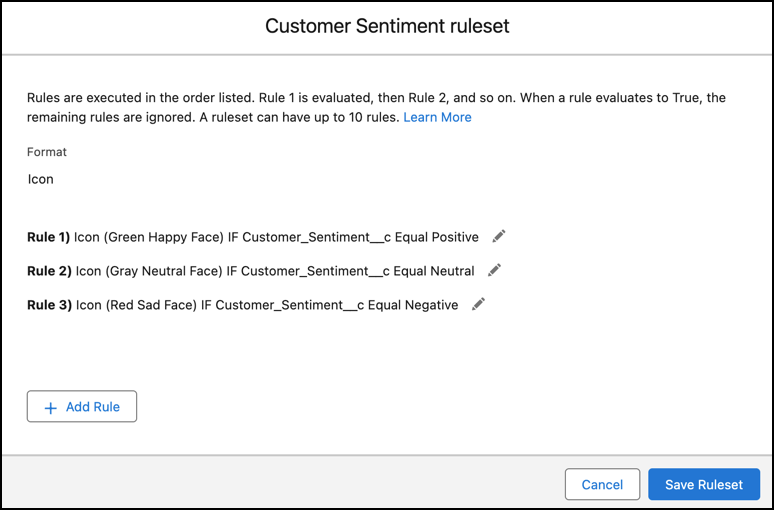
Use Dynamic Forms to show Customer Sentiment, enabling customer support representatives to respond appropriately to a case.
8. Customize and Migrate Records
Dynamic Forms in Salesforce offer customization and automation capabilities, although they are not enabled by default on all pages and must be activated by an admin. Once enabled, admins can migrate fields to the Lightning App Builder as individual components for extensive configuration. Save options for account, case, or lead pages require manual setup in the new configuration. Dynamic Forms streamline record updates, automating real-time changes and reducing the need for complex programming, ideal for large datasets and intricate workflows.

9. Display Parent Fields on Child Field Record Pages
Dynamic forms in Salesforce offer a way to enhance record pages by displaying parent fields directly on child record pages, eliminating the need to create cross-object formula fields. Traditionally, showing data from a parent record on a child record page required creating formula fields to pull in the necessary information, which could clutter the object schema and increase maintenance overhead. With dynamic forms, admins can easily add parent record fields directly to the child record page layout using the Lightning App Builder. Dynamic forms not only simplify the process but also ensure that the displayed data is always up-to-date by pulling it directly from the parent record in real-time.
Conclusion
With Salesforce’s Dynamic Forms, you can transform the management and interaction of data across your organization. Dynamic forms ensure a more efficient, responsive, and user-centric environment.
Explore related content:
How To Use Custom Permissions In Salesforce Flow
Salesforce AI: Transforming Data into Sales Engagement


One Comment