
Exploring Subflows: When and How to Use Them


Hello folks,

Spring 22 is approaching fast. The release notes are out, and there are a bunch of exciting flows coming for flows. Let’s dive into those in the next issue of the newsletter, though. I will write about Salesforce subflows today.
Exciting News: Recognition as a Salesforce Influencer
But before I dive right in, I need to tell you about something quite extraordinary that happened to me this past week: Salesforce Ben, one of the most popular publications about Salesforce, published a post that listed the top 20 Salesforce influencers for Salesforce, and to my surprise, I happen to be one of them. I heard something like this was coming, but I did not expect to be on a list of 20. I thought if they made a list of 50 folks to follow over 50, then I’d be on it. Thanks for all your support. I am grateful. You can find the full list here.
Understanding Subflows
Subflows are not for everyone. They have their place in the flow architecture, and they are helpful, but there are many misconceptions around them. What they should not be used for, in my humble opinion, is as follows:
- To get a fresh empty canvas to organize your flow better.
- To bring all the logic for all the record-triggered flows together for one single object.
- To circumvent governor limits, e.g., force a separate transaction.
The Concept of Subflows in Programming
The concept of subflows is not new in the programming world. In programming, you can have various different code logic executing the same code in multiple places. What you would typically do in that case is that you’d separate out this piece of code and call it from within your code whenever it is needed. In summary, good reasons to use subflows are:
- Have a need to repeat the same logic within various flows.
- Flow logic is expected to be revised over time.
- Ease of maintenance.
What are Salesforce subflows?
Salesforce subflows can be autolaunched, or screen flows. Screen subflows can be called from screen flows. Autolaunched subflows can be called by every other flow type with the exception of before-save record-triggered flows (a.k.a. fast field updates, and this may change in the coming releases).

There is no setting that makes a subflow a subflow; they are essentially flows that you call from within another flow by inserting the subflow element.
For an active flow to work without problems, the subflows need to be activated as well.
Unless forced to execute in a different context, subflows will run in the same context that your main flow runs in: user, system, or system without sharing.
To understand better what a subflow is, you can think of them as aliases that call another sequence of logic that will be pasted into your main flow when it runs, and the whole logic will be executed as a whole.
Subflow Parameters
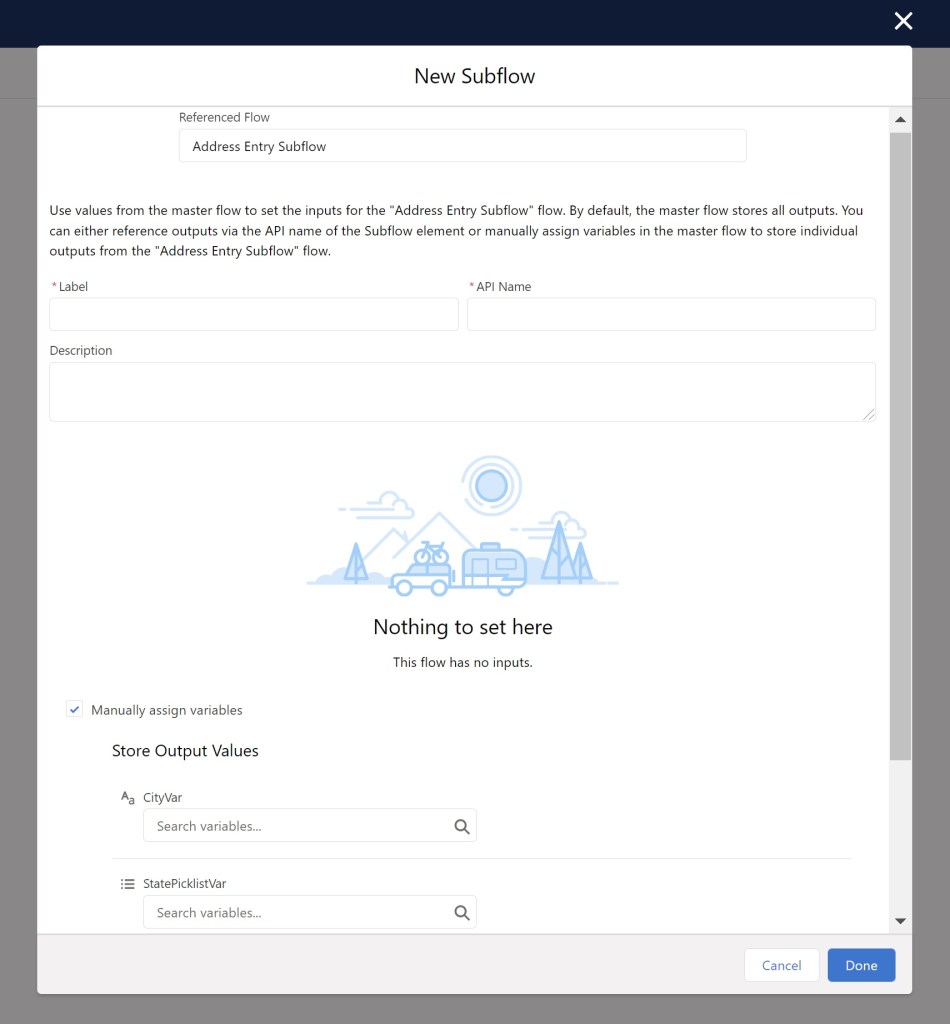
Subflows often have input and output parameters. The way you set this up is like any other autolaunched or screen flow: You check input and/or output checkboxes when you set up your variables.
Examples of Subflow Use Cases
Let me give you two examples:
- Address entry screen subflow: You may have certain custom checks, validations, and error messages that you need to set up whenever the user enters an address. In most cases, you will have many different flows, sometimes the same flow in two different locations calling for an address entry. You can create an address entry subflow and pass the values back to your main flow after the user enters them correctly.
- Average Duration Calculation Subflow: You may need to calculate the time it took for your organization to close cases on all cases under one single account and take an average of the duration. If you need to do this multiple times in multiple flows, it may be a good idea to build this as a subflow. You can pass the accountId to your subflow and get back an average duration number back that you can use in your main flow.
Common Misconceptions about Subflows
Let’s go back to my original bullet points of wrong reasons for using Salesforce subflows, and play Mythbusters:
- Fresh empty canvas: Unless you plan to use your subflow multiple times in different flows, subflows do not give you simplicity; they may increase complexity.
- One giant record-triggered flow: This means you will do everything after-save. The outcome will be one giant flow with subflows, potentially less performant and harder to maintain. Salesforce is giving us tools to manage multiple Record-Triggered flows on one object. More on that will come in next week’s issue.
- Governors limits: This is an interesting one. Louder for the ones in the back: Subflows do not force a separate transaction. Main flow and all subflows execute in one single transaction. There is literally nothing that helps you beat governors limits when using subflows.
Now that I got that off my chest, let me give you a few links.
Recently published content:
- I posted a list of all the Salesforce blogs I follow. Please read it here.
- I published a short video that includes a sneak peek into Spring 22 flow features. You can watch that here.
Enjoy your flow learning journey.
Explore related content:
How To Use Subflows On Fault Paths
Can You After-Save When You Can Before-Save?
Salesforce Flow Best Practices
Salesforce Platform Admin Certification: Navigating the 2025 Changes


4 Comments