Headless 360: Developer Lessons From a Weekend of Building


The Salesforce marketing machine has been in full swing around “Headless 360” since its announcement at TDX in April 2026. Now I have an acute BS detector in my head for hype, generally choosing to ignore it until it dies down, and then maybe I’ll look at it later if the upside looks promising. However, I felt that I owed it to my students, my clients and myself to get educated on Headless 360. What better way than to build something out in a dev org?

What followed was one of the most instructive weekends I’ve had in years, not because everything worked, but because it didn’t.
What is Salesforce Headless 360?
Headless 360 is Salesforce’s existing developer tooling; metadata API, Salesforce DX, the Command Line Interface (CLI), exposed through Model Context Protocol (MCP) in a way that AI agents can operate it programmatically.
The underlying developer tooling has been around since SFDX launched in 2016-17. What is new is the agent layer sitting on top of it. MCP is what makes that possible. It gives AI models a structured way to discover and invoke tools.
Think of it as a universal connector between the AI agent and the system it needs to work with. In the Salesforce context it allows a tool like Cursor to reach into your org and execute operations without a human driving every command.
Setting Up the Tech Stack: Tools, Conflicts, and Fixes
Here’s the reality check: Simply getting the tech stack set up and working took me most of Saturday morning.

To get up and running, I installed and configured the following:
- Node.js and npm (and resolved a PATH conflict with an existing install)
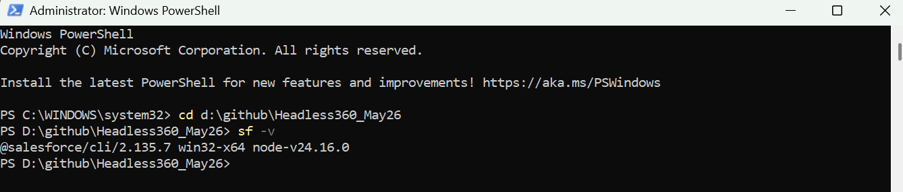
- Salesforce CLI v2.135 (and fixed a dual installation conflict with a Program Files version)
- Git for Windows, installed properly to PATH rather than relying on the version bundled with GitHub Desktop
- GitHub Desktop for repository management
- Cursor as the AI-powered IDE, later upgraded to the Pro version
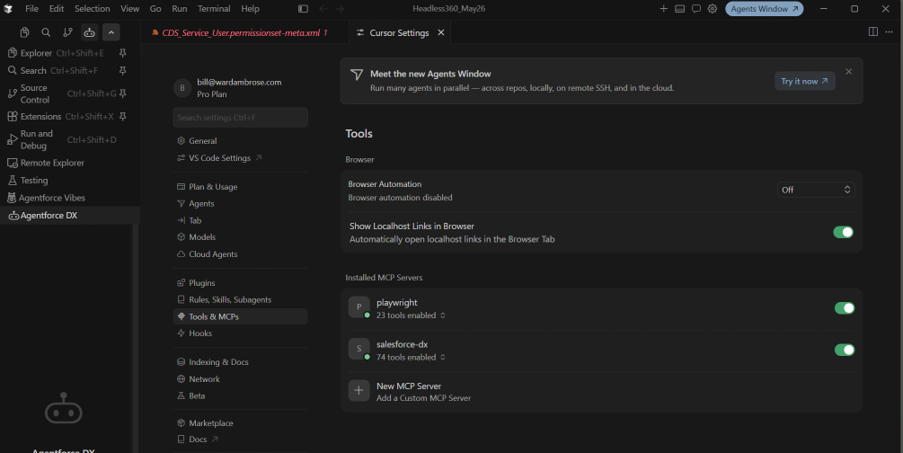
- Two MCP servers, Salesforce DX and Playwright, configured via JSON for automated testing

None of this is too tricky, but if you have spent your career in the Setup UI, purely ‘in clicks’, it’s not trivial either. The real prerequisite is not coding ability, but rather the technical literacy and comfort to explore and play with command line environments. I’m old enough to have used DOS based computers before GUIs came along. So while I’m no expert using windows Powershell I’m certainly not afraid of it.
What the AI Agent Can and Can’t Do
Once the stack is running, the capability is impressive. I gave the agent a plain English instruction to clone the Minimum Access profile, rename it, set system permissions and then object permissions across several standard objects.
It autonomously decided to create an SFDX project structure, retrieve the source profile, modify the XML, and deploy via the Metadata API. It then verified the result with a SOQL query. I didn’t write a single line of code or click through Setup UI until checking the work afterwards.
The First Mistake and What It Taught Me
Here comes the first of several mistakes, but note, I’m not blaming the agent, rather my own inexperience. Isn’t that what learning is all about?
The agent deployed to the wrong org on the first attempt because my default target wasn’t correctly configured. It deployed to an old trailhead playground I used ages ago to create a simple LWC and deploy using Visual Studio Code. I quickly fixed the snag and the second attempt was perfect.
The tooling amplifies your existing knowledge. It doesn’t replace it. This is key, if you have insufficient knowledge you won’t know what good looks like. When the agent struggled to find the correct page layout name, or when a permission set was created without a licence that silently broke the tab visibility behaviour, it was platform knowledge, rather than agent capability, that helped me to resolve the issues.
Prompt Design to Stop Credit-Burning Loops
Another rapid learning for me was to prompt in such a way that the agent cannot go round in multiple loops burning up credits while making no progress. You need a ‘circuit breaker’ to allow you to intervene and fix or refine the prompt before proceeding.
This is definitely not a set and forget tool. I used to fly airliners for a living and the autopilot analogy is perfect. The autopilot will fly the aircraft very well, with more accuracy than the pilot. But the pilot still needs to know how to fly the plane to a very high standard, and more importantly to properly supervise the autopilot.
Below is an example of that agent-supervision loop in action. In this instance, I prompted the Salesforce DX MCP server directly to check the default org status, confirm the active username, and verify whether the CDS_Service_User metadata existed in the force-app directory. Within seconds it returned a full breakdown: the org alias, instance URL, org ID, and confirmation that only one org was configured as the default target. It then located the permission set itself, showing the exact file path and summarizing its contents, including object permissions across Account, Case, and Contact, and tab visibility settings. This is the kind of verification step that used to mean digging through Setup UI screens. Now it’s a single natural language query, with the agent doing the retrieval and the summarizing for you.

The Step-by-Step Workflow for AI-Assisted Salesforce Deployment
The various elements of the build were carried out through a combination of agent deployment, manual Setup checking, CLI retrieves and Git commits. The order went like this:
- Select a bite sized incremental step.
- Assemble the most precise prompt you can (spoiler alert, Claude and Gemini were very helpful as additional companions here. Sloppy prompting quickly burns through AI credits.
- Review and deploy.
- Verify in the browser after each deployment.
- Retrieve using a package.xml manifest.
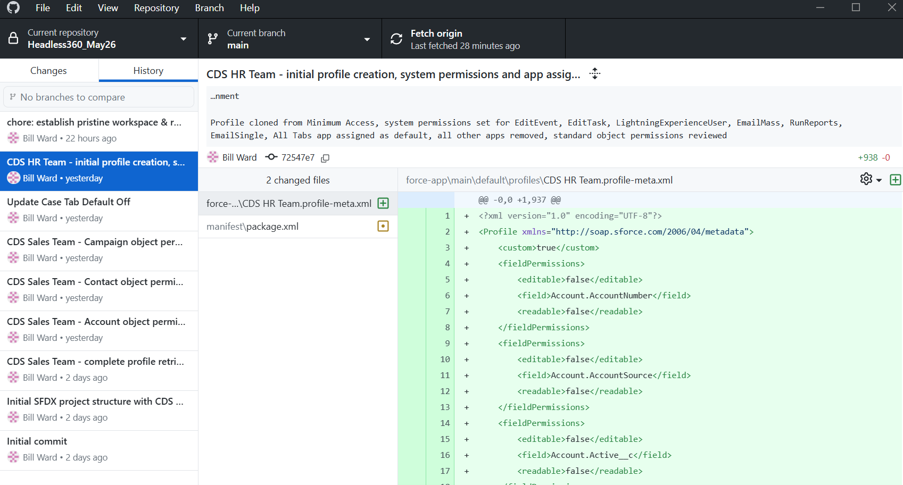
- Commit to Git with a meaningful message.
- Move to the next piece.
Understanding Conditional Profile Retrieves
The package.xml manifest approach was another significant technical learning for me. Profiles in the metadata API are conditional and only return settings for components explicitly included in the same retrieve request. Once I understood that, the retrieve process became reliable and repeatable.
Who Headless 360 is For?
Salesforce announced Headless 360 at TDX last April, their developer conference, and that timing can’t be an accident. The primary audience is surely developers and architects building agentic infrastructure, not admins performing standard implementations or improvements, at least not yet. For experienced admins, the most immediate value lies in the productivity story for repetitive deployment tasks. Work that previously required careful manual clicking can now be delegated to an agent with a precise instruction, freeing up time for judgment-intensive work.
Ready to Try Headless 360? Build Something You Already Know
If you’re curious about Headless 360, build something you already understand. I used a familiar exercise from a course I teach. I’m very familiar with what good looks like, so I could evaluate every output easily. Understand the outcome first. Then let the agent find the path.
Getting there took a full Saturday morning just on setup, then a mix of agent prompts, manual verification, and Git commits to build out profiles and permissions safely. I made mistakes along the way, wrong deployment targets, missing licenses, agent loops that burned credits without progress. Each one taught me something about the platform that no amount of agent capability could substitute for.