
Setup with Agentforce: What Admins Can Actually Do Right Now


For a Salesforce admin, Setup is the cornerstone of the job. It’s where they access requests, field builds, make flow fixes, and check on org health. Setup with Agentforce puts a conversational layer on top of all of it. Instead of clicking through Object Manager or digging through the Setup Audit Trail, admins can just ask.

We’ve dug into the documentation across several Setup areas: user access management, data model management, flows, and org health and usage. We also talked with the product team directly. This helps us deliver the most accurate and complete overview of what’s supported today. Here’s what each area actually covers, and where the boundaries lie.
This is part one of a two-part series. Part two will cover the remaining Setup areas. We’ll be watching closely for updates coming out of Dreamforce, so keep an eye out for more.
Managing User Access With Setup with Agentforce
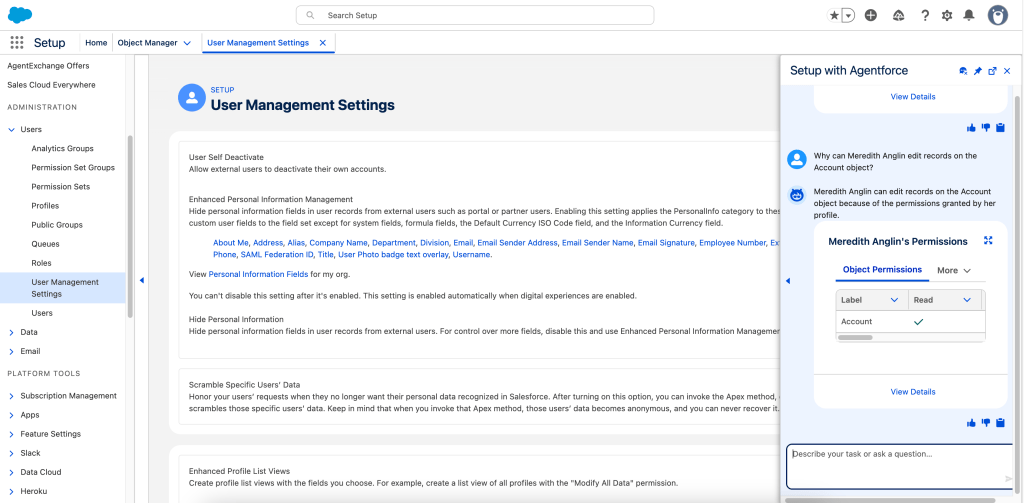
Access troubleshooting eats a lot of admin time. A user can’t see a record, or they can edit something they shouldn’t be able to touch, and figuring out why often means tracing permission sets, profiles, sharing rules, and role hierarchies by hand. Setup with Agentforce handles a generous slice of that work directly.
Admins can ask what access a specific user has to an object. They can ask why a user can edit a particular record, or why they can’t. The agent explains the reasoning behind record access, not just the outcome, which matters when you’re trying to fix the root cause instead of patching a symptom.

Sharing Rules and Configuration
The agent also reaches into sharing configuration. You can ask about organization-wide defaults for an object and update them through conversation. Updating OWDs needs the Manage Sharing permission. You can review criteria-based and owner-based sharing rules. See what access they grant to a specific user, role, or group. Creating sharing rules works too. Only criteria-based rules are supported, only on objects other than accounts, with a single criteria condition, and Manage Sharing is required.
Managing Groups, Queues, and Permission Sets
Building out a data model is one of the more repetitive parts of admin work, and Setup with Agentforce is built to speed it up. Ask for a custom object, and the agent proposes one, reusing existing objects and fields where it can instead of creating duplicates. 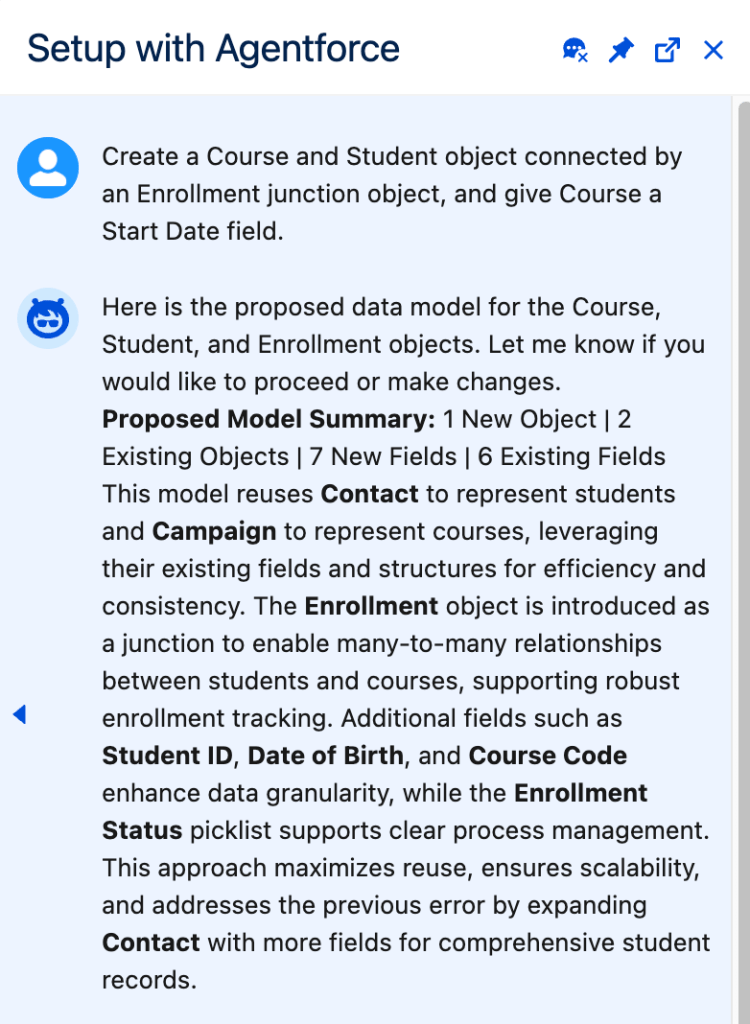
The scope goes beyond a single object. You can ask for a custom object along with several fields in the same request, specifying data types like date, picklist, or checkbox. You can also ask for multiple related objects at once, including a parent-child pair or a junction object that connects two objects. A request like setting up a Course and Student object connected by an Enrollment junction object works in a single pass.
Supported Field Types and Object Reuse
Supported field types cover the essentials: checkbox, currency, date, date and time, time, email, long text area, lookup relationship, number, percent, phone, picklist, rich text area, text, text area, and URL. Picklists are capped at ten values per field, and multi-select or global picklists aren’t supported.
Object reuse has boundaries too. Every existing custom object in the org qualifies for reuse and field configuration, but standard objects are limited to a specific allowlist: Account, Asset, Campaign, Case, Contact, Contract, Lead, Opportunity, Order, Product2, and Quotes. Ask the agent to add a field to a standard object outside that list, and it won’t be able to help.
Scale Limits and Default Settings
There are ceilings on scale too. A single data model output tops out at fifteen objects and fifteen fields per object. Reuse of existing objects and fields stops working once an org passes 125,000 fields across custom objects and supported standard objects. And once something gets created, the agent can’t edit or delete it. Object Manager still owns that job. Discovery questions aren’t supported either. Asking the agent to list every field on the Contact object won’t work; that still requires Object Manager or a SOQL query.
New objects and fields come with sensible defaults baked in. A new custom object gets an auto-numbered record name field and has reports, activities, and Chatter groups enabled automatically. New fields get AI-generated help text and descriptions, along with type-specific defaults like a 255-character length for text fields or a two-decimal setup for currency fields.
Creating and Managing Flows
Flow automation is a narrower slice of Setup with Agentforce, but it covers a real need. Admins can ask the agent to build a flow for a specific purpose, like setting the status of new cases to Escalated before save, or copying an account’s phone number to related contacts whenever the account updates.
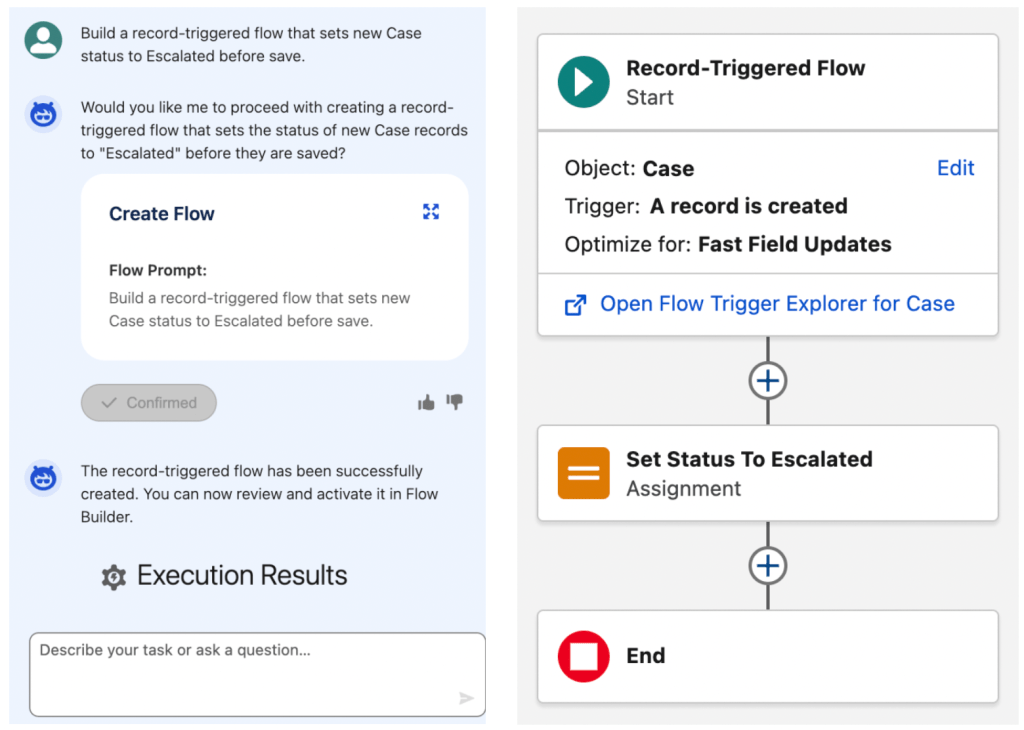
The agent can also summarize flows you already have. You can ask for a summary by flow label or by API name. This helps you understand what an existing automation does without opening Flow Builder and tracing every element by hand.
Retrieval is supported through filters. Admins can pull up all active flows created within a given window, or list every flow currently sitting in Draft status. This kind of quick inventory check is useful before a release. It helps confirm nothing unexpected got left in an incomplete state.
The scope here is intentionally limited. Any flow-creation request needs a clearly stated purpose, and the agent only builds autolaunched, record-triggered, and schedule-triggered flows. Screen flows and other flow types stay out of reach for now.
Monitoring Salesforce Org Health and Usage
This area turns the agent into a running diagnostic tool for the org itself. Admins can ask broad questions about overall health and usage, or narrow ones about a specific metric, and get an answer without navigating to a dozen different Setup pages.
Security gets direct coverage. You can ask for your org’s Security Health Check score or a general security status summary. Login errors are queryable too, including a breakdown by error type over a defined window like the past two days. 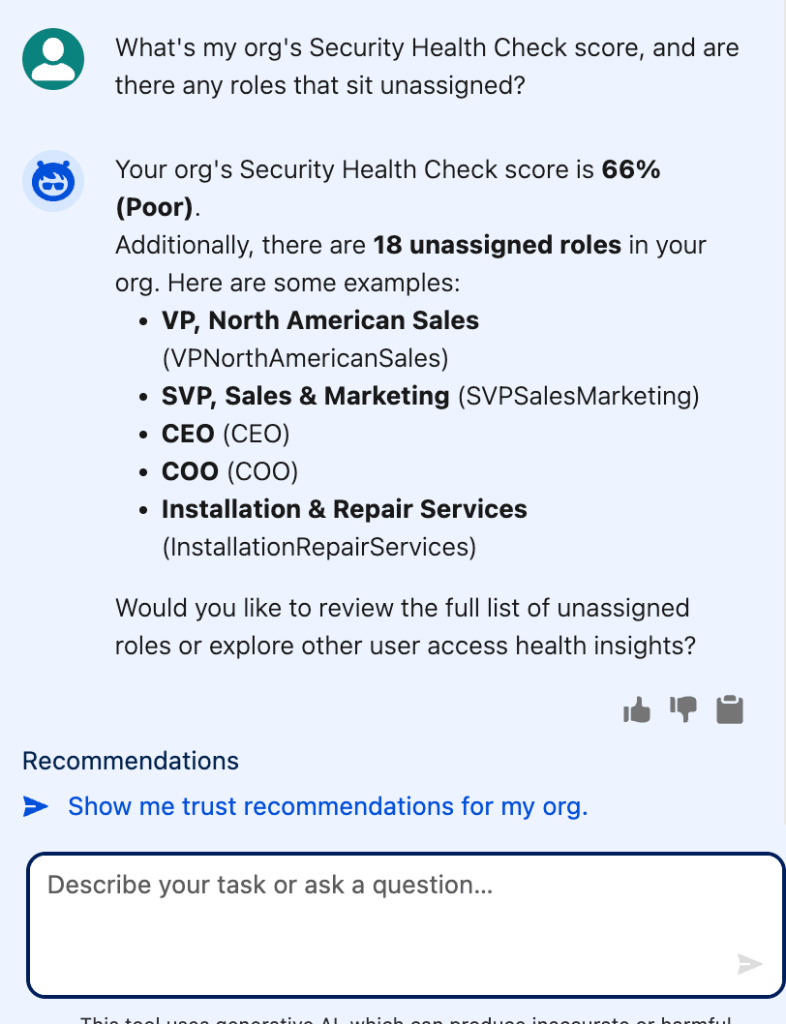
User access health rolls in here as well. Admins can ask which permissions have unusually low user counts, or whether any roles in the org sit unassigned. Storage utilization, Apex version currency, and custom component errors all get their own supported questions, so you can catch outdated dependencies or storage limits creeping up before they cause a problem.
A few areas go further than simple lookups. Lightning Experience performance can be compared week over week. License utilization questions cover both how many licenses are in use and which ones are closest to their limit. Org Trust Advisement data surfaces availability risks and recommendations for improving trust and availability.
For orgs running Experience Cloud sites, the agent can identify which objects, sensitive fields, or record counts sit exposed to guest users.
None of these org health questions carry extra permission requirements beyond the baseline for Setup with Agentforce. This lowers the barrier to visibility.

