
Salesforce AI Guardrails: An Admin’s Guide to Permissions, FLS, & Agentforce


Over the past year, Salesforce news feeds have been dominated by big-picture AI announcements: Headless 360, Model Context Protocol (MCP), Slack AI agents, and the overarching evolution of Agentforce. While these architectural leaps are exciting for developers and enterprise architects, they often leave everyday admins asking: “How do I actually govern this in my org on Monday morning?”

When leadership asks you to turn on generative AI capabilities, the responsibility of data privacy, field security, and user access falls on the admin’s shoulders. Generative AI is an entirely new execution layer that requires clear guardrails and setup.
In this guide, we will break down the three core operational pillars every admin needs to master before rolling out Prompt Builder and Agentforce: License and Permission Set allocation, Field-Level Security (FLS) inheritance, and Agentforce action boundaries.
License & Permission Set Allocation Strategy
Salesforce provisions generative AI capabilities using a two-tiered security approach: Permission Set Licenses (PSLs), which unlock feature availability at the tenant level, and Permission Sets, which grant functional administrative or operational capabilities to specific users.
Assigning base admin permissions directly to user profiles is a recipe for security drift. Instead, you should construct functional roles using Permission Set Groups (PSGs).
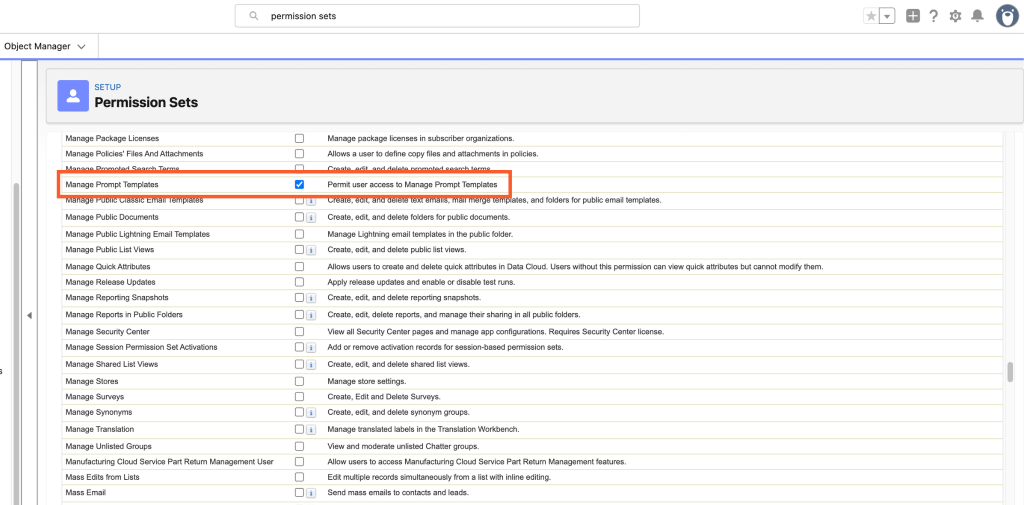
The Four Core Admin & User Roles
- The AI System Administrator: Requires the
Einstein GPT UserPSL along with custom permission sets grantingManage Prompt Templates,Manage Agents, and access to AI Insight logging objects. This role should be reserved strictly for the core CRM team. - The Prompt Template Author: Needs the ability to build, test, and iterate on prompt templates in Prompt Builder without necessarily managing autonomous AI agents. Assign the
Prompt Template Managersystem permission. - The Standard End-User: Requires the
Einstein GPT UserPSL and thePrompt Template Userpermission set. This allows users to execute prompts embedded in Lightning record pages or Flow screens without granting them access to modify the underlying system prompts. - The Agentforce Runtime User: Requires the
Agentforce UserPSL and custom permission sets mapped specifically to the objects and Flow actions that the autonomous agent is authorized to touch on their behalf.
Admin Best Practice: Combine Prompt Template User with your object-specific permissions inside a dedicated Permission Set Group (for example, PSG_Sales_AI_Users). This ensures that when a sales rep moves to another department, revoking their PSG cleanly removes their generative AI access without touching their core profile.

Enforcing Field-Level Security (FLS) in Prompt Grounding
One of the biggest anxieties for compliance teams is the fear of AI “hallucinating” or leaking restricted data such as margins, salary fields, or private notes, to unauthorized staff. Thankfully, Salesforce built Prompt Builder with built-in runtime security enforcement.
How Context Inheritance Operates at Runtime
When an end-user triggers a prompt template on a record page, Prompt Builder executes a multi-stage security check before the prompt payload ever leaves your org and reaches the LLM via the Einstein Trust Layer. Here is the list of stages it goes through:
- Object-Level Security (OLS Check): Does the running user have Read access to the target object? If no, object context grounding is blocked entirely.
- Field-Level Security (FLS Check): Does the user have Read access to the individual merge fields referenced in the prompt template? If a user lacks FLS for a specific field, that field resolves to a null value (blank).
- Record-Level Sharing Rules: Can the running user view the specific record? Prompt Builder strictly respects implicit and explicit sharing rules (OWDs, Role Hierarchy, Criteria-Based Sharing).
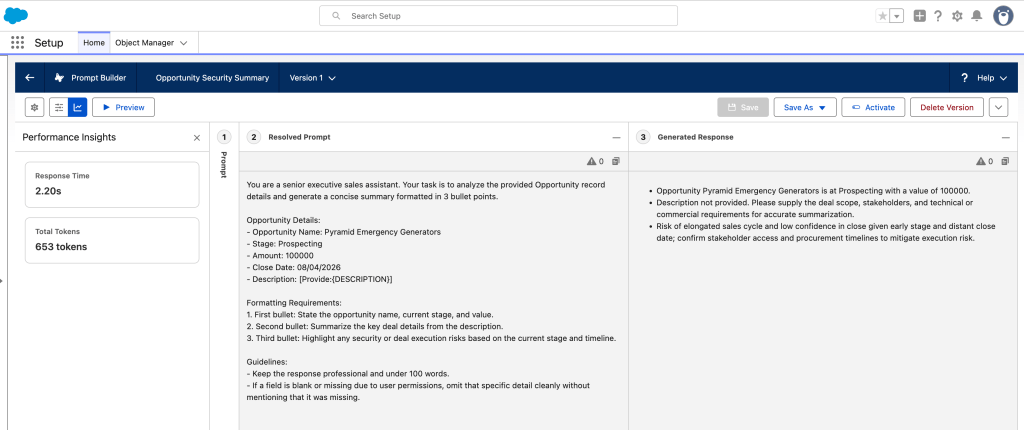
Imagine you have designed a Prompt Template that reads as follows: “Summarize the following deal: Account Name {!$Input:Opportunity.Account.Name}, Stage {!$Input:Opportunity.StageName}, Expected Revenue {!$Input:Opportunity.Amount}, and Target Profit Margin {!$Input:Opportunity.Profit_Margin__c}.”
Let’s watch what happens when two users with different permissions run that template in real time:
- Sales VP (Has Read Access to Profit Margin): The template resolves fully with complete financial metrics. The summary generated by the LLM incorporates the 28% profit margin cleanly.
- Customer Support Rep (FLS Restricted on Profit Margin): The system automatically suppresses the
Profit_Margin__cfield value before sending the payload to the LLM. The AI receives a prompt with a blank margin value, generating a helpful summary of the deal without ever exposing or processing the restricted financial metric.
Because FLS stripping occurs prior to the Einstein Trust Layer processing, there is zero risk of restricted data residing in prompt caches or model responses.
Agentforce Action Limits & Autonomy Guardrails
While Prompt Builder focuses on generating content, Agentforce introduces autonomous multi-step execution. In addition to drafting text, Agents also query records, execute Flows, trigger APIs, and update database records. Without firm boundaries, autonomous agents can execute unintended actions.
Choosing the Right Execution Boundary
Salesforce provides three primary modes for governing how agents execute actions:
- Human-in-the-Loop (Ask Every Time): The agent constructs the proposed action or output, but requires an explicit user click in the UI before committing changes to the database or dispatching communications.
- Run Safe Defaults (Recommended Starting Point): The agent is granted autonomy for read-only lookups (e.g., querying order statuses or searching knowledge articles), but automatically triggers a human approval prompt for write, update, or delete operations.
- Full Autonomy (Bypass): The agent executes read and write operations end-to-end without human intervention. This mode should be strictly limited to low-risk, internal background utilities with robust error handling.
Architecting a “Human-in-the-Loop” Gate for Agent Emails
A classic challenge admins face is enabling an agent to assist with customer outreach without giving it unrestricted permissions. The solution lies in splitting the workflow into two distinct steps:
Step 1: Draft Creation (Automated Action)
Assign the agent an autolaunched Flow or Prompt Template action that creates a Draft Email or populates a custom pending field on the Case object. The agent’s scope ends once the draft is created.
Step 2: Human Approval & Dispatch (Restricted Gate)
Place an explicit single-click action on the Lightning page layout. The user reviews the AI-generated draft, makes manual edits if needed, and clicks “Approve & Send.” The actual Send Email system capability is restricted to the human user’s permission set, ensuring the agent can never bypass human review.
Agentforce Security Checklist
Before enabling generative AI features in production, verify your administrative baseline using this quick checklist:
| Governance Pillar | Salesforce Setup Location | Recommended Admin Action |
|---|---|---|
| User Permissions | Setup ➔ Permission Set Groups |
Bundle Prompt Template User into PSGs instead of editing Profiles. |
| Data Security & FLS | Setup ➔ Object Manager ➔ [Object] ➔ Fields |
Verify sensitive fields (e.g., margins, salaries) are restricted via FLS before referencing in prompts. |
| Action Boundaries | Setup ➔ Agents ➔ [Agent Name] ➔ Actions |
Set write/delete actions to Require Confirmation for Human-in-the-Loop review. |
| Einstein Trust Layer | Setup ➔ Einstein Setup / Audit Logging |
Enable Zero Data Retention (ZDR) and review PII masking settings with compliance. |
By establishing clear permission set structures, relying on native FLS inheritance, and implementing human-in-the-loop validation for autonomous agents, admins can confidently deliver cutting-edge AI features while keeping their org secure and compliant.
Explore related content:
Architectural Decisions in the AI Era: Flow, Apex, and Agentforce
AIforce: Salesforce’s New AI Interface Layer for Slack, Claude, and Lightning


Good walkthrough. One thing we keep running into on Agentforce rollouts: field-level security only protects what the prompt is grounded on. If an agent action calls a Flow running in system context, or Apex without “with sharing”, it can still read and update records the user could never see. We now review every action’s run mode alongside the permission sets. It also helps to tell the prompt to say a value is not available when a merge field comes back blank, so the model does not fill the gap with a guess.
Thanks, Ankur. Run mode deserves more attention. A Flow set to system context ignores the running user’s field-level access, so permission sets alone can’t catch it. How do you document your run mode reviews?