AIforce: Salesforce’s New AI Interface Layer for Slack, Claude, and Lightning


Salesforce introduced AIforce at Dreamforce, and it changes where Salesforce work actually happens. Rather than pulling people into Salesforce’s own screens, AIforce sends Salesforce’s data, workflows, business logic, and governance out to the AI tools teams already use. Salesforce calls it a live interface layer, and it launches alongside three connected products that we are already familiar with: Slackforce, Claudeforce, and Agentforce Coworker.

We’re covering what AIforce includes, then walking through each of its three launch products in the order Salesforce announced them.
What AIforce Actually Changes for Admins and Users
AIforce sits on top of Salesforce’s existing Agentic Enterprise architecture. That architecture already includes Data 360, which unifies data and metadata across systems, and Customer 360, which supplies the business logic, processes, and permissions agents need to act. It also includes Agentforce, the deployable digital workforce Salesforce has been building out. AIforce is the newest layer, and it extends that whole foundation to any AI interface a team chooses to work in.
Marc Benioff, Salesforce’s Chair and CEO, described the launch as a turning point for how people interact with AI. He framed AIforce as a way to pair model intelligence with everything a company has already built inside Salesforce, resulting in a system that stays governed, keeps Zero Data Retention, and works alongside the systems already running the business.
A few principles apply across every AIforce product:
- Permissions carry over automatically: An agent can only see and do what the person using it is already authorized for, and every action still routes through Salesforce’s own rules.
- Users build their own views: Instead of working inside a fixed layout, someone can describe the interface they want and get one generated on the spot.
- Setup stays light for admins: Salesforce says there’s no new permissions system to configure and no migration step before a team gets access.
Salesforce points to its Trailblazer community as evidence of how much data is already sitting untapped in these orgs. Salesforce says Trailblazers have built 12 million apps and produce 9.6 billion API calls every day, numbers Salesforce is using to argue that AIforce unlocks work that was previously reachable only through a dashboard.
Slackforce Turns Conversations Into Live, Shared Interfaces
Slack CRM and Slackbot Laid the Groundwork
Slackforce builds on two things Salesforce already shipped: Slack CRM, which put native CRM functions inside Slack, and an earlier update that let Slackbot read from and write to Salesforce through MCP. The new piece is Slackforce Surfaces.

What Slackforce Surfaces Actually Do
With Surfaces, a user doesn’t need to know how to build a dashboard or design a presentation. They describe what they’re trying to understand or communicate, and Slackbot assembles it, choosing whatever format fits best instead of working from a fixed template. The result might look like a dashboard, an executive deck, a calculator, or something else entirely.

The defining feature is that a Surface keeps pulling from live data after it’s built. It isn’t a snapshot of what Salesforce looked like the moment someone asked. If a pipeline shifts, a case resolves, or a metric moves, the numbers inside the Surface update on their own.
Built for Teams, Not Solo Use
Surfaces are also built to be worked in together, not handed off. Once someone pins a Surface to a channel, the rest of the team can dig into it, leave comments, and take action from inside it, all governed by each person’s own Salesforce permissions.
Slack CRM gets an upgrade alongside Surfaces. A user can create a new Salesforce account, log call notes, or update a record just by typing a request in Slack, without switching to a separate CRM screen. Slack Code extends the same shared-workspace approach to engineering, giving teams a common place to build software with an agent instead of routing everything through one person.
Claudeforce Pairs Salesforce’s Data With Claude’s Reasoning
Built on the Salesforce and Anthropic Partnership
Where Slackforce is built for shared team spaces, Claudeforce is built around a single seller’s workday, and it’s scoped to Sales for now. It’s the latest step in Salesforce and Anthropic’s ongoing partnership, which has already produced Claude Tag inside Slack and Claude’s integration into Agentforce.

Salesforce in Claude Runs Through a Prebuilt MCP Server
The product itself is Salesforce in Claude, delivered through a prebuilt MCP server. Salesforce says this replaces the manual work integrations like this usually take, including setting up authentication by hand and mapping each skill individually.
37 Sales Skills Built for the Full Deal Cycle
Once connected, Salesforce in Claude comes with 37 sales skills covering the full deal cycle. Salesforce and Anthropic say they built these around Claude’s own reasoning and tool-calling ability, rather than writing simple prompts on top of a CRM API. A few examples of what that produces:
- A morning summary flagging what shifted in a rep’s pipeline overnight and what needs attention first
- A breakdown of a specific deal that anticipates likely objections, drawn from prior calls, emails, and stage history
- A list of accounts with renewal or expansion potential that might otherwise get missed
- Meeting prep and post-call follow-up drawn automatically from an account’s full history
Each skill draws from a rep’s actual pipeline, not a generic template. That’s the difference Salesforce is selling with Claudeforce. The AI already knows the account, the deal, and the deadline. A rep just has to ask.
Permissions, Autonomy, and Enterprise Frontier Safeguards
Every action still runs inside a rep’s existing Salesforce permissions. Reps also set the rules for how much autonomy Claude gets. Take an email going outside a company as an example. A rep can require Claude to check first, or let it send once they trust the workflow.
Salesforce and Anthropic also built Enterprise Frontier Safeguards for this rollout. It pairs Zero Data Retention with monitoring that flags serious misuse. Those flags go directly to the customer. An Anthropic employee never reviews the underlying data first. That rollout is scheduled to begin later this fall 2026.
Early Results and Availability
Alexa Vignone, Salesforce’s President and Chief Revenue Officer, described her own sales team’s pilot results. She said her reps now begin each day with pipeline review and account history handled, freeing that time for direct customer conversations instead, and called the pace of internal adoption unlike anything she’d seen in a prior rollout.
Salesforce in Claude is rolling out now, with an initial focus on Sales. Salesforce says it plans to add skills for other teams over the next few months.
Agentforce Coworker Brings an AI Teammate Into Lightning
Slackforce and Claudeforce move Salesforce out to other tools. Agentforce Coworker keeps that same intelligence inside Lightning, where Salesforce says millions of its customers already do their daily work.
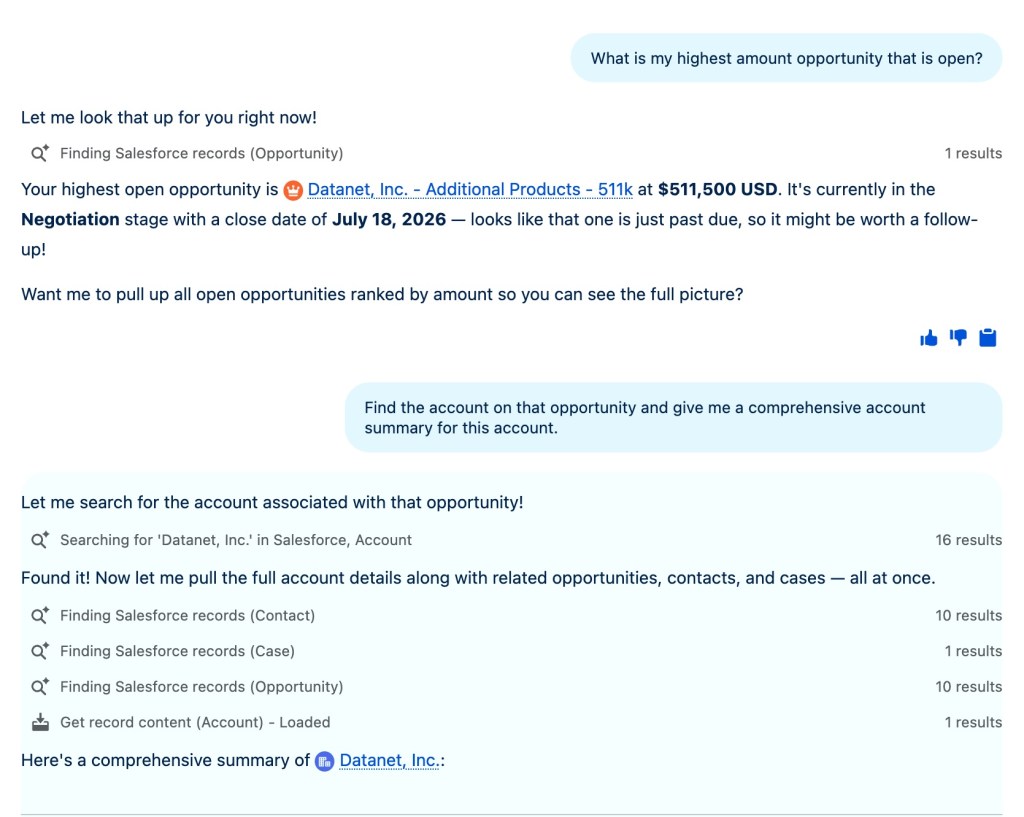
Coworker functions as an AI teammate embedded in the interface reps and admins already use. It reviews account records, recent activity, and history. It flags what needs attention and can act on it directly. Nobody has to open a separate app.
Coworker runs from inside Salesforce itself. Salesforce says it automatically inherits a company’s existing permissions and business rules. No data leaves that trust boundary. Coworker can also hand off work to specialized Agentforce agents the business has already built. That means what it can do expands as the broader agent setup grows.
Activation and Early Results
Salesforce designed activation to take one step: no new permissions model, no migration process. Salesforce reports 100,000 users turned Coworker on within its first 35 days of release.
Brandon Bernard, Senior Vice President and Sales Technology Strategist at Fulton Bank, shared results from his own rollout. Within a few weeks, his organization stood up more than 20 use cases in production, reaching around 3,000 users. He pointed to strong daily usage and said Coworker was already helping his teammates locate information faster, prepare for work more thoroughly, and push tasks forward.
What AIforce Means for the Salesforce Ecosystem
Slackforce, Claudeforce, and Agentforce Coworker are three expressions of the same shift. Salesforce’s context, permissions, and business logic no longer stop at the edge of its own UI. Slackforce puts that context into shared, live team surfaces. Claudeforce puts it into a reasoning layer built for individual sellers, and Agentforce Coworker keeps it running natively where millions of users already work every day.
For admins and developers, years of Salesforce data, workflows, and configuration are already sitting there, ready to use. That value no longer requires a dashboard to reach. AIforce is Salesforce’s bet that describing what you need will replace navigating to find it. That bet plays out across every surface your team already uses.
Explore related content:
Salesforce Launches New Fellowship for Veterans Entering Tech

