
What Is Agentforce Coworker?
Salesforce's AI-Powered Search and Action Tool - Explained

If you’ve ever lost 20 minutes digging through Salesforce records, Slack threads, and SharePoint folders trying to piece together what’s going on with an account, Agentforce Coworker was built for exactly that scenario.

Powered by Data 360 and currently in beta, Agentforce Coworker is Salesforce’s AI-powered work assistant. It connects your Salesforce CRM, Slack, and 270+ external data sources into a single conversational interface. You type a question. It searches across your connected data and returns a synthesized answer. And when you’re ready to act on that answer, it automatically routes your request to the right Agentforce agent to get the work done.
Agentforce Coworker sits at the intersection of search, AI, and automation. In other words: it’s more than a search bar. It’s designed to replace the context-switching that slows down sales reps, service teams, and admins on a daily basis.
What Agentforce Coworker Actually Does
At its core, Agentforce Coworker gives users three capabilities:
Ask Anything and Get Synthesized Answers
Instead of running multiple searches and piecing together results manually, users type a natural language question and Agentforce Coworker pulls a synthesized answer from CRM records, documents, Slack conversations, and more.
Connect to Your Data Wherever it Lives
Agentforce Coworker works immediately with Salesforce CRM and Slack out of the box. It also connects to 270+ external sources including Google Drive, SharePoint, data lakes, knowledge bases, and collaboration tools.

Turn Answers into Actions
When a user asks Agentforce Coworker to complete a task, it doesn’t just return information. It automatically routes the request to the right Agentforce agent. The feature serves as one unified starting point for both search and follow-through.
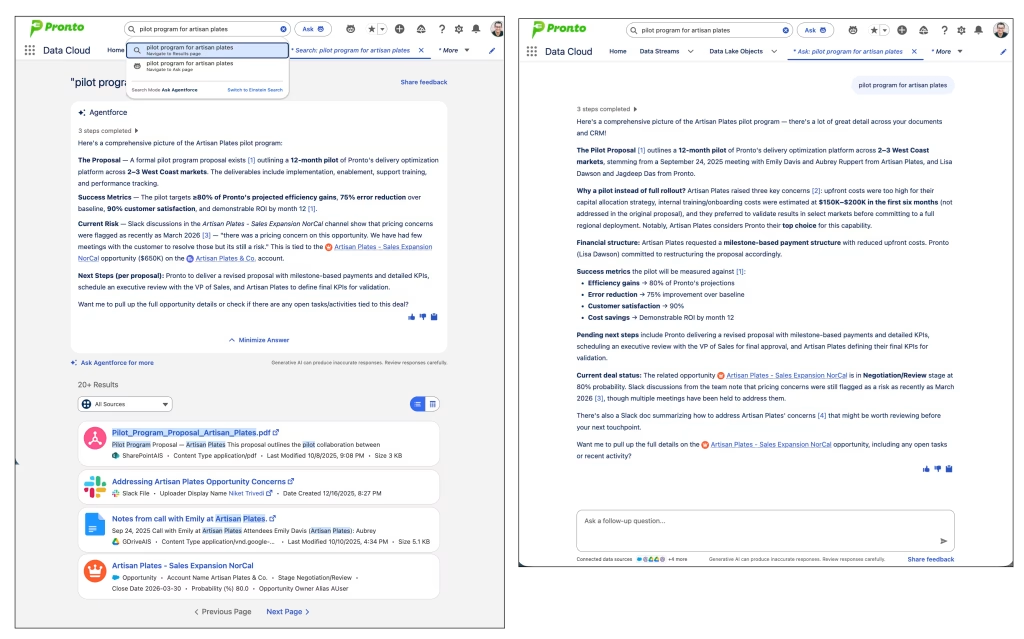
Real-World Agentforce Coworker Use Cases
Salesforce provides two detailed use cases that illustrate how Agentforce Coworker works in practice. Both follow a Discover, Research, Act pattern.
Unblocking a Stalled Opportunity
A sales rep at Ursa Major Solar is working a deal with Edge Communications that has gone quiet. They ask Agentforce Coworker, “What’s going on with Edge Communications?” The tool surfaces relevant data from connected sources, revealing that the deal is at risk due to pricing concerns documented in a specific deck.
The rep digs deeper: “Tell me more about the pricing concerns.” Agentforce Coworker details the client’s concerns about ramp-up and training costs and notes that an inside sales rep has a follow-up meeting scheduled. Finally, the rep asks for coaching on how to handle those concerns. Agentforce Coworker routes automatically to the Sales Coach Agent, which delivers personalized coaching before the meeting.
Resolve a Recurring Support Issue
A service rep at Ursa Major Solar notices a spike in login-related support tickets. They ask Agentforce Coworker, “What’s going on with login issues this week?” It surfaces data showing a 30% spike in login-related tickets across North America.
The rep asks whether the team has seen this issue before. Agentforce Coworker reviews past documents and conversations, confirms a similar spike happened last quarter after a configuration update, and surfaces the relevant Jira ticket and customer email template from that incident. The rep then asks for a resolution recommendation. Agentforce Coworker routes to the Sales Support Agent, which searches knowledge articles and past case data and recommends a fix.
Note: External data source integrations like Jira are currently in pilot. Contact your Salesforce account executive to request access.
How to Set Up Agentforce Coworker
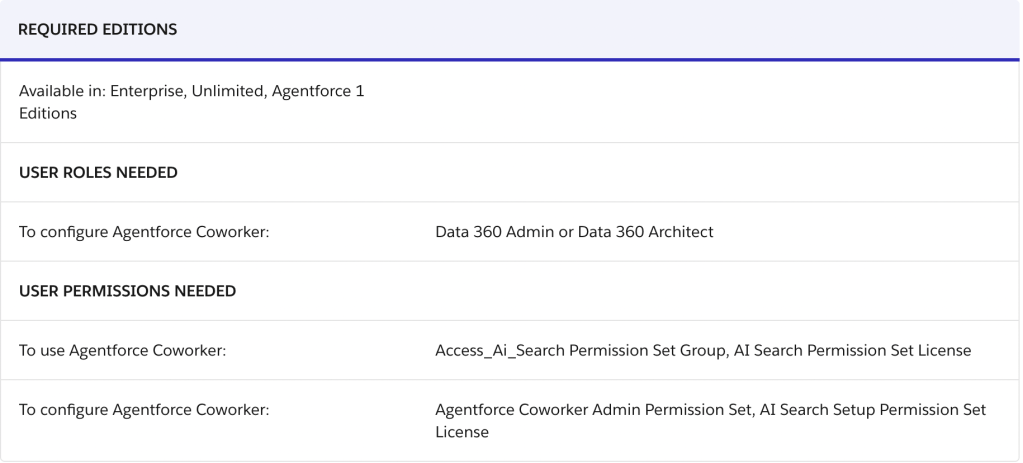
Agentforce Coworker is available in Enterprise, Unlimited, and Agentforce 1 Edition orgs. Setup is largely automated, but there are required permissions, a specific sequence of steps, and data governance policies to configure before your users can access it.
Editions: Enterprise, Unlimited, Agentforce 1 Edition
Admin permissions required:
- Agentforce Coworker Admin Permission Set
- AI Search Setup Permission Set License
User permissions required:
- Access_Ai_Search Permission Set Group
- AI Search Permission Set License
Turn It On in Setup
Go to Setup and search for Agentforce Coworker in the Quick Find box. Select Get Started with Agentforce Coworker, click Turn On, and confirm. The platform runs automated setup steps. A green On label appears in the top right when the process completes.
Add Data Sources
When you turn on Agentforce Coworker, Salesforce CRM data connects automatically. External data sources you’ve already set up in Data 360 require a separate step to add search metadata.
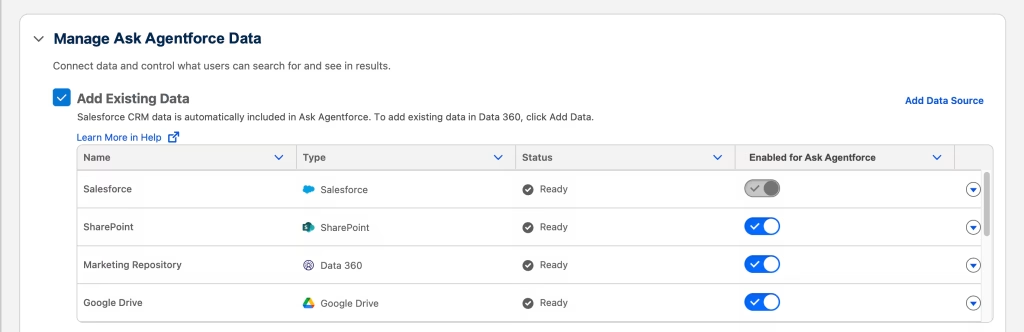
From the setup page, navigate to Manage Agentforce Coworker Data and select Add Data Source. You can select a single connector such as Google Drive or SharePoint, or select Data 360 to choose from any Data Model Object (DMO). From there, you select which DMO data to include, define searchable fields including Title, Supporting, URL, and Searchable Fields for each DMO, name the data source, and save.
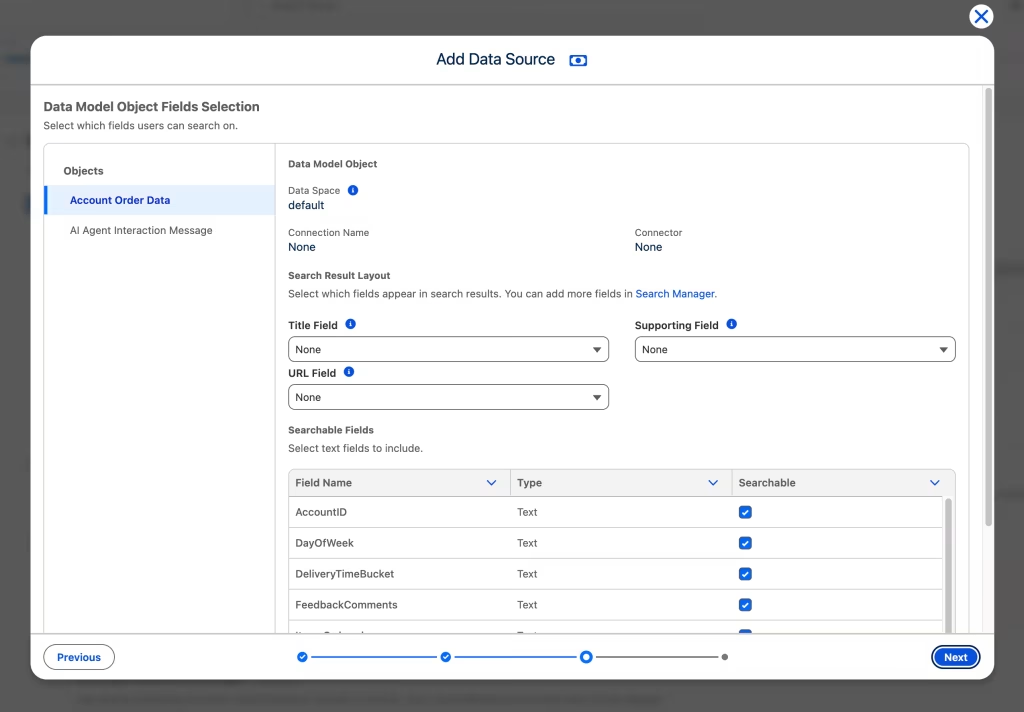
Indexing begins automatically. Processing time depends on the volume of data in Data 360.
Enable for End Users
At the bottom of the Agentforce Coworker Setup page, turn on the end user experience. This adds an Ask button next to the global search bar for users with the appropriate permissions. Users access conversational AI search across Salesforce and all connected data through that button. Einstein Search remains available alongside it.
Assign User Permissions
From the Manage Agentforce Coworker Users section of the setup page, select Manage next to Manage Access to Agentforce Coworker. Assign the permission set group to the relevant users. You can also check how many permission set licenses your org has assigned versus how many remain available.
To remove access, remove the Access_Ai_Search permission set group and the AI Search permission set license from the user.
Configure Data Governance
Agentforce Coworker applies default data access policies automatically for supported sources like Google Drive and SharePoint when you connect them. For Slack, users can only access Slack data in Salesforce that they already have permission to view in Slack.
To control which records and objects appear in search results, configure object-level and record-level data governance policies through the Data Governance tab in Data 360. For Google Drive and SharePoint specifically, you can enable preset permission inheritance so that users only see files in search results that they already have access to in those platforms.
One important caveat: permission changes in Google Drive or SharePoint take up to one hour to propagate into Agentforce Coworker. During that window, a user whose file access was just removed can still see that file’s title and metadata in search results, but cannot open it.
Billing: What to Know Before You Turn Coworker On
Agentforce Coworker affects credit consumption for Data 360, Agentforce Conversations, and Flex Credits. Your billing model depends on how your org is licensed.
Seat-Based Licenses
Users with these licenses (Agentforce 1 Edition or Agentforce for Sales, Service, and Industries) get unmetered access to Agentforce Coworker. Their searches do not consume Flex Credits or Data Services Credits. Agentforce Coworker provisions automatically through your Salesforce Foundation Flex Credits.
However, you must configure user-based AI permissions correctly to activate this unmetered access. Without proper setup, users consume credits even if they hold a qualifying license. Unmetered access only applies to authenticated users with these licenses. Guest and portal users are billed normally regardless.
Consumption-Based (Metered) Billing
Organizations on a consumption-based plan consume credits based on usage. The key usage types that apply to Agentforce Coworker include:
Standard, Basic, and Advanced Prompts, which meter direct LLM requests processed up to 2,000 tokens per prompt and count additional 2,000-token chunks as separate prompts. Standard Actions, which count agent actions in text conversations at up to 10,000 tokens per action. Data 360 Queries, which meter by number of records processed. Data 360 Unstructured Processing, which meters by the volume of unstructured data processed such as PDFs and audio files. And Data 360 Streaming Pipeline, which meters by rows or records processed depending on the data stream type.
If your org holds both Data Services Credits and Flex Credits, Agentforce Coworker uses Data Services Credits first for data collection and processing.
To check current credit consumption, use Digital Wallet. To review the credit cost of each usage type, consult the Data 360 Rate Card. For pricing specifics, contact your account executive.
Coworker Limits to Know
Before deploying Agentforce Coworker broadly, review the platform limits. All of the following are hard limits enforced by the platform:
Google Drive ingestion supports up to 5,000 files per shared drive with a maximum file size of 100 MB for PDFs and 4 MB for other files. Incremental ingestion updates every hour.
SharePoint ingestion supports up to 10 to 15 GB of total file volume per site and up to 5,000 files per site per ingestion run. PDFs cap at 100 MB and other files at 4 MB. Files with security labels or tags, empty Excel files, and OneNote files are not supported.
Slack queries are limited to 180 per minute per user on a sustained basis, with burst capacity up to 1,000 queries per user. Each user has an independent rate limit based on their JWT token.
The Search Agent AI answer component runs at 100 requests per minute and uses multiple model calls per query.
Should Your Org Move Forward?
Agentforce Coworker is still in beta, which means some capabilities are still rolling out (external sources like Jira are pilot-only) and the feature is not currently supported in Government Cloud Plus orgs.
That said, for organizations already on Enterprise, Unlimited, or Agentforce 1 Edition, the setup investment is low and the use cases are concrete. If your sales or service teams spend time hunting for information across multiple tools, Agentforce Coworker has a clear and immediate application.
The governance, permission, and billing configuration requires careful attention before you go live. But the automated setup process removes most of the heavy lifting on the infrastructure side. Keep watching the Salesforce release notes for updates as this moves from beta to general availability.
Explore related content:
How to Deploy Agentforce Right the First Time, Straight from the Experts
Salesforce Offers Free Agentforce Addon to SMBs at No Extra Cost
How To Build Custom Flow Actions For Agentforce – Planning Phase

