
No Browser or UI Required: Salesforce Headless 360 Explained
Salesforce Announced a Brand New Development Vision at TDX26

Using Salesforce has always meant logging into Salesforce. A service rep opened a console. They clicked into a case. They manually updated a status. It was a human, navigating a platform, getting work done. But now, humans are not the only ones doing the navigating. Agents are too, and they do not use a browser. They call APIs, invoke MCP tools, and run CLI commands. So Salesforce made a decision: rebuild the platform to include agents.

The result is Salesforce Headless 360, announced at TDX 2026. It is a big shift in how Salesforce exposes its platform. Everything on Salesforce is now an API, an MCP tool, or a CLI command. Agents can use all of it.
What Is Headless 360, Exactly?
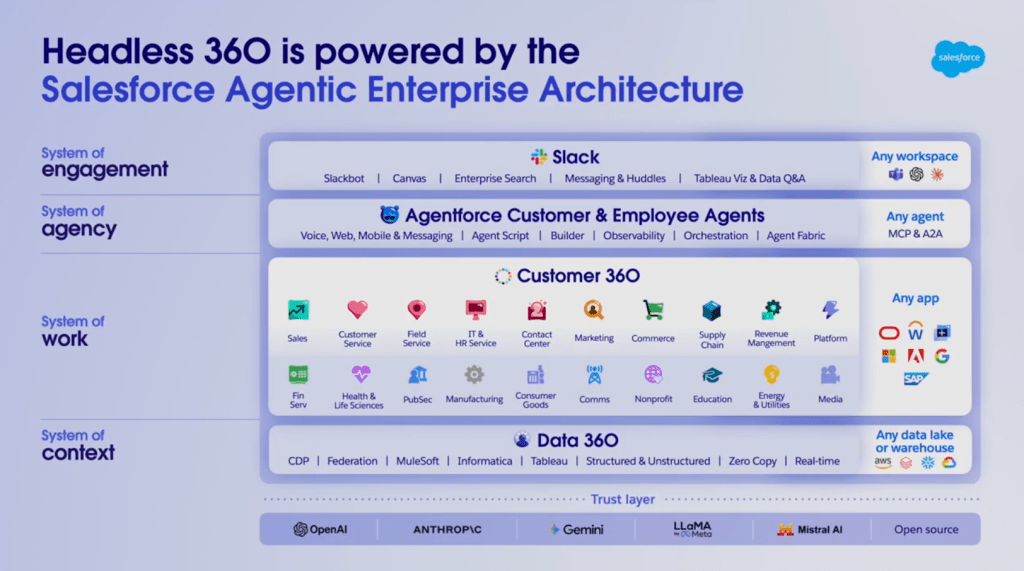
The name might sound technical, but the concept is fairly straightforward. “Headless” means no UI required. Your agents, your coding tools, your pipelines can access Salesforce capabilities without ever touching a screen. A platform built for humans clicking through screens is not built for agents, and Headless 360 is Salesforce’s solution to that gap. Headless 360 delivers three main things:
- New MCP Tools and Coding Skills: Over 60 new MCP tools and 30+ preconfigured coding skills give coding agents complete, live access to your Salesforce platform. That includes your data, your workflows, and your business logic. Developers can use the coding tools they already work in, including Claude Code, Cursor, Codex, and Windsurf.
- A New Agentforce Experience Layer: Some agent responses need to be more than text. A card to approve, a form to complete, or maybe a decision to make. The Experience Layer is a new UI service that separates what an agent does from how it appears. It renders rich, interactive components natively inside Slack, Mobile, ChatGPT, Claude, Gemini, Teams, and any client that supports MCP apps. Build once, and render everywhere your users already work.
- New Tools to Control Agents at Scale: Shipping an agent is the easy part. Knowing it will behave the way you designed it, reliably, across every edge case, weeks after launch, is where most people get stuck. Headless 360 introduces a full set of tools that give you that control across every stage of the agent lifecycle.
For Developers: Build Any Way You Want
The 60+ MCP tools and 30+ coding skills announced at TDX are the engine here. They give coding agents complete, live access to your Salesforce platform from the tools developers already use. Claude Code, Cursor, Codex, Windsurf, all of them. No context switching and no separate Salesforce-specific toolchain.
The DevOps Center MCP extends that same access into your CI/CD pipeline. You describe what you want to deploy, and your agent handles the execution. Salesforce says this cuts cycle times by as much as 40%.

With Native React support, developers can build fully custom interfaces with all platform power underneath. Any design language, interaction model, or brand expression. It runs natively in Salesforce, connected to your org metadata, secured through GraphQL, and inheriting all existing access controls.
At the TDX keynote, Nancy Xu, VP of Agentforce, walked through a live demo. Her team built an agent from scratch in under 10 minutes. In that time they built the agent, created an org, deployed it, tested it, observed it, and improved it, all in fewer than 10 command lines.
AgentScript: The Backbone of Trust
One of the most important pieces of Headless 360 is AgentScript, which is now generally available. AgentScript is a single, flat, versionable file that defines how your agent behaves. You write explicit business logic where you need it and let the agent reason freely where you do not. It is the difference between an agent that can do anything and an agent that does exactly what you need it to.
In the TDX keynote demo, the AgentScript walkthrough showed exactly how sub-agent routing works. When a user opens a session, the script takes in the prompt and routes it to the right sub-agent. Payout disputes go to one sub-agent, portfolio management goes to another. Determinism is built in, and if a discrepancy is found, the agent escalates to a case. Guardrails ensure it does not try to process something it was not built for.
Testing, Observability, and A/B Testing
Here is something most people miss about agent development. Joe Inziarello, Salesforce’s Executive Vice President and Chief Digital Officer, said it well at TDX. With traditional software, 80% of the work is the build and 20% is refinement. With agents, it is flipped. Getting the agent out there takes 20% of the effort. Making it great takes the other 80%. Headless 360 addresses this directly.
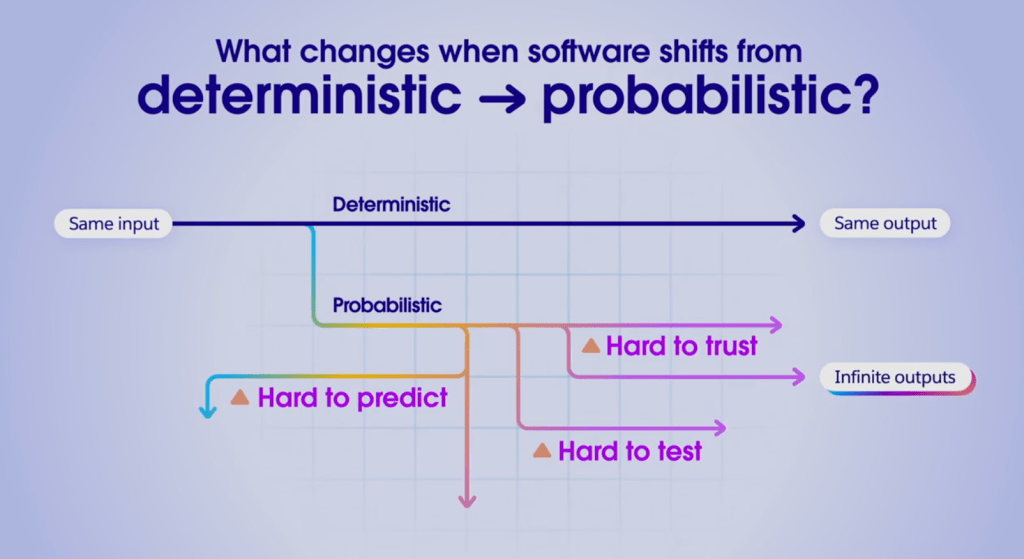
Before launch, the Testing Center catches problems early, including gaps in logic, guardrail violations, and unpredictable outputs, before any of it reaches a real user. Custom Scoring Evals go further. They do not just tell you whether something ran, they score whether the agent made the right decision. You define what good looks like for your use case. Every response is evaluated against that standard.
After launch, Observability and Session Tracing show not just what happened but why. When an agent drifts, you find the cause in hours, not weeks. A/B Testing lets you run multiple agent versions against real traffic at the same time. You make data-driven decisions about what to promote to production.
The Conversation Is the Interface
Slack is becoming the front door of the agentic enterprise. Custom AI agents on Slack have grown 300% since January. Salesforce built the Agentforce Experience Layer around that reality. In the TDX keynote, a travel demo showed a customer interacting with an agent through a chat window. The response was not plain text. It was a rich, embedded interface, with trip details, rebooking options, and real data, all inside the chat. That used to require separate front-end development, back-end development, and orchestration layers. Now it is a single runtime agent.
Why the Platform Still Matters
If agents can call any API and models are already powerful, you might wonder why the platform matters at all. Well, intelligence alone is just inference. A powerful model without context, business logic, and guardrails is just a chatbot. It cannot actually do your work.
A coding agent connected to a raw database does not know that a customer has an open escalation, a renewal due in 30 days, and a breached SLA. That context took years to accumulate. It lives in Salesforce. Data 360 now exposes it as an API, an MCP tool, and a CLI command. Agents can reach it without touching a UI. Agents also inherit existing workflows, approval chains, business rules, and edge-case logic that was built years ago. They do not have to rediscover it; they work within it. And the trust layer, the permissions, sharing rules, and compliance controls your IT team already approved, comes with it.

Conclusion
Headless 360 is a repositioning of the entire Salesforce platform, and it was one of the most talked-about announcements at TDX. The surface changes. The platform does not. Agents now orchestrate your apps, your workflows, your business logic, and they inherit all of it without rebuilding any of it.
For admins and practitioners, this means your org configurations, your flows, your data models, all of it is now agent-accessible. The work you have already done has not been deprecated, it has been amplified. Ready to learn? Get started at labs.agentforce.com.
Explore related content:
The Salesforce DKIM Sandbox Problem, and How to Fix It

