


Salesforce Summer ’26 is still in preview, but four permissions-related updates are generating conversation. Whether your focus is day-to-day access management or building toward a more mature governance model, these changes touch the infrastructure that everything else runs on.

Permissions work has always been one of those thankless admin tasks that lives in the background until something goes wrong. These four updates won’t change the fact that permissions management is unglamorous. But they do make it faster, more visible, and harder to get wrong. That’s worth paying attention to before Summer ’26 drops. Here’s what’s coming, what it all actually does.
The Field Access Summary: One View to Rule Them All
Managing field-level security has historically been a fragmented, manual process. If you wanted to understand how a specific field was configured across your org, you had to bounce between the Object Manager and individual Permission Set or Profile setup pages, one at a time. For complex orgs with layered permission structures, that process is tedious at best and error-prone at worst.
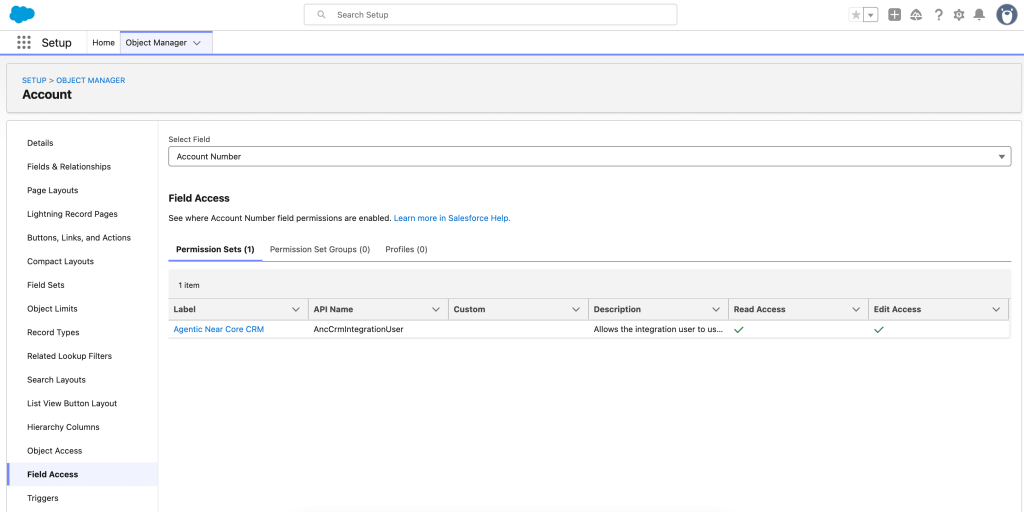
Summer ’26 addresses this with the Field Access Summary, a centralized view inside Object Manager that surfaces access levels for a specific field across all profiles, permission sets, and permission set groups in one place.
This isn’t just a navigation convenience. For admins trying to enforce least-privilege access, the ability to see the full picture at a glance makes it easier to identify and clean up unnecessary permissions. Least-privilege audits that used to require manually cross-referencing multiple setup pages can now happen in a single view.
To use it: Setup > Object Manager > select an object > Field Access > select a field.

Transaction Security Policies Now Cover Profile Changes
For orgs with compliance requirements or elevated security needs, this update shifts permissions governance from reactive to proactive.
Transaction Security Policies can now be configured to generate tracking events when an admin creates or modifies a profile that includes critical permissions. Beyond tracking, these policies can also be set to block unauthorized changes in real time before they take effect, not after.
One standout detail from the release notes: you can specifically track the removal of the TransactionSecurity Exempt permission from profiles. That’s the kind of change that can quietly expand the attack surface on a privileged account, and until now it wasn’t something you could easily monitor or intercept in real time.
For orgs that have historically relied on the Setup Audit Trail as the primary record of permission changes, this is a meaningful upgrade. The Audit Trail tells you what happened; Transaction Security Policies give you the ability to stop something from happening in the first place.
Permission Dependencies Are Now Visible When You Save
When you make changes to permissions or apps in the enhanced profile UI, Salesforce has always handled certain downstream adjustments automatically. Enabling one permission would sometimes trigger secondary changes to keep dependent permissions in alignment. Those background changes happened silently. The only way to know they occurred was to dig through the Setup Audit Trail after the fact.
Starting in Summer ’26, the enhanced profile UI surfaces those dependent permission changes during the update process, before you’re done. After saving changes to user permissions, object permissions, or assigned apps, you’ll see any additional changes that were triggered right there in the interface.
The practical value here is about intent. Every “Save” should be a conscious, understood action. When secondary access changes happen invisibly, it introduces ambiguity about what changed, who changed it, and why. Making those dependencies explicit turns what used to be a forensics exercise into a design decision.
Profile Filtering Is Being Enabled by Default

This is the one with an enforcement deadline, so pay attention. Starting in Summer ’26, the Profile Filtering setting will be enabled by default. The effect: users will no longer be able to see profile names other than their own unless they’ve been explicitly granted the View All Profiles permission. Without that permission, profile names across the org are invisible to them.
Salesforce enforces this update in Winter ’27, which gives you a window to prepare, but it’s not a long one. Before enforcement hits, you need to audit which users in your org actually need visibility into all profile names as part of their job. Admins, operations teams, and anyone running queries or processes that depend on profile name visibility may need the View All Profiles permission added to their profile or permission set before the update kicks in.
This is also worth reviewing if you have integrations or custom code that queries profile metadata. If anything in your org relies on accessing profile names for users other than the running user, it could be affected.
To review and prepare: Setup > Release Updates > Enable Profile Filtering, and follow the testing and activation steps.
Start Auditing Before Summer ’26 Drops
Permissions management has never been glamorous work, but it’s foundational. Summer ’26 makes it meaningfully easier to do well. The Field Access Summary eliminates the tab-switching marathon of field-level security audits. Visible permission dependencies mean no more silent background changes. Transaction Security Policies bring real-time oversight to profile modifications that previously flew under the radar. And Profile Filtering locks down metadata that never needed to be broadly visible in the first place.
None of these updates reinvent the wheel. They just make the wheel a lot easier to use and a lot harder to misuse. Review your Profile Filtering prep now. Winter ’27 enforcement will come faster than you think.
All features described here are in preview as of this writing and are not yet generally available. Feature availability and timelines are subject to change based on Salesforce’s final Summer ’26 release announcement.
Explore related content:
Master Custom Batch Sizes for Schedule-Triggered Flows

