


Every new Agentforce feature widens your org’s permission surface. Prompt templates, Agentforce actions, and Einstein Copilot setups all touch sensitive data in ways your existing security reviews may not cover. If your quarterly security health check still treats AI features as an afterthought, it’s time to build them into the core cadence.

AI data masking and sensitivity mapping deserves a spot in your governance framework alongside the checks you already run. This covers two related tasks. First, auditing how the Einstein Trust Layer protects data moving to and from large language models. Second, verifying that standard users can’t reach admin-level AI configuration they were never meant to touch.
This piece builds on the org governance framework Lizz Hellinga presented at Texas Dreamin’, expanded here with a closer look at AI data masking and sensitivity mapping.
What the Einstein Trust Layer Actually Does
The Einstein Trust Layer is the built-in gateway that every Salesforce-originated generative AI call passes through, whether that’s Prompt Builder, an Agentforce action, or Einstein for Service reply recommendations. Every prompt and every model response routes through this layer first, which is the entire reason admins can point Agentforce at real production data without treating it as an open security hole.
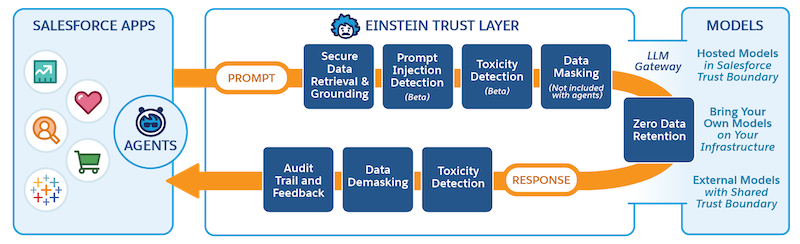
Three architectural facts matter for your audit:
Zero Data Retention
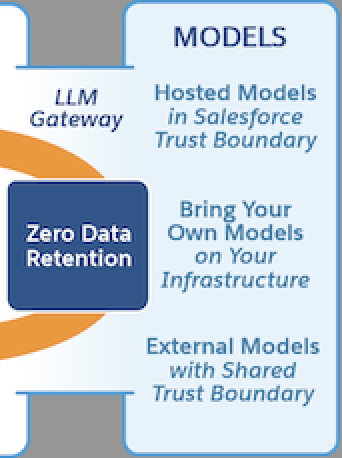
Salesforce runs under contracts with external model providers, including OpenAI and Azure OpenAI, that require any data sent for processing to be wiped once a response is generated. Nothing lingers on the provider’s side after the exchange completes. This is a contractual commitment, not a configuration toggle, so your audit should confirm which model providers your org actually uses and verify those agreements apply.

Data Masking With a Catch
Before a prompt reaches an external model, the Trust Layer scans it for sensitive elements and swaps them out for placeholder text. Once the model responds, it maps those placeholders back to the original values before the reply reaches the user. This masking step doesn’t currently apply to agent interactions. It’s active for embedded features like Einstein Service Replies and Einstein Work Summaries, which you can configure directly in Trust Layer setup, but agent traffic runs outside that protection today.
Grounding Respects Existing Permissions
When a prompt pulls in Salesforce data to ground its response, it can only see what the person running that prompt is already allowed to see. Nobody gets a backdoor through AI that bypasses their normal profile or permission set. This single fact is why your permission set hygiene reviews directly determines what your AI features can see. A bloated profile creates risk in every AI-generated response that user triggers.
Permission Set Exposure Control: Who Can Touch What
Prompt templates run on a two-tier permission model, and mixing these up is one of the most common gaps you may see in org audits.
One permission set lets a person open and use existing prompt templates day to day. A separate one is required before anyone can build a new template or change an existing one. A standard sales rep might reasonably need User access to run an approved template. That same rep should almost never hold Manager access, since that would let them create or edit templates that touch production data and control what gets sent to an LLM.
Run this check as part of your quarterly security review:
- Pull every user currently assigned Prompt Template Manager: Confirm each one is an actual admin or a designated AI process owner, not a standard user who inherited it through a cloned permission set.
- Cross-reference Prompt Template User Assignments: Run this against your active Agentforce and Prompt Builder rollout. Deactivate access for anyone outside the current pilot or use case.
- Check for any custom permission sets built before your AI rollout: It’s possible some may have accidentally bundled prompt template access alongside unrelated permissions.
Third-party tools built for Salesforce metadata auditing can help here. They let you compare permission set assignments across your org at once instead of clicking through Setup user by user. This becomes especially useful once you’re managing more than a handful of AI-related permission sets across sandboxes and production.
Security Health Check Cadence for AI Governance
Include this work into your existing security health check rather than treating it as a separate initiative. Here is a practical sequence:
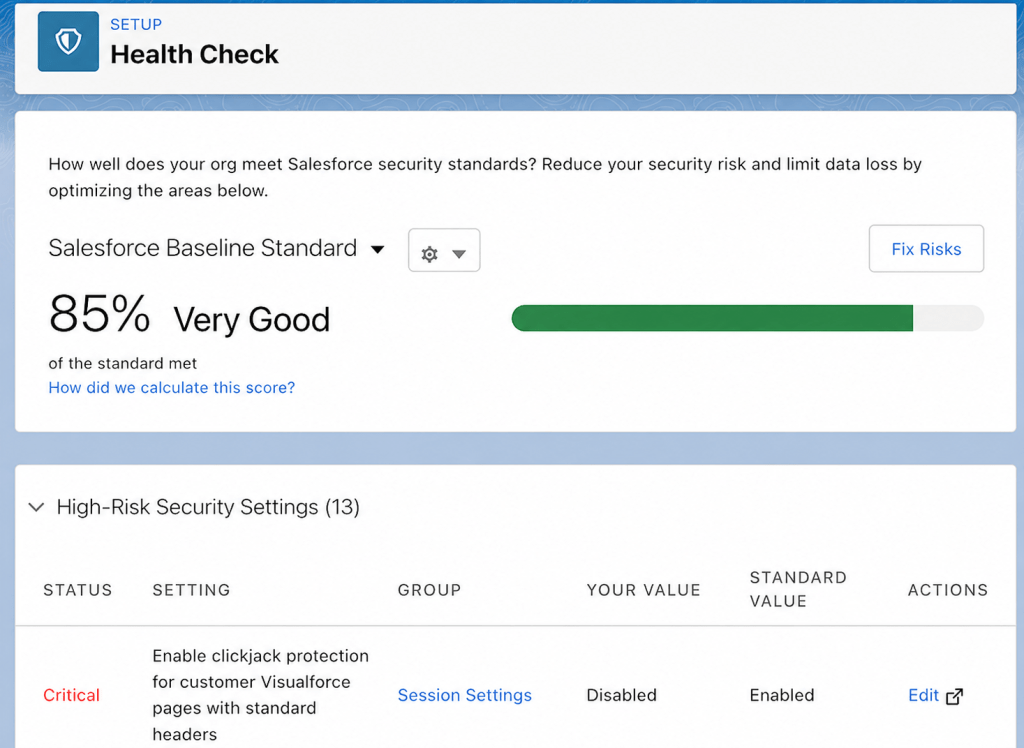
- Quarterly: Run the Salesforce Security Health Check. Add the prompt template permission set audit above. Review sharing rules and guest user access alongside it, since AI grounding inherits from the same access model.
- Monthly: Spot-check any newly created permission sets or permission set groups for accidental AI access bundling. This catches drift early instead of finding it during the next full quarterly pass.
- Annually: Revisit which LLM providers your org actually connects to and confirm the zero data retention terms still apply to each one you’re using.
None of this requires a new committee or a separate audit calendar. It just means widening the checklist you already run. The quarterly, monthly, and annual cadence above slots directly into existing security workflows, so nothing new gets added to anyone’s plate beyond a few extra line items.
Building Toward AI-Ready Data Hygiene
There’s a second layer to sensitivity mapping that extends beyond permissions: the data itself. Clean, well-described custom fields help grounding retrieve the right information and help any AI feature understand what it’s looking at. A field with a vague API name and no description is a governance problem whether or not AI ever touches it, but it becomes a bigger one once an LLM is expected to reason over it accurately.
If you’re running a rotational field and object audit as part of your broader governance framework, use it to flag fields feeding into prompt templates or Agentforce actions first. Prioritize those over the general backlog. Bad grounding data can produce a wrong answer a rep sends straight to a customer.
Run your Einstein Trust Layer Audit Now
AI features move fast, but the governance behind them doesn’t have to lag. Most of the controls covered here already exist inside Salesforce. They just need to be checked on purpose instead of assumed. Bring the Einstein Trust Layer and prompt template permissions into your regular security cadence. Treat AI access like any other permission risk. Your org will be in better shape than the one that finds out the hard way.
Explore related content:
Agentforce Coworker Applied: Enterprise Intelligence at Your Fingertips

