
Salesforce Is Tightening Security Across Every Org
Here's what admins need to know about MFA, step-up auth, and report access.

If you haven’t gotten the memo yet, Salesforce is rolling out a sweeping set of platform security requirements between now and mid-July. These aren’t suggestions. They’re enforcement dates with real consequences: users get blocked, exports get stopped, and policies get auto-enabled. Admins who wait will be scrambling.

On May 13, Salesforce hosted a webinar walking customers through five specific security controls coming to every org. Here’s the plain-English breakdown of what we learned on the call:
Why Salesforce Is Enforcing Security Changes in 2026
The threat landscape has changed, and fast. According to Salesforce’s security team, early 2025 brought a surge in social engineering attacks targeting individual users. By late 2025, attackers had shifted tactics, bypassing MFA entirely by tricking users into approving malicious connected apps. Now in 2026, AI is in the mix on the attacker side: automating target identification, accelerating data exfiltration, and generating convincing phishing emails and deepfakes.
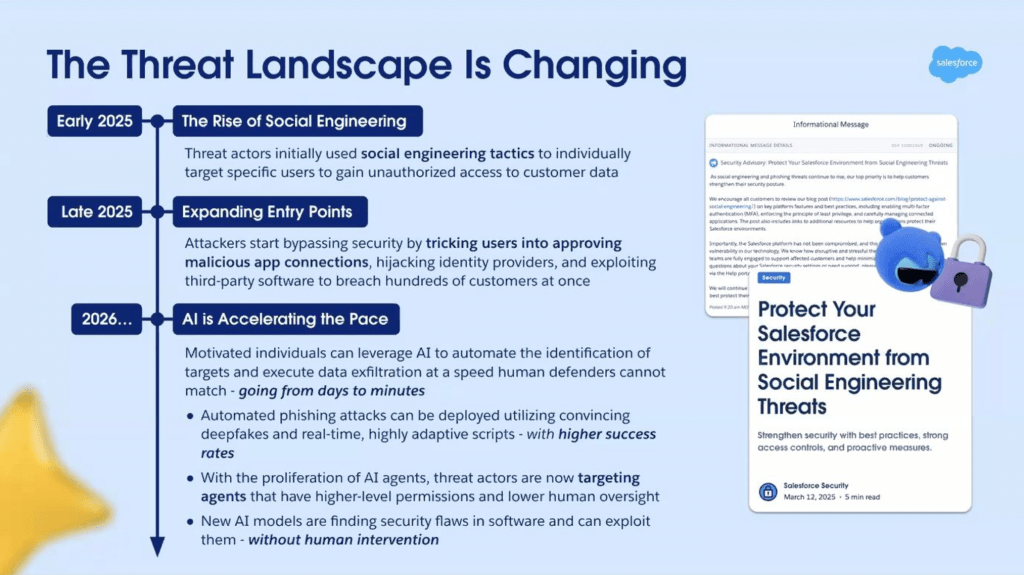
“Attacks that previously took days, weeks, or even months to accomplish can now happen in minutes,” noted a Salesforce security leader during the webinar. None of this happened because of vulnerabilities in the Salesforce platform itself. The weak points are users, integrations, and identity tools, and these new controls are designed to address exactly that.
The Security Controls Salesforce Is Enforcing This Summer
MFA for All Employee Users
MFA has technically been required since 2022. What’s changing is enforcement, and what counts.
Starting July 6, all employee users must complete MFA verification on every login, whether they’re logging in directly or through SSO. This applies to both production and sandbox environments. It does not apply to Developer Edition orgs, trial orgs, scratch orgs, or Experience Cloud logins.


The “Waive Multi-Factor Authentication for Exemptions” permission, which some orgs have used to skip MFA for certain users, is going away. Those users will need to be enrolled before the enforcement date.
For SSO users, this one matters: Salesforce will now check the AMR/ACR signals sent by your identity provider to confirm that MFA was completed upstream. If those signals are missing or don’t indicate standard or phishing-resistant MFA, Salesforce will prompt the user to register a Salesforce MFA method on the spot.
What to do now: Audit your org for any users with the MFA waiver permission. Make sure SSO configurations are sending the correct AMR/ACR signals. Set up access recovery procedures so users who lose their MFA device can still get in.
Sandbox enforcement: July 6 Production enforcement: July 20
Phishing-Resistant MFA for Admins and Privileged Users
Standard MFA (push notifications, authenticator app codes, SMS) can be defeated through social engineering. Phishing kits exist specifically to intercept those codes in real time. Phishing-resistant MFA can’t be intercepted that way because it’s cryptographically bound to the specific login domain.
Starting with Summer ’26 enforcement, any user with elevated permissions (System Administrator profile, Modify All Data, View All Data, Customize Application, Author Apex, and a handful of others) must use phishing-resistant MFA. That means a security key, biometric authenticator (Face ID, Touch ID, Windows Hello), or a passkey: no codes involved.
This applies to direct logins and SSO logins. For SSO, the same AMR/ACR signal check applies. If the signal doesn’t confirm phishing-resistant MFA was used at the IDP, Salesforce will require enrollment at login.
What to do now: Identify every user in your org who falls under the “privileged users” definition. Get them set up with security keys or passkeys before the enforcement date. Check your IDP configuration to ensure it’s sending the right signals.
Sandbox enforcement: July 6 Production enforcement: July 20
Time-Based Step-Up Authentication for Report Access
This is a new control, not an expansion of an existing one. Once it rolls out, any user who runs or views a report will be required to complete step-up authentication (essentially re-verifying their identity) at least once every two hours. Admins can configure that window to be shorter (as tight as two minutes), but two hours is the floor.
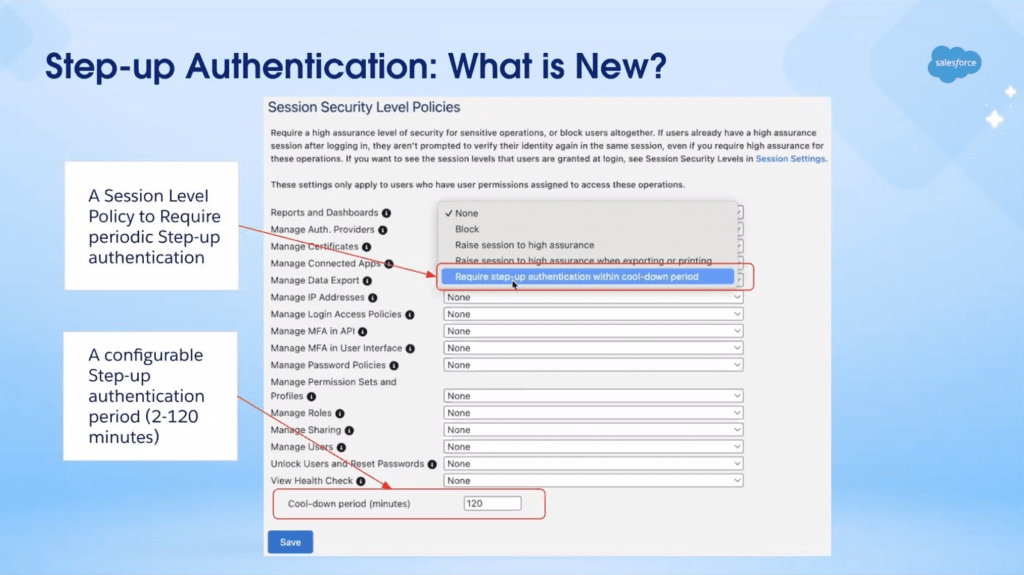
This applies to all users, including SSO logins. Critically, the step-up verification happens at the Salesforce layer, not the IDP layer. Even if a user just authenticated through SSO with phishing-resistant MFA, they’ll still need a Salesforce-side verification method set up (an MFA method, a verified phone number, or a reachable email address) to complete the step-up.
The configuration lives in Setup under Identity Verification > Session Security Policy, where admins can enable the setting and adjust the time window.
Available for testing (sandbox + production): May 27 Enforcement: A few weeks after availability
What to do now: Since this is a brand-new feature, it won’t be available to test until May 27. Once it is, get in there quickly. Make sure every user has at least one Salesforce-side verification method: MFA app, phone number, or email.
ML-Based Anomalous Report Activity Detection
In addition to the time-based step-up, Salesforce is adding a machine learning layer on top of report access.
A new ML model will run continuously in the background, learning each user’s normal patterns for viewing, running, and exporting reports. If the model detects behavior that deviates significantly from those established patterns, it flags the activity. The next time that user attempts to view or export a report, they’ll be prompted for step-up authentication before the action proceeds.
This applies to all users with access to Salesforce reports. For most users on a normal day, nothing will change. The step-up only triggers when the model flags something unusual.
If a user can’t complete step-up authentication (either because they haven’t set up an MFA method, their verification info is outdated, or they fail the challenge) the activity is blocked.
Sandbox rollout: June 22 Production rollout: July 13
What to do now: Same prep as the time-based step-up: verify MFA enrollment, phone numbers, and email addresses are current for all report users.
Transaction Security Policy Enhancements (Shield / Event Monitoring Customers)
This section applies only to orgs with a Salesforce Shield bundle license or an individual Event Monitoring license. Two changes are coming.
New Default TSP for Large Report Exports
Salesforce is deploying a default Transaction Security Policy specifically for report exports. If a user tries to export a report through the UI with more than 10,000 records, step-up authentication will trigger. They’ll need to re-verify before the download continues.
This default policy will land in your org in a disabled state. Before the enforcement date, you can review it, edit it, enable it early, or delete it, particularly if you already have a similar policy in place. If you’ve touched it in any way (edited, enabled, or deleted it), or if you already have an existing report activity policy, Salesforce will not auto-enable it on your behalf. If you’ve ignored it entirely, they will.
New Permission Required to Manage TSPs
Previously, any user with the Customize Application permission could edit, enable, or disable Transaction Security Policies. That’s changing. A new permission, Modify Transaction Security, will be required in addition to Customize Application. Users with only Customize Application will be able to read TSPs but not modify them.
Even users with both permissions will trigger a step-up authentication challenge any time they attempt to edit, enable, or disable a policy.
Available in sandbox: June 1 Available in production: June 15 Sandbox enforcement: June 22 Production enforcement: July 13
What to do now: Review who in your org currently has the Customize Application permission and decide who should also receive the new Modify Transaction Security permission. Check whether you already have a report export policy before the default one lands.
Common FAQ Topics
Does logging in with MFA mean I won’t be prompted again when I access reports?
Not necessarily. Login MFA and the report-level step-up prompt are treated as separate events. You can expect to be challenged again when you open a report once enough time has elapsed since your last verification.
What options do users have for completing the step-up prompt?
Salesforce supports several identity verification methods, including authenticator apps, security keys, biometrics, and passkeys. SSO users who haven’t registered one of these will receive a one-time code by email or text instead.
Does being on a company network or trusted IP get me out of this requirement?
No. Network location doesn’t factor into this requirement at all. The prompt applies universally regardless of where a user is connecting from.
Can admins control how frequently users are re-prompted?
Yes, though within a fixed window. Admins can set the re-prompt interval somewhere between 2 and 120 minutes. Salesforce sets those boundaries and admins can’t go outside them.
What happens if Salesforce’s verification service goes down mid-session?
Reports will be blocked rather than allowed through. Salesforce built this to prioritize data protection over access convenience, so any service disruption results in a hard stop. Users should contact Salesforce Support if this happens.
What if a user has no verification method on file?
They’ll be reached via a one-time code sent by phone or email. Anyone who can’t receive either will need to get a verification method registered before they can access reports after enforcement begins.
Get Ahead of the Deadline
The five controls rolling out this summer touch every org, every admin, and every user who runs a report. The good news is that most of the groundwork (MFA enrollment, SSO signal configuration, permission audits) is work you can start today. The one exception is the time-based step-up for reports, which won’t be testable until May 27. Get that on your calendar now, and use the time between now and then to make sure your users are ready when it lands.
Salesforce has a knowledge article landing page with resources for each of these controls. Find it HERE, bookmark it and check back frequently as enforcement dates approach.
Developing story: Password managers that support FIDO2/WebAuthn passkeys (like 1Password, Bitwarden, or iCloud Keychain) may qualify as phishing-resistant MFA. If your users are already using one of these tools, they may be closer to compliant than they think. Stay tuned for updates.
Explore related content:
How Salesforce Will Secure Your Org Against Hackers

