
The Salesforce DKIM Sandbox Problem, and How to Fix It


We have all heard of data breach incidents that involve the Salesforce platform. Phishing (or Vishing) is a big problem that tricks admins and developers with elevated access to give up their credentials. In the wake of these incidents, Salesforce was forced to tighten the platform. One of these areas is the emails that are sent via the platform.

If you’ve been navigating Salesforce’s DKIM requirements since they rolled out mandatory email domain verification, you probably already know the production setup story. You generated your DKIM key, handed it to your web admin, waited for DNS propagation, and called it done. Easy enough.
What nobody warned you about is what happens every single time you refresh a sandbox.
Spoiler: DKIM doesn’t come with you. Womp womp.
The Sandbox DKIM Problem
Salesforce recently mandated DKIM configuration for both production and sandbox environments as part of its broader email domain verification push. As far as security goes, it makes sense. Domain verification helps prevent spoofing, protects your organization’s email reputation, and reduces the risk of your emails getting flagged or blocked by recipients.
But there’s a wrinkle that’s hitting developers and ISVs especially hard. DKIM configuration does not carry over from production when you refresh a sandbox. Every single time you spin up a new sandbox or refresh an existing one, you’re starting from scratch. That means generating a new DKIM record in Salesforce, getting it to your web admin, waiting for DNS to propagate, and only then being able to test any email functionality at all.

For organizations that do infrequent sandbox refreshes, this is an annoying but manageable speed bump. For ISVs and development-heavy teams running on a continuous build cycle, where refreshing a sandbox is practically part of the standard sprint workflow, this is a major disruption.
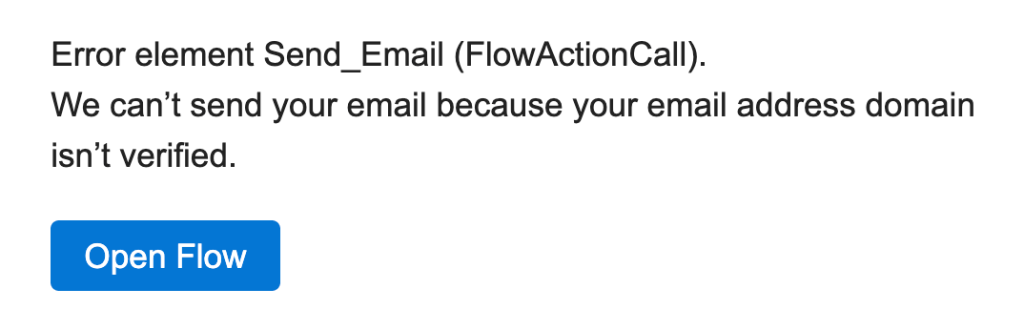
Think about how that development loop actually runs: you build in sandbox, production keeps moving forward, you cherry-pick tested features, deploy to production, then refresh the sandbox to start the next wave clean. Email automation testing is baked into that cycle. Confirmation emails, flow-triggered notifications, customer-facing communications: if DKIM isn’t in place, none of that testing works. You’re flying blind on a core piece of your org’s functionality every time you start a new development cycle. Below is the Flow error your team will hit when DKIM isn’t configured after a sandbox refresh.
So Why Doesn’t DKIM Just Carry Over?
It seems like a reasonable expectation: you verified your domain in production, so why does a sandbox refresh wipe that out and force you to start over?
The short answer is that sandboxes are designed to be isolated from production. That isolation is intentional. It’s what makes sandboxes safe to work in. But DKIM verification isn’t like most org settings. It doesn’t live entirely inside Salesforce. It lives in your DNS records, outside of Salesforce’s walls, which means carrying it over automatically isn’t as straightforward as copying a configuration.
To do that, Salesforce would need to either automatically generate and activate a new DKIM key for your sandbox environment, or find a way to share your production key across environments. Both options have security implications that make them complicated to implement cleanly.
The result is a process that pulls in a web admin or someone with DNS access every single time you refresh. Salesforce has acknowledged this and says a permanent fix is in the works. Until then, here’s what you can do.
The Workaround: Substitute Email Addresses for Unverified Domains
Salesforce published a solution that addresses a specific and important piece of this problem, and it helps beyond sandboxes.
Here’s what it does: rather than blocking email entirely when a user’s domain isn’t verified, Salesforce can substitute a different From address behind the scenes. The user’s display name and reply-to address stay exactly as they are. What changes is the technical From address, which shifts to the format email@UniqueId.sfcustomeremail.com, where that unique ID is your org ID or your Experience Cloud site ID.
To turn it on, it’s a two-step process:
- From Setup, search for Deliverability in the Quick Find box and select it.
- Check “Use a substitute email address for unverified domains” and save.
That’s it.
What this does in practice is allow emails to send even when a domain doesn’t have an active DKIM key and isn’t on your Authorized Email Domain list. The recipient still sees the sender’s name and can reply directly to their actual email address. The substituted From address is the part that keeps deliverability intact on the backend.
What This Looks Like in the Real World
Salesforce’s own documentation walks through a few scenarios that illustrate how this plays out, so let’s look at them closely.
Take an internal user, call her Vera Lee, whose email is vLee@example.com. Her org has this option enabled, and example.com has no active DKIM key and isn’t on the Authorized Email Domain list. When Vera sends an email through Salesforce’s Send Email action, the recipient sees:
- From: “Vera Lee”
email@orgId.sfcustomeremail.com - Reply-to: “Vera Lee”
vLee@example.com
Vera’s name is front and center. Replies go straight to her. The only thing that changed is the technical sending address, invisible to most recipients, but critical for deliverability.
The same logic applies to Experience Cloud site users. Say Oscar Jackson logs into a portal and sends an email with a Yahoo address. Same setup: substituted From, unchanged display name and reply-to. For organizations running Experience Cloud sites where portal users often have personal email addresses (Gmail, iCloud, Yahoo), this is particularly useful since those public domains can’t be verified at the org level anyway.
Organization-wide email addresses work the same way. If your Support profile has support@example.com as its OWE address and that domain isn’t verified, the From field uses the substitute address while the display name and reply-to remain exactly what your customers expect to see.
One important note from Salesforce’s documentation: this feature has no impact on emails sent from @gmail.com, @hotmail.com, or @outlook.com addresses, nor on emails sent through Salesforce Free Suite or trial orgs using the salesforce-free-mailsend.com domain.
This Is a Workaround, Not a Permanent Fix
Let’s be clear about what this setting does and doesn’t do. It doesn’t fix the reconfiguration problem. Every time you refresh a sandbox, you’ll still need to generate a new DKIM record, get it to your web admin, and wait for DNS to propagate. That requirement hasn’t gone away.
Think of this as duct tape on a leaky pipe. It’s not the real repair, but it keeps things functional while you wait. In practice, that means email doesn’t just stop working the moment you refresh a sandbox. Your team can keep testing, automations keep firing, and customer-facing communications don’t go dark while DKIM is being sorted out on the backend.
Here’s the simplest way to think about it: the substitute address acts as a placeholder. Instead of your real domain, Salesforce uses its own verified domain to get the email out the door. Your display name still shows up, replies still come back to your real email address, and the whole thing looks normal to the recipient. The only thing that changed is the technical From address working behind the scenes. It is essentially a dummy address that keeps things moving while your real domain gets verified.
That’s what a stopgap is: a temporary fix that keeps things functioning until a permanent solution is available. Not glamorous, but useful when a broken email testing environment can stall an entire development cycle.
Salesforce is working on a permanent solution for the sandbox DKIM persistence problem, but there’s no published timeline yet. For now, this is the official guidance, and it’s worth having in your back pocket.
Conclusion
The bigger picture here isn’t just a technical inconvenience. Email is core to almost every Salesforce implementation: automation flows, customer communications, approval processes, case notifications. When sandbox email testing breaks every time you start a new development cycle, you’re introducing delays and gaps into your QA process. Things slip through. Edge cases don’t get caught. Customer-facing bugs make it to production.
The DKIM mandate is the right security call. But the operational reality of how it interacts with sandbox workflows has created real pain, especially for the developer community. The substitute email address feature is a meaningful step toward making compliance less disruptive, and until the permanent fix lands, it’s the tool Salesforce wants you to use.
We’ll update this post as more information about the permanent sandbox DKIM solution becomes available. In the meantime, if you’ve implemented this workaround in your own org and want to share how it’s working for you, we’d love to hear from you.
Explore related content:
Salesforce Spring ’26 Is Dropping Unverified Emails
How to Set Up Slack Record Alerts Using Salesforce Flows
The Usage Tab Is Here: See Your Salesforce Flow Dependencies at a Glance
Salesforce Offers Free Agentforce Addon to SMBs at No Extra Cost

