The Usage Tab Is Here: See Your Salesforce Flow Dependencies at a Glance


One of the quiet but useful updates in Spring ’26 is the new Usage tab inside the Automation Lightning app. For admins managing complex orgs with dozens of interconnected flows, this is the kind of quality-of-life improvement that saves real time and real headaches.

The Automation Lightning app is Salesforce’s centralized workspace for managing flows, orchestrations, and other automations. Rather than navigating through Setup menus, admins can view, monitor, and manage their entire automation inventory from one place. With Spring ’26, get a clear picture of how those automations connect to each other.
Before this release, tracking down which flows were calling a particular subflow was one of the more frustrating tasks in flow management. Salesforce’s Dependency API was supposed to solve this, but it has never been completed to fulfill its promise; it doesn’t offer dependency information for autolaunched flows. Many third-party tools that tackle this problem, like Org Check, also rely on the Dependency API and inherit the same gap. The Usage tab changes that by surfacing bidirectional dependency information directly inside the app, no external tools or metadata downloads required.
What Problem Does the Usage Tab Solve?
Flow dependencies have always been a bit of a black box. You know a flow exists. You know other things probably call it. But short of opening every automation in your org and manually tracing the logic, there was no clean way to see those relationships at a glance before making changes.
Before this release, one of the biggest challenges for admins was trying to find flows calling a particular subflow. Salesforce has a dependency API that is supposed to provide a solution for these scenarios, but dependency API has never been completed by Salesforce to fulfill its promise; it does not offer dependency information for autolaunched flows. Many tools in the marketplace (such as Org Check and the likes) that offer solutions in this area also leverage the dependency API, and therefore does not include this information.
The workaround? Either maintain meticulous external documentation (which almost no one does consistently), use a third-party tool (not too many support it), download the metadata and search through it, or hold your breath and hope the deactivation didn’t cascade into something critical.

Salesforce heard that frustration loud and clear. This feature was delivered through the IdeaExchange, which means it was admin-requested, admin-approved, and a long time coming.
What the Usage Tab Actually Shows
In the Automation app, select a flow and click into the new Usage subtab. You’ll see two things: a list of the automation versions that use that flow, and a view of the automations that a specific flow version calls itself. That bidirectional visibility is what makes this genuinely useful.
Think of it as seeing both directions of the dependency chain. You can look at a flow and ask “who depends on me?” then drill into a specific version and ask “what do I depend on?” Both answers are right there, without leaving the app.
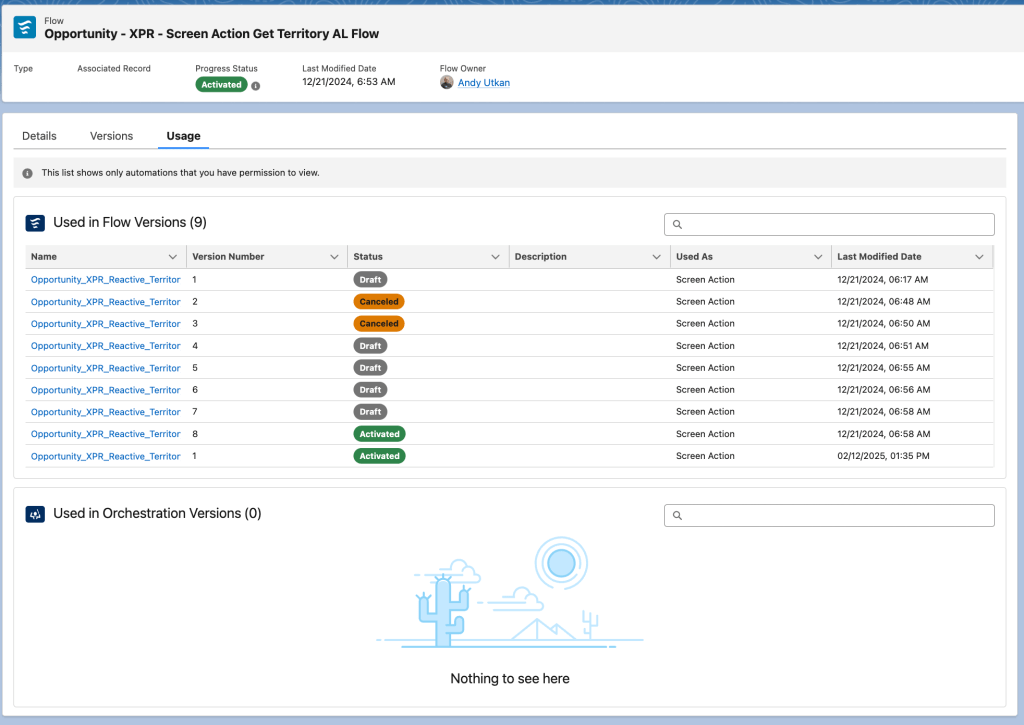
One caveat: the list only shows automations you have permission to view.
The “Used in” lists cover both flow versions and orchestration versions, so if a flow is being called as a step inside an orchestration, that relationship surfaces too. Flows can reference other flows in multiple ways. The Usage tab accounts for them: Screen actions in screen flows are also covered.
Who Can See the Usage Tab
This feature is available in Lightning Experience across Enterprise, Performance, Unlimited, and Developer editions. To view usage details, you’ll need the Manage Flow user permission so standard users won’t stumble into this, but most admins will have access by default.
How to Get There
Open the Automation app, select the Flows tab, click into any flow, and you’ll see the Usage tab alongside Details and Versions. Click it, and you’ll land on the dependency view. To see what a specific flow version calls, head into the Versions tab for that flow and click through to any version. The usage details for that version will be scoped to what it references outward.

Why This Matters Beyond the Feature Itself
The real value here is changing the behavior that comes before making changes. Before Spring ’26, the “just try it” approach to flow modifications was more common than most admins would admit. Mapping dependencies manually was tedious enough that it often got skipped. Now there’s no excuse not to check.
Multiple admins building flows in the same org means dependencies multiply fast. Legacy automations layered across release cycles make it even harder to track. Knowing a flow is referenced in nine other automations before you touch it prevents incidents.
It’s also a meaningful step toward treating flow architecture the way developers treat code: with visibility into what’s upstream and downstream before anything changes. That cultural shift matters as orgs grow more complex and as the admin role continues to expand in scope.
Conclusion
Salesforce has been investing in making the Automation app a more complete command center for admins. The Usage tab fits that direction. Features like this, combined with Flow Trigger Explorer and the Monitor tab, are slowly building toward something closer to a real operational dashboard for automation management.
If flow documentation and impact analysis have been pain points in your org, the Usage tab is worth exploring as soon as Spring ’26 hits your instance. And if you’ve been meaning to audit your flow dependencies anyway, this is a good excuse to finally do it.
Explore related content:
See Everything at Once: A Guide to Joined Reports
What SOA Taught Us About AI Agent Interoperability
Data Import Wizard vs. Data Loader: Which Tool Is Right for You?
Spring ’26 Release Notes: Highlights for Admins and Developers