
The New Slackbot Is Here: What Salesforce Just Shipped, Why It Matters, and How Teams Should Use It

If you have used Slack for a while, Slackbot probably feels like a small background character. It sets reminders, shares tips, and occasionally pops up when you least expect it.

Now, Salesforce and Slack have rebuilt Slackbot into a personal AI agent for work that lives directly inside Slack. The goal is simple but ambitious: reduce the time people spend searching, catching up, and piecing together context, and increase the time they spend actually doing meaningful work. Slack is being positioned as the conversational layer where people, data, workflows, and AI agents all meet. Slackbot is now the front door.
In this post, we will look at what the new Slackbot is, what it can realistically do, and what this means for Salesforce teams.
What Slackbot is now

Slackbot has been rebuilt into a context-aware AI agent that works inside Slack with no setup or training required. The most important word there is context.
Slackbot can use information from the places you already work: messages, channels, files, conversations, and connected tools. It is designed to respect existing access controls, meaning it only works with information you already have permission to see.

Instead of acting like a generic chatbot that needs constant explanation, Slackbot is designed to start from what is already happening. Your conversations, your projects, and your shared knowledge form the baseline for how it responds.
Workplace AI struggles when it is disconnected from real work. If it cannot see how decisions are made, what tools teams use, or how information flows, it becomes a novelty instead of a partner. Slackbot is meant to close that gap by sitting directly inside the system where daily work already lives.

What Slackbot can actually do
Slack positions Slackbot as something you can ask for “anything,” but in practice, its value shows up in a few patterns.
-
Answer questions and summarize work
Slackbot can summarize conversations, pull highlights from channels, and help you understand what happened while you were away. Instead of scrolling through hundreds of messages, users can ask for a recap, key decisions, or next steps.
This is where many teams will feel value first. The cost of catching up is high, and Slackbot is built to reduce that overhead. -
Prepare for meetings and plan work
Slackbot can help prepare agendas, surface related discussions, and pull together context before meetings. If calendars and tools are connected, it can also help coordinate scheduling and identify relevant information tied to the people involved.
Meeting preparation often lives across tools and tabs. Slackbot brings that prep back into a single conversational flow. -
Draft content and structured outputs
Slackbot can generate first drafts of emails, briefs, project plans, summaries, and internal documentation. Because it has access to your conversations and files, it can ground those drafts in real work instead of generic templates.
The real value is not writing for you. It is removing the friction of starting and organizing. -
Work with files and connected systems
Slackbot can analyze documents, transcripts, and spreadsheets. It can extract insights, summarize long materials, and help locate specific details inside large files.
When connected to enterprise search and business systems like Salesforce, it becomes a conversational way to surface data and context that usually requires navigation, reports, or manual digging.
Things Slackbot can’t do (and why)
-
It can’t browse the live internet or fetch breaking news
Slackbot is grounded in your Slack workspace and connected enterprise systems. It is not a real-time web browser. It can’t reliably answer questions like “Who won the NFL playoff games yesterday?”, “What’s trending on X right now?”, or “What were today’s stock prices?” If it’s not inside your Slack data, connected tools, or approved enterprise search sources, Slackbot doesn’t have it. This is a feature, not a bug. It keeps Slackbot focused on work, not the open web.

-
It can’t see or use data you don’t already have access to
Slackbot does not bypass permissions. It can’t read private channels you’re not in, access Salesforce records you don’t have permission to see, open Drive files you weren’t shared on, or pull HR or finance data you’re restricted from. If you can’t access it manually, Slackbot can’t either. -
It can’t magically fix bad or missing data
Slackbot works with what exists. It can’t invent decisions that were never documented, summarize conversations that never happened, clarify projects that live only in people’s heads, or fix inconsistent naming, scattered files, or poor documentation. If work is fragmented or undocumented, Slackbot will reflect that. -
It can’t replace your systems of record
Slackbot is an interface, not a source of truth. It can’t replace Salesforce as your CRM, replace project management tools, replace approval chains, or act as a compliance system. It can surface, summarize, and assist, but ownership of data and actions still lives in your platforms. -
It can’t make judgment calls or business decisions for you
Slackbot can highlight risks, summarize feedback, and structure options. It can’t decide strategy, approve budgets, resolve conflicts, or determine priorities. It supports human decision-making. It does not replace it.
Why this update matters for Salesforce teams
Salesforce is tying Slackbot directly to its broader Agentforce and autonomous AI strategy. Slack is becoming the interface where humans and digital agents collaborate.
For Salesforce teams, this changes the role Slack plays.
Slack is no longer just a notification stream. It is becoming a workspace where insight is generated, work is coordinated, and actions are initiated. When AI can summarize accounts, surface risks, draft follow-ups, and coordinate next steps from inside conversations, Slack stops being a side tool and starts becoming an operational front end.
For admins and architects, this also changes priorities. When answers become easy to retrieve, messy systems become visible. If permissions are unclear, if files are scattered, or if Salesforce data is poorly structured, Slackbot will surface those weaknesses quickly.
Slackbot does not fix operational debt, but it does expose it.
You still have the classic Slackbot
It’s important to separate what has changed from what has not. Every Slack workspace still has the original Slackbot, and it continues to work exactly the way it always has. It handles system notifications, reminders, workflow messages, and basic Slack guidance. None of that functionality is being removed or replaced. The rebuilt Slackbot is an added AI layer, not a swap. If your workspace does not yet have access to the new AI features, Slackbot will continue behaving like the familiar system helper you already know. The difference is simply this: everyone keeps classic Slackbot, and only some organizations now also get the AI-powered Slackbot on top of it.
It’s also important to understand that the new, AI-powered Slackbot is not automatically included for every Slack customer. The classic Slackbot remains available to all workspaces, but the rebuilt AI version is tied to specific Slack plans. For teams on plans below Business+, the new Slackbot is offered as an add-on feature rather than a default capability. That means access depends on both your plan and whether your organization chooses to enable it. In practice, many teams will continue using the classic Slackbot unless they upgrade or add the AI experience to their workspace.
Trust, permissions, and what actually protects your data
Slack emphasizes that Slackbot respects roles, permissions, and existing access controls. It does not invent new visibility rules. It uses what is already defined.
That means your real security model is not Slackbot. It is:
-
Slack workspace and channel permissions
-
Salesforce object, record, and field access
-
Document sharing settings
-
Enterprise search connectors and their scopes
Slackbot moves faster than people do. If someone already has access to something they should not, Slackbot makes it easier to retrieve. If access is clean, Slackbot becomes a powerful amplifier of that structure. For organizations, this is a reason to take permission hygiene seriously before wide rollout.
The workflows teams will adopt first
Based on Slack’s design and early enterprise patterns, most teams will start with a few predictable use cases.
-
Catch-up and recaps
“Summarize this channel.”
“What decisions were made yesterday?”
“What do I need to respond to?”
This replaces scrolling, not thinking. -
Meeting support
Agenda creation, pre-reads, follow-ups, and turning conversation into structure.
This replaces manual prep and documentation. -
Drafting everyday work
Internal updates, customer emails, project notes, onboarding material, and content outlines.
This replaces blank pages and copy-paste chaos. -
Salesforce context inside conversation
Questions about accounts, deals, risks, ownership, and history will increasingly start in Slack instead of dashboards.
This replaces tab switching, not CRM.
Why Slackbot goes beyond keyword search
It’s tempting to think of Slackbot as a smarter version of Command + F, but the difference is much bigger than that. Command + F can only search the page you are already looking at, and it only finds exact words or phrases. Slackbot works across channels, conversations, files, and connected tools, and it understands what you are asking, not just what you type.
Instead of returning a list of matches, it can summarize discussions, surface decisions, highlight risks, and connect related context that may be spread across weeks of work. Most importantly, Slackbot does not stop at retrieval. It helps turn information into action by drafting follow-ups, building agendas, and structuring next steps. Command + F shows you where something was said. Slackbot helps you understand what happened and what to do next.
How to roll this out without burning trust
The updated Slackbot will feel powerful quickly, which is both good and dangerous. The biggest risk might be unclear expectations. A practical rollout approach could look like this:
-
Define a few approved starter use cases
For example: daily recaps, meeting prep, and document summarization. This gives people direction and early wins. -
Establish norms for sensitive spaces
Not everything needs to be an AI test case on day one. Make it clear which channels or data domains require review before heavy use. This builds confidence instead of apprehension. -
Teach prompting as a skill
Good use of Slackbot is conversational. People need to learn how to refine questions, provide goals, and iterate. This is closer to working with a teammate than filling out a form. -
Create a feedback channel
Wins, failures, confusion, and unexpected behavior should have a home. That channel will quickly show whether issues are about access, data quality, or usage patterns.
Example prompts to try with Slackbot
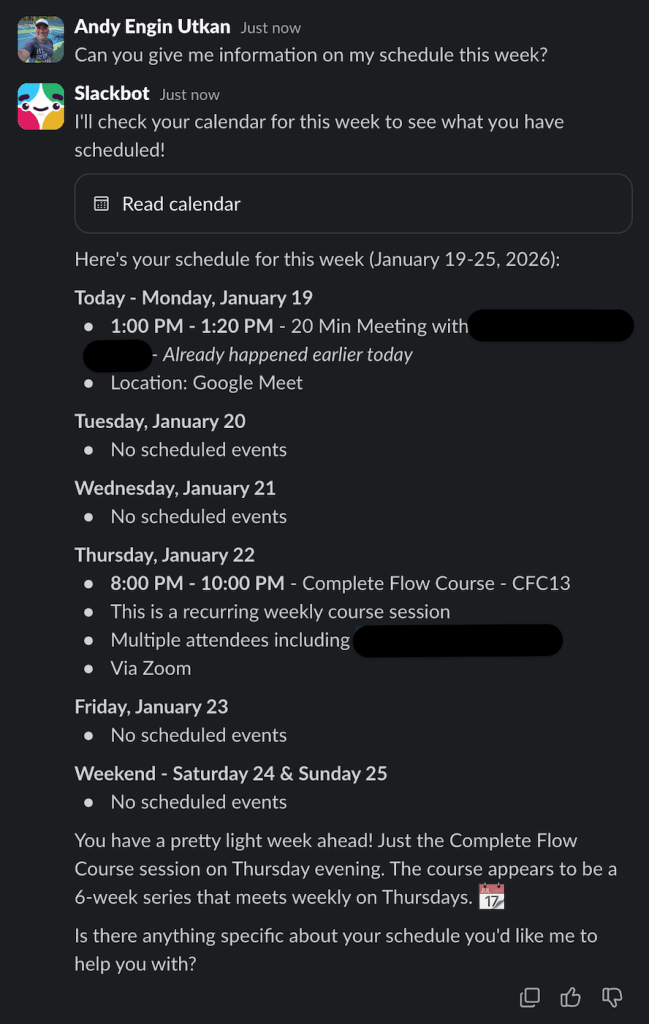
Slackbot is most powerful when you talk to it the way you would a teammate. Clear goals, natural questions, and a bit of context go a long way. To help you get a feel for what it can do, here are a few practical prompts you can try right away. Each one is designed to show a different way Slackbot can summarize work, surface context, and turn everyday conversations into something actionable.
"Can you give me information on my schedule this week?"
You can ask Slackbot to help you write an email, whether that’s a quick internal update, a customer follow-up, or a more formal announcement. Because it can reference your conversations and files, it can draft something grounded in real context instead of a generic template.
"I am planning on writing an email to all students reminding them the session and telling them to complete the preparations steps I emailed them this week before the session. Also remind them to not come into the Zoom session as a guest, I need to be able to determine who they are. Security precaution. Be kind. Help me draft the email. Use emojis."

Here are some more prompt ideas to try:
-
Summarize what I missed in #project-x this week and call out any decisions.
Great for catch-ups and fast context building. -
Pull together an agenda for our onboarding meeting tomorrow based on recent conversations.
Shows off meeting prep and context awareness. -
Find the latest document we shared about the Q1 launch plan and summarize it.
Highlights file search and analysis. -
What open questions or risks are coming up most often in our sales channels?
Demonstrates pattern recognition across conversations. -
Draft a short internal update I can post to leadership about where this project stands.
Shows how Slackbot can turn messy discussion into structured communication.
The bigger shift Salesforce is pointing to
Salesforce is not launching the new Slackbot in isolation. It is part of a broader shift toward autonomous agents, AI-driven workflows, and conversational interfaces. Slack is becoming the place where that vision becomes usable in everyday work.
Salesforce is betting that people will increasingly ask questions, request actions, and coordinate work through conversation. Slackbot becomes the layer that translates human intent into structured work across systems. For Salesforce teams, the opportunity is significant: faster alignment, fewer lost decisions, less manual synthesis, and more time spent on work that actually moves outcomes.
The responsibility is just as significant: clean data, clear permissions, and thoughtful design become non-negotiable when AI becomes the fastest path to answers.
Slackbot will not magically make work organized, but it will make disorganization impossible to hide.
Explore related content:
Salesforce Platform Admin Certification: Navigating the 2025 Changes
Spring ’26 Release Notes: Highlights for Admins and Developers

