
Collection Filter Criteria Resource in Salesforce Flow
A Last Minute Winter 27 Flow Functionality With Great Potential


In Salesforce release previews, we often see updates that make an admin’s day-to-day life easier, and then we see features that have the potential to completely transform how we build our automations. The Collection Filter Criteria Resource falls into the latter category.

While discussed alongside Winter ’27 preview highlights, this feature represents a big shift in how collection manipulation is handled in Flow Builder.
Understanding Collections and Records in Salesforce Flow
Before diving into advanced collection features, it is worth grounding ourselves in the basic building blocks of data within Flow.
A record represents a single row of data from a Salesforce object, such as a specific Account, Contact, or Opportunity. It contains individual fields and their values. A collection variable is a grouped list of multiple items of the same data type stored in memory during flow execution. When working with records, a record collection variable holds multiple record instances simultaneously, like Accounts returned from a single query. These collections allow admins to perform bulk operations, loop through items, or execute updates across an entire dataset without querying Salesforce repeatedly.
What is the Existing Collection Filter Element?
Traditionally, when you need to take a record collection and filter or slice it into specific sub-collections, you rely on the Collection Filter flow canvas element.
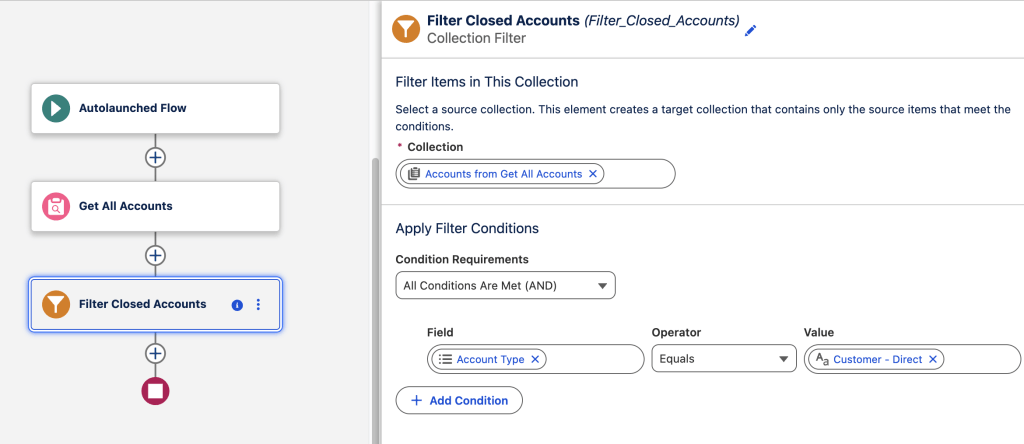

The standard Collection Filter element sits directly on the Flow canvas as a structural node. It was introduced to reduce complex looping and decision elements on the canvas. You point it to a source collection variable and set standard logic conditions, (such as Status equals "Closed"). The element then outputs a filtered subset into a new collection variable. While functional and better than manual looping, adding multiple filter elements can quickly clutter your canvas. This increases visual complexity and forces sequential logic whenever you need multiple views of the same data.
The Evolution: What is the Collection Filter Criteria Resource?
The Collection Filter Criteria Resource moves this filtering capability out of canvas nodes and directly into the Toolbox/Resource-Manager. Instead of dropping a new element node onto the visual canvas, you define a dedicated, dynamic filter resource.
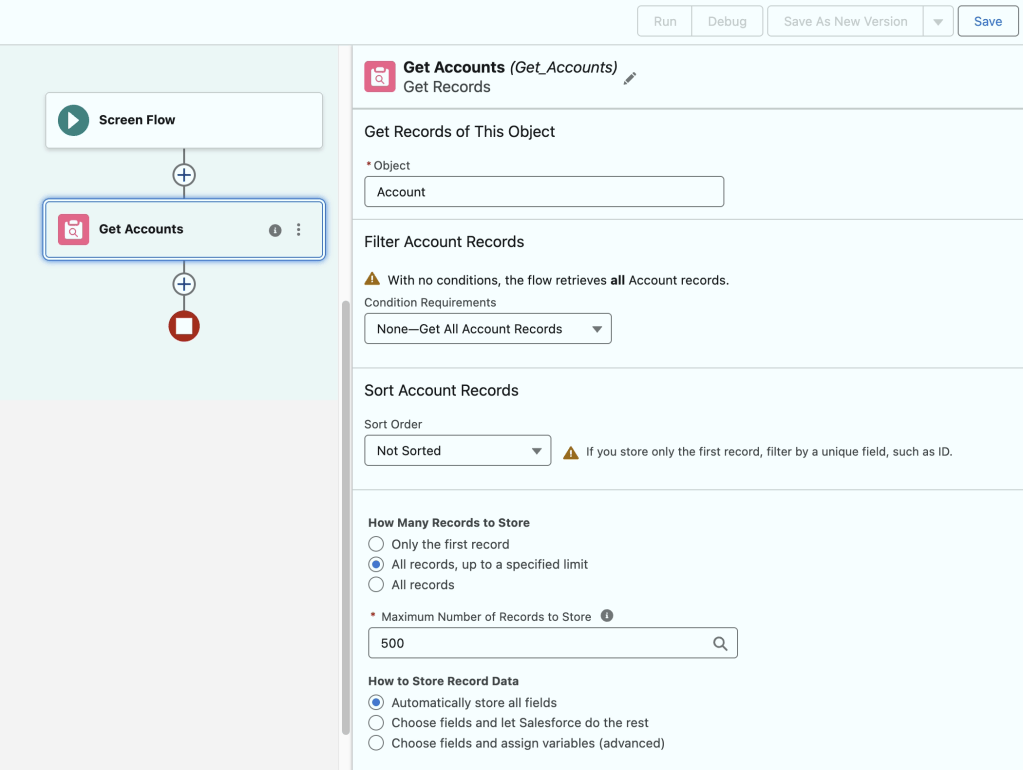
Here is a breakdown of how this feature functions in Flow Builder based on recent walkthroughs:
- Creation via New Resource: Navigate to
New Resourcein the Manager toolbox and select Collection Filter Criteria. - Source Collection Mapping: Point the resource directly to an existing collection variable (e.g., records returned from a single
Get Recordselement limit-capped to 500 records – the limit is optional). - In-Memory Sorting & Filtering: Define inline filter conditions (e.g.,
AnnualRevenue > 1,000,000) and configure explicit sort orders (e.g.,LastModifiedDate Descending) right inside the resource configuration. - In-Memory Performance: All filtering and sorting occur purely in-memory. It consumes zero additional SOQL queries or DML operations.
- Multiple Views, One Collection: You can create multiple distinct Filter Criteria resources pointing to the exact same source collection—such as one for
Large Accounts, one forSmall Accounts, and another forAccounts by State—without bloating your canvas with individual element nodes.

What are Apex-Defined Variables in Salesforce Flow?
To fully appreciate the advanced capabilities of the Collection Filter Criteria resource, we must also look at Apex-defined variables.
An Apex-defined variable is a complex custom data type created in Apex code. It uses custom Apex classes with @InvocableVariable properties. You can reference it natively within Flow Builder. Standard Flow record variables strictly mirror Salesforce objects like Account or Contact. In contrast, Apex-defined variables handle custom JSON payloads or web service callouts. Admins and developers can also manage multi-tiered complex data structures directly within a Flow.
How Apex-Defined Variables Are Created, Used, and Mostly Seen
- Creation: A developer creates an Apex class defining public properties decorated with
@InvocableVariable. Once saved, this custom class automatically becomes available in Flow Builder underNew Resource > Variable > Apex-Defined Data Type. - Where They Are Mostly Seen: Apex-defined variables are most commonly used in integration scenarios involving External Services, HTTP Callouts, custom Apex Invocable actions, or complex screen components (such as custom Lightning Web Components passing structured data back to the flow).
While standard Salesforce record collections in Flows currently filter on direct object fields, Apex-defined variables allow complex object structures with nested child records. With Collection Filter Criteria resources applied to Apex-defined variables, admins can filter parent collections based on child relationships. For example, isolating Accounts that have associated Contacts in a specific postal code or open Opportunities.
Salesforce flow product team informed me that Collection Filter Criteria resource will be able to filter based on child records when processing Apex-defined variables. This functionality will be very effective when eliminating unnecessary loops in collection processing.
Why Salesforce Admins Should Use Collection Filter Criteria
- Cleaner Flow Canvas: By offloading collection slicing into resource definitions, your Flow visual canvas remains uncluttered, readable, and focused on core logic branches.
- Optimized Governor Limits: Performing multiple targeted filter operations entirely in-memory prevents redundant
Get Recordscalls and stays well within transaction limits. - Flexible Sub-Slicing: Creating multiple dynamic filter views off a single initial dataset speeds up execution times and simplifies data management across complex Screen Flows and Auto-launched Flows.
While this functionality continues to mature across release cycles, it is clear that in-memory collection manipulation is paving the way for faster, cleaner, and far more powerful Flow architectures. See it in action on the Salesforce Break YouTube channel:
Salesforce flow product teams told me that they are planning on developing additional collection processing functionalities resembling lists and maps in Apex.
What do you think? Do you see potential in this new functionality? What are your wishes on how this is implemented going forward?
Explore related content:
The Ultimate Guide to Salesforce Flow in Winter ’27
Salesforce Winter ’27 Admin Highlights: Top Data, Security and UX Gems
Architectural Decisions in the AI Era: Flow, Apex, and Agentforce

