
Headless 360: Build an Agentforce Agent Using Natural Language
Inside the Trailhead Badge that Turns a Conversation Into a Working Salesforce Agent

Salesforce just dropped a Trailhead badge that answers both questions at once. It walks you through the concepts behind Headless 360 and then puts you in a live headless builder where you can create a working Agentforce service agent using nothing but a conversation. No code. No clicking through setup menus. Just natural language. That hands-on experience is a big part of what this post is about, so if you want to follow along, pull up the badge and work through it alongside this breakdown.

The Problem Headless 360 Is Solving
Here’s the honest reality of how most teams work today. Your developers are in VS Code, Cursor, or Windsurf, your sales reps are responding to customers in Slack, your field teams are using Teams or WhatsApp, and AI agents are routing, summarizing, and taking action across every system simultaneously.
Nobody is sitting in Salesforce all day. That’s not a criticism. It’s just how work actually happens now.
But Salesforce, historically, required you to come to it. You logged in, clicked through the Lightning UI, and you navigated to the right object, the right record, the right page. For human users, those steps add up. For AI agents, it’s a dealbreaker. Agents don’t browse. They call APIs, use MCP tools, and they run commands. Salesforce Headless 360 is the answer to that gap.
What “Headless” Actually Means
The term comes from how developers have long thought about software architecture. A “headless” system separates the backend, the data, logic, and business rules, from the frontend, the UI that users interact with.
Applied to Salesforce, headless means exactly what it sounds like. The business logic, data, workflows, permissions, and governance that live inside your Salesforce org are now accessible without ever opening the Salesforce UI. The “head,” in this case the Lightning Experience, is optional. The body, the platform underneath, is fully available to anyone who needs it.

Salesforce isn’t going away as a UI. Lightning Experience isn’t being retired. This isn’t an either/or announcement. It’s an “and.” Headless 360 adds a layer of accessibility on top of what already exists, extending Salesforce to wherever users and agents actually work.
The Four Pillars That Make Headless 360 Work
For developers, Headless 360 rests on four foundational elements.
- Skills: Salesforce has built more than 30 prebuilt coding skills that give AI coding agents, tools like Claude Code, Cursor, and Windsurf, the ability to discover, understand, and act on Salesforce natively. These agents know how to work within the platform without requiring a developer to build that knowledge from scratch.
- MCP tools and APIs: There are more than 60 MCP tools available today, with more coming. Combined with Salesforce’s full API suite, this gives external developers deep native access to the platform from whatever environment they prefer.
- Metadata: Org-aware grounding means agents and tools have real understanding of your specific data model. Your objects, your fields, your configurations. An agent working in your org isn’t guessing. It knows your environment.
- Headless Experience Layer: Sometimes called HXL, this flexible rendering layer lets agents and apps surface experiences wherever users are. Slack, Teams, WhatsApp, Voice, custom portals. The delivery channel is variable. The platform underneath stays consistent.
Build an Agentforce Agent Using Natural Language
Salesforce’s own Trailhead module demos this with a practical example. Using nothing but natural language, you can build and deploy a functional Agentforce service agent through a headless builder. You describe what you want. The coding agent generates the configuration, writes the code, and deploys it to your org. You can then open Agentforce Studio, review the subagents that were created, add actions from the Asset Library, activate the agent, and preview it in a live chat interface.
The whole process runs on conversational prompts. No clicking through setup wizards. No manually configuring every field. You describe the agent you want, a hospitality booking assistant with reservation management and complaint handling, and the agent builds it.
The Trailhead Badge That Shows You Exactly How It Works
Salesforce didn’t just announce Headless 360. They built a Trailhead badge that puts you inside it. And the hands-on portion is worth walking through in detail because it changes how you think about what “building on Salesforce” can actually look like.

The badge includes a live headless builder, a chat interface powered by a coding agent, where you build a working Agentforce service agent using nothing but natural language. No Apex, Flow builder, or clicking through setup wizards. You describe what you want, and the coding agent handles the rest.
Step One: Start a Conversation
The first thing you do in the builder is ask the coding agent what it can build. That’s it. That’s the starting point. You type a prompt in plain English and the agent responds with options, asks clarifying questions, and starts helping you scope the project.
For the badge example, you’re working in the hospitality industry. You tell the agent you want a service agent for a hospitality company, and it comes back with suggestions. From there, you get specific. You ask for two subagents: a Reservation Agent named “Reservation Management” and a Guest Complaint Agent named “Guest Complaints.” You name the parent agent “Bookings Help Agent” and set the API name. If the coding agent asks what personality the agent should have, you tell it warm and gracious, and it incorporates that into the configuration.
The coding agent then builds out the entire service agent. It generates the configuration files, writes the code, and gives you the option to review the script before doing anything with it. If something looks off, you can ask it to make changes in the same conversational thread. When you’re ready, you tell it to deploy. One message. Done.
Step Two: Review What the Agent Built
Once the agent is deployed, you open Agentforce Studio inside your Salesforce org to see what was actually created. This is where things get interesting, because the coding agent built the structure but didn’t wire up every action automatically. That’s by design. You’re meant to review and configure.
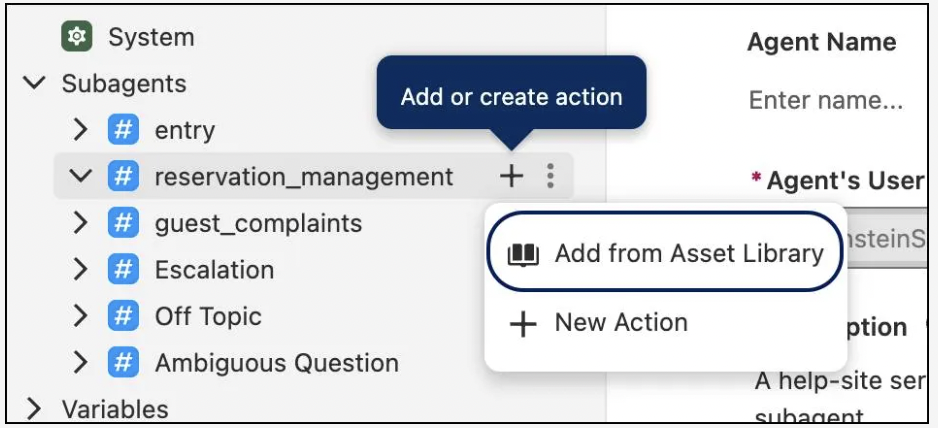
Inside the Bookings Help Agent, you click into the subagents. You find reservation_management and expand it. The structure is there, but the actions it needs aren’t connected yet. This is where you step in.
You click the plus sign next to the subagent and select Add from Asset Library, search for reservation-related actions and select two: Finalize Reservation and Get Reservation Time Slots. Add them to the agent. Then you go into Finalize Reservation, find the Contact record input, and check the box to require it before the action can execute. That one setting is what allows the agent to pull up a specific guest’s reservation details and surface them in the conversation.
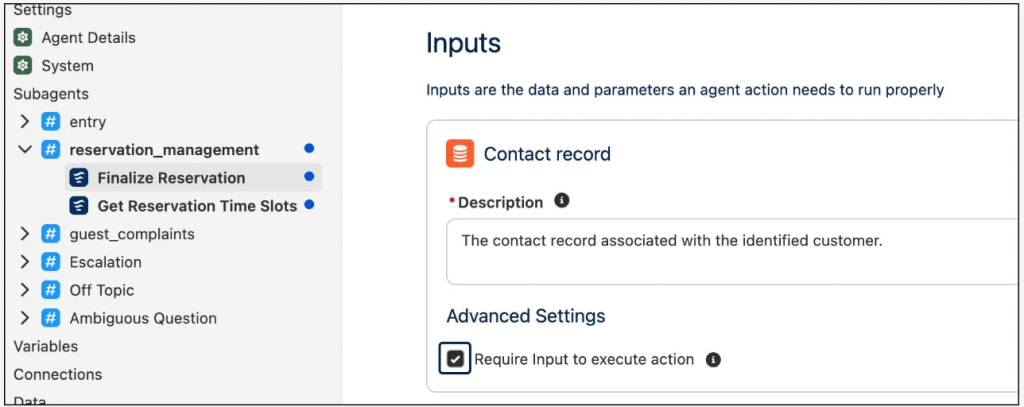
Then you do the same for guest_complaints. You add Create Case from the Asset Library, which gives that subagent the ability to open a support case on behalf of a customer directly from the chat interface.
Step Three: Activate and Test
With the actions configured, you save, commit the version, and activate the agent. Then you open the preview and actually talk to it.
You ask what times are available at the fine dining restaurant tomorrow. The agent checks availability and returns the open slots. You tell it you want to book the latest one. It asks for your name, email, or phone number. You provide the details. It asks for the number of guests. You confirm. The agent gives you a summary and asks you to verify before finalizing. You say yes. Reservation made.
The whole exchange feels like a normal customer service chat. But what’s running underneath it is a Salesforce-powered agent with real business logic, real data, and the full governance layer intact.
What This Actually Demonstrates
That end-to-end flow, from typing your first prompt to previewing a live booking conversation, is what Headless 360 makes possible. The coding agent understood what you were trying to build. It generated the configuration. It deployed to your org. You added the specific actions, activated it, and tested it. The entire process ran through conversation and a few clicks in Agentforce Studio.
No IDE, no custom code you had to write yourself, and no months-long development cycle. Engine, a modern travel platform, used Headless 360 to deploy enterprise applications across multiple surfaces in 12 days. The badge gives you a condensed version of that same experience so you can see the mechanics firsthand.
Don’t Wait to Get Your Agents Production-Ready
The shift to the agentic enterprise is not a future-state conversation anymore. It’s happening. Teams are already using AI tools in their daily workflows. Developers are already building with coding agents. The question isn’t whether your organization will navigate this transition. It’s whether your platform is set up to support it.
Headless 360 is Salesforce’s answer to that question. It doesn’t ask you to reorganize how you work. It meets you and your agents wherever you already are, with all the data, logic, and governance your organization has spent years building intact.
That’s the real pitch. The platform doesn’t change. The surface does. And now, the surface can be anywhere.
Want to try it yourself? The Salesforce Headless 360 Trailhead badge walks you through building your first agent using natural language, no Salesforce UI required. Start with “Introduction to Salesforce Headless 360” and work your way through the hands-on builder.
Explore related content:
No Browser or UI Required: Salesforce Headless 360 Explained

