
Setup with Agentforce: What Salesforce Admins Need to Know


If you’ve ever wished you could just talk to Salesforce Setup instead of clicking through dozens of menus to find the right page, Agentforce is making that a reality. Setup with Agentforce is a feature that brings an AI-powered conversational assistant directly into the Setup experience, letting admins complete common tasks faster and with far less navigation overhead.

Here’s everything you need to know to get it configured and running.
What Is Setup with Agentforce?
Setup with Agentforce puts Salesforce’s AI assistant inside every page of Setup. Through a natural language interface, admins can ask questions, issue commands, and complete a wide range of administrative work without hunting for the right page or remembering exact menu paths.
The assistant lives in a side panel while you work, so you never lose your place. For more complex tasks, conversations can expand into a full-screen experience complete with a canvas that displays record details, list views, and metadata previews.
It’s available in Lightning Experience on Enterprise, Performance, Unlimited, and Developer Editions with Foundations or Agentforce 1 Editions.
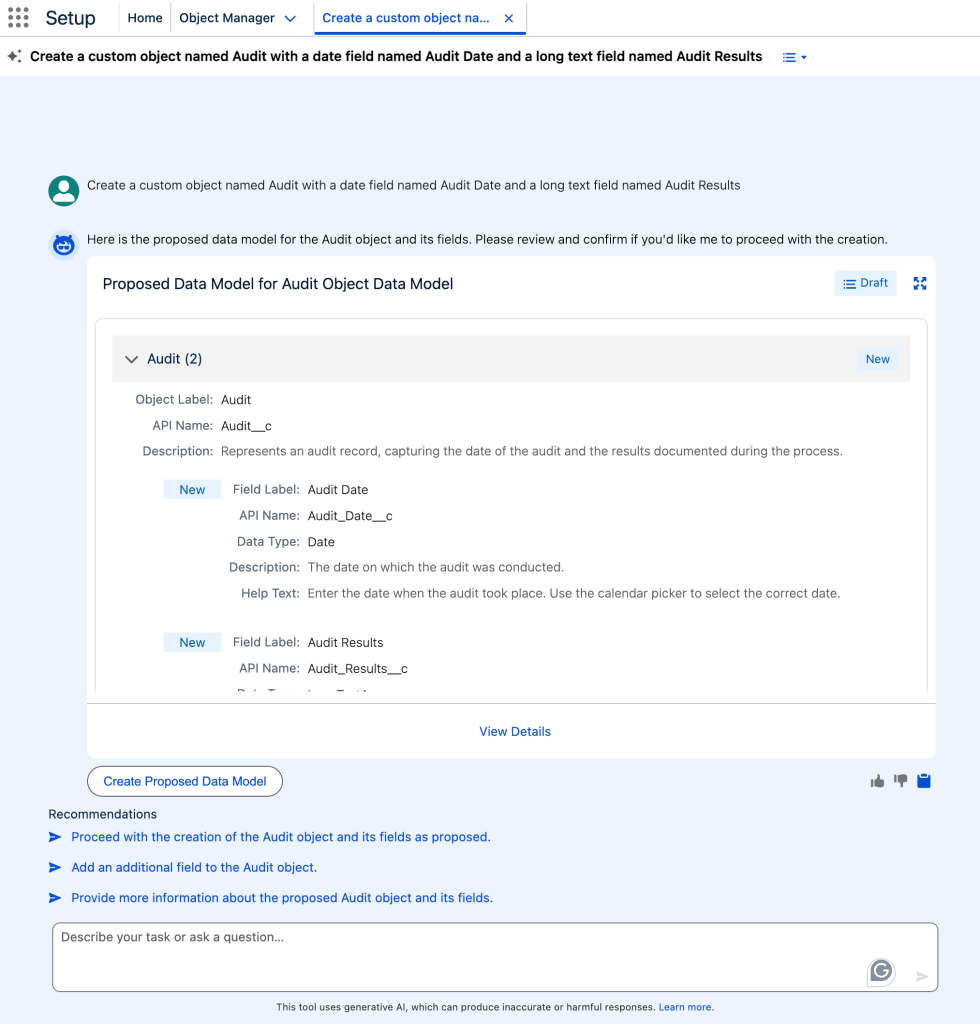
Some of what the Setup agent can help with:
- Managing users and troubleshooting access issues
- Configuring permission sets, permission set groups, org-wide defaults, and sharing rules
- Creating custom objects, fields, and relationships
- Building and managing flows
- Creating Lightning pages and custom report types
- Writing, modifying, explaining, and validating formulas
- Pulling org health and usage metrics
- Navigating to the right Setup page when you’re not sure where to go
- Creating Salesforce mobile apps and pages (Pilot)
One important note: the Setup agent won’t make changes without your approval. It proposes what it plans to do, and you confirm with a reply like “Yes,” “Confirm,” or “Proceed” before anything happens.

Before You Begin: Required Editions and Permissions
Getting Setup with Agentforce running requires a few layers of permissions and setup steps. Here’s what you need in place before you flip the switch.
To enable Setup with Agentforce, you need the Customize Application permission.
To use it, every admin (including yourself) needs three additional permission set assignments:
- A custom permission set with the “Use Setup with Agentforce” user permission
- The standard Prompt Template User permission set
- The standard Data Cloud User permission set
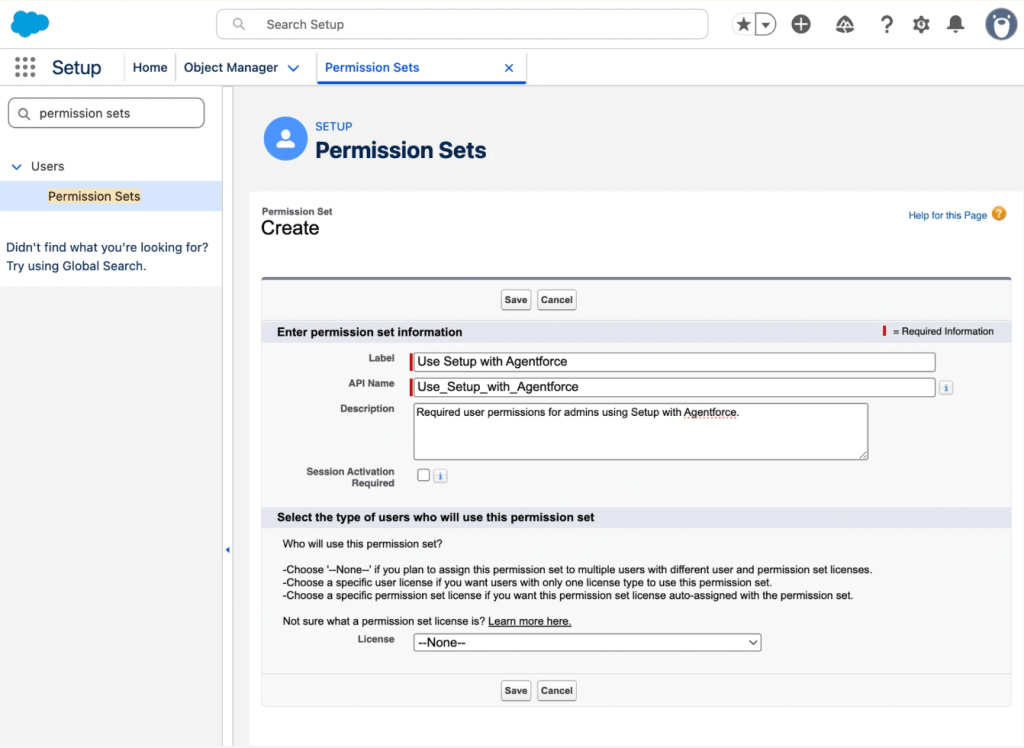
Head to Permission Sets in Setup, create a new set with no license selected, add the “Use Setup with Agentforce” system permission, save it, and assign it to your users. Repeat the assignment process for the two standard permission sets. Have all assigned users refresh their browsers when done.
You’ll also want to verify two Data 360 configurations:
Default Data Space: If you’re using the default Data Space and haven’t created additional data spaces, no extra setup is usually required. If your org uses custom data spaces, confirm that the Setup with Agentforce Data Cloud objects and related resources are available in the correct data space, and that the appropriate permission set is associated with it.
Data Governance Policy: Data 360 orgs start with a preactivated Allow All data access policy by default. If that policy is still active, it typically provides the access Setup with Agentforce needs. If your org’s governance policies have been customized, verify that an active policy grants users access to the required Data 360 objects within the appropriate data space.
How to Enable Setup with Agentforce
Once permissions are in order, follow these steps in sequence. Order matters here.
- Confirm that all admins who will use the Setup agent have the required permissions and Data 360 access described above.
- Enable Data 360 if it isn’t already on. Wait for setup to fully complete before moving on. You’ll know it’s done when you see the “Your Home Org Details” heading on the Data Cloud Setup Home page.
- Enable generative AI in your org, then enable Agentforce.
- If your org previously had an agent created through the “Agent for Setup” or “Enhanced Agent for Setup (Pilot)” tiles, delete that agent from the Agentforce Agents Setup page before continuing.
- In Setup, search for “Setup with Agentforce” in Quick Find and open it.
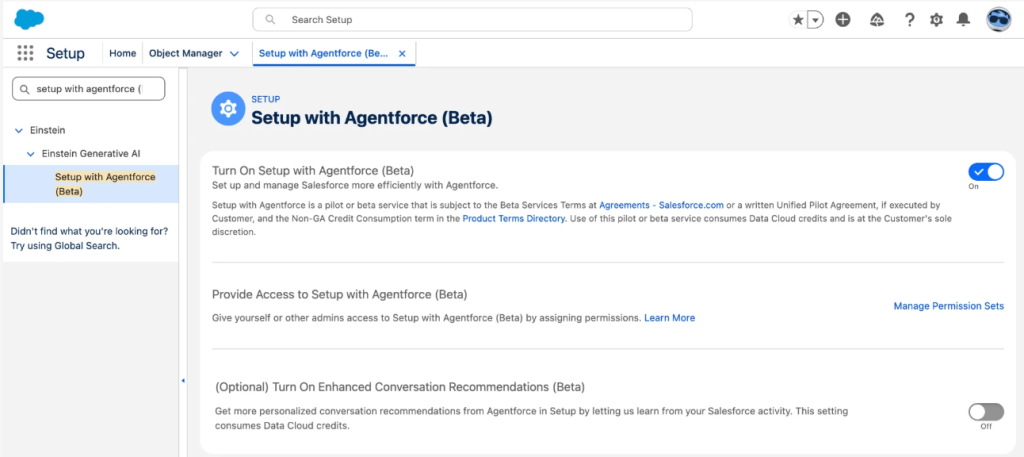
- Toggle Setup with Agentforce on. Do not do this before Data 360 setup is complete, or the agent won’t function correctly.
- Refresh your browser.
- Optionally, enable Enhanced Conversation Recommendations (covered below).
Unlike other agent types in Salesforce, the Setup agent is not visible or editable in Agentforce Builder. There’s no topic or action selection required because all supported functionality is enabled automatically.
Enhanced Conversation Recommendations (Optional)
By default, the Setup agent personalizes its conversation recommendations using your Setup Audit Trail and past agent conversations. If you want more tailored suggestions, you can enable Enhanced Conversation Recommendations.
This feature goes further by collecting your page views, CRUD actions, and other runtime data, then feeding those insights into Data 360 and Salesforce’s personalization layer to sharpen what the agent recommends as you work.
To turn it on: go to Setup with Agentforce in Quick Find, confirm the feature is enabled, toggle on Enhanced Conversation Recommendations, and then assign the “Collect User Engagement Data for Insight Calculation” user permission to the admins who should benefit from it.
The Redesigned Setup Home
Setup Home got a redesign in Winter ’26, and Setup with Agentforce takes it a step further. In addition to the updated layout and tiles, the Agentforce-enabled Home adds a prompt bar at the top where you can type a question or command to kick off a conversation.
Setup Home also surfaces a snapshot of your org’s health and usage in one place, including a security health score, license usage, storage metrics, and optimization recommendations. You no longer have to bounce between multiple Setup pages to get a read on your org’s overall state.
Conversation recommendations on the Home page are personalized to your activity, so common next steps surface automatically. Each conversation you start from the prompt bar on Home opens in its own tab, which makes it easy to juggle multiple tasks simultaneously.
One caveat: the Agentforce-enabled Setup Home isn’t available in Setup apps with their own custom home pages, such as Data 360 and Service Cloud.
Using the Setup Agent Day-to-Day
From any Setup page, you can launch the agent by clicking the “Ask Agent for Setup” button. This opens the Agentforce side panel alongside your current page, so you can chat while staying in context. You can widen the panel or expand a conversation to full screen if needed.
Conversations started from Setup Home open in their own tabs. Conversations started from other Setup pages open in the side panel. If the agent can’t answer your question or complete a task, it won’t leave you stranded; it will surface links to the relevant Setup pages or Salesforce Go features and, where applicable, pull in information directly from Salesforce Help with links to source articles.
A few navigation tips worth knowing: the left sidebar remains accessible on every Setup page, including Object Manager, and it preserves its expanded or collapsed state as you move around. Setup pages now open in a dedicated Setup tab rather than replacing the Home page, so your work stays organized.
Conclusion
For admins managing complex orgs, the friction of navigating Setup to accomplish routine tasks adds up. Setup with Agentforce doesn’t replace your knowledge of the platform, but it removes a lot of the repetitive clicking and searching that slows work down. The agent respects your permissions, won’t act without your go-ahead, and covers a wide enough range of tasks to be genuinely useful in day-to-day admin work.
Salesforce notes that it’s updated automatically with new functionality as the product matures, and they recommend it over the earlier Agent for Setup (released March 2025) due to its broader task coverage.
If you try it out and have thoughts, Salesforce has a dedicated Trailblazer Community group for Setup with Agentforce feedback.
Update: Setup with Agentforce Is Now GA
Salesforce shared on May 26 that Setup with Agentforce is now generally available, expanding access beyond the earlier beta rollout. Salesforce also noted that customer and community feedback, including input gathered during TDX 2026, helped shape the release.
To get started, Agentforce and Data 360 need to be enabled in your org. Availability can vary depending on your edition and Salesforce Foundations configuration, so it’s worth confirming licensing and setup requirements before you begin.
On the credits side, Setup actions are currently non-billable and do not consume Agentforce credits. One exception is the Help and Navigation action, which currently uses a small amount of Data 360 credits. Salesforce has indicated this may move to a different framework in a future release, which would remove that credit usage, though timing is subject to change.
Explore related content:
No Browser or UI Required: Salesforce Headless 360 Explained

