
Migrate to Flow (Beta) in Spring 22

When it comes to beta features, I always approach them with cautious optimism. Sure, they bring exciting possibilities, but there’s always the risk that Salesforce will pull the plug before full deployment. If you’ve been around the Salesforce ecosystem for a while, you’ve likely seen features come and go before reaching general availability. Salesforce Anywhere, for example, vanished before it had a chance to make a real impact. That’s why I usually don’t invest too much time in beta features—unless they’re strategically important. And Migrate to Flow (Beta) fits that category perfectly. Unlike other beta features that may or may not make it to production, this one is different. Salesforce has publicly committed to retiring Workflow Rules, which means that Migrate to Flow will eventually become a core tool in every admin’s toolbox. The only real question is how well it will work by the time it reaches GA.

For those who have followed my sessions—whether at Florida Dreamin’ or in virtual events—you know I’ve spent a lot of time helping people transition from Workflow Rules and Process Builder to Flow. My YouTube channel also covers migration strategies in detail (see the resource section below for links). This experience made me particularly interested in testing Migrate to Flow, and in this post, I’ll walk you through what works, what doesn’t, and what you need to be aware of before using it in your org.
Current Limitations of the Tool
The tool only works on workflow rules for now. It does not support processes. I assumed it would support most workflow rules, but I was wrong.
Testing the Tool
I had two workflow rules in my Preview Org that I have built for my sessions before. I tried to migrate these workflow rules using this tool. Unfortunately, one did not convert due to an update on a long text area field. The other one was not supported because it created a task.
This wasn’t very reassuring, to be honest. But I had to test the tool, so I created a simple field update flow to migrate that.
The use case is as follows: When a picklist value is updated with a specific value on the lead record, the workflow rule updates the other picklist value.

Successful Use Case
And as you would expect, the tool converted the workflow rule to a before save flow which is faster and more efficient.
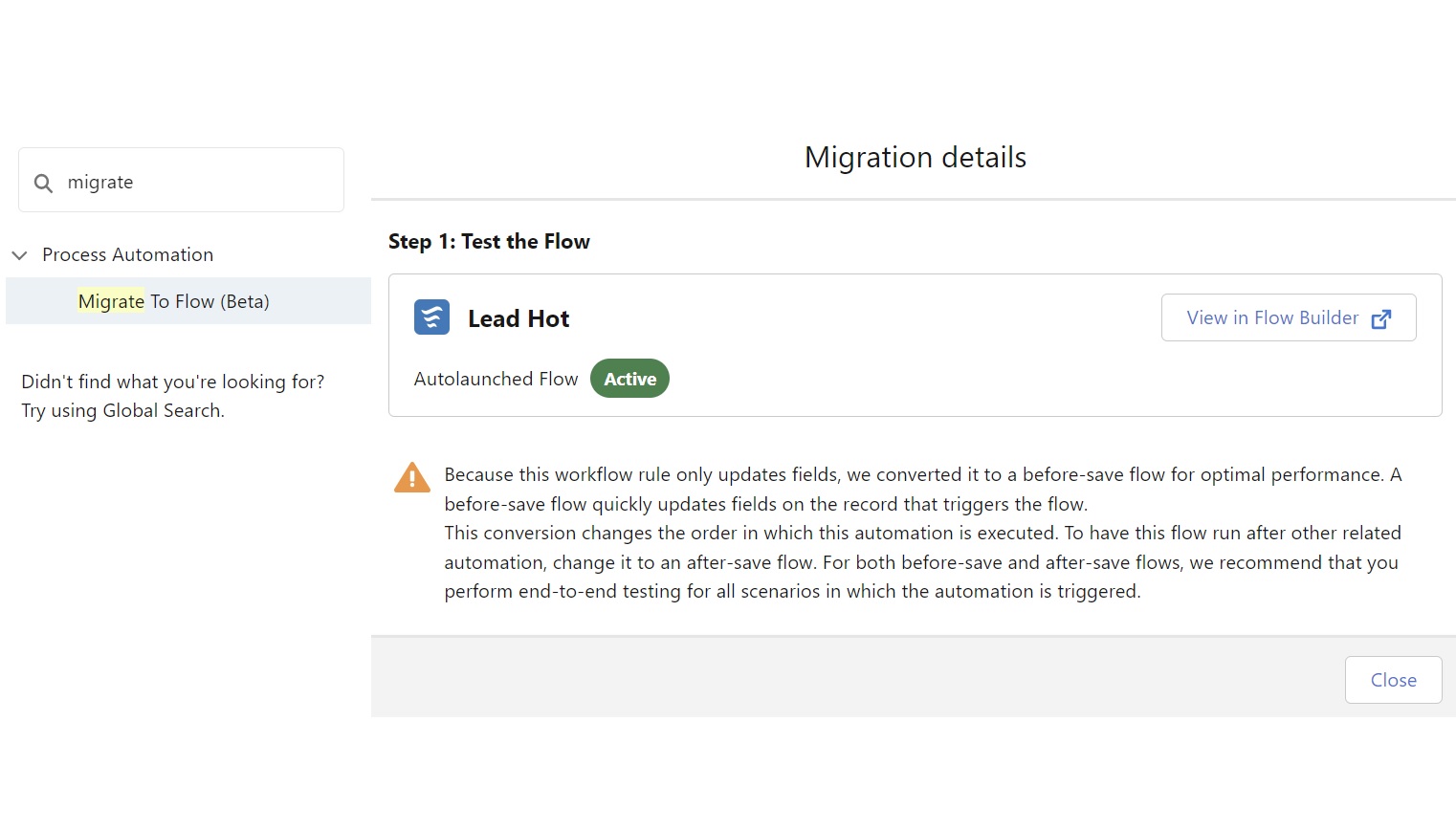
Here is the message you see on the screen when the new flow is created:
“Because this workflow rule only updates fields, we converted it to a before-save flow for optimal performance. A before-save flow quickly updates fields on the record that triggers the flow.
This conversion changes the order in which this automation is executed. To have this flow run after other related automation, change it to an after-save flow. For both before-save and after-save flows, we recommend that you perform end-to-end testing for all scenarios in which the automation is triggered.”
Observations on Terminology
Did you notice something here that immediately caught my attention? Salesforce practically wiped out the terms before save and after save from the record-triggered flow configurator screen; they buried the terms into the description fine print. This flow is called a fast field update flow on that screen. And after save is called actions and related records.
However, these terms don’t exist on this screen or the Trigger Explorer screen. And if I am going to be picky before-save is written with a dash here, without a dash on the Trigger Explorer.
It seems like Salesforce needs more clarity around the terms they use.
Recommendations for Release Notes
The release notes are very brief for the Migrate to Flow (Beta) tool. It does list what it supports; however, it does not list what it does not. I would recommend adding that to the release notes.
Conclusion
The Migrate to Flow (Beta) tool is an important first step, but it still has serious limitations that admins need to be aware of before relying on it. The fact that it doesn’t yet support Process Builder is a major gap, and even within Workflow Rules, some automations simply don’t convert properly. My testing showed that field updates work well, but actions like creating tasks or updating long text areas are still unsupported.
That said, we can’t ignore the direction Salesforce is heading. Flow is the future, and while this tool is still evolving, it’s clear that Salesforce will continue to refine it. By the time Workflow Rules and Process Builder are fully retired, we can expect a more comprehensive and reliable migration tool.
For now, I recommend:
- Using this tool cautiously—only for simple Workflow Rules that involve basic field updates.
- Manually rebuilding complex automations in Flow, especially if they involve tasks, text area updates, or multi-step logic.
- Testing all migrated flows extensively—just because the tool converts a Workflow Rule doesn’t mean the automation will behave exactly the same way in Flow.
- Staying informed—as Salesforce continues improving this tool, keeping up with release updates and testing new functionality will be crucial.
Additionally, Salesforce needs to clarify its terminology in Flow Builder and Trigger Explorer. The shift from “Before-Save” and “After-Save” flows to “Fast Field Updates” and “Actions and Related Records” seems unnecessary, and the inconsistency in documentation can create confusion for admins. Hopefully, future releases will bring better consistency in naming and clearer documentation.
The Migrate to Flow tool is a work in progress, but it’s absolutely necessary given Salesforce’s automation roadmap. If you’re an admin or consultant, now is the time to develop strong Flow skills—because whether or not this tool works perfectly today, Flow is where we’re all headed.
Here are some videos with related content:
- Build your Workflow/Process as a Record Triggered Flow – Salesforce Platform Power Hour hosted by Sarah Pilzer
- Salesforce Process To Flow Conversion with Brenda Glasser
- Don’t Migrate your Automation to Flow with Terri Miller – In other words, analyze, plan, redesign and build.
Enjoy
Explore related content:
Integrating the New Flow Action Button From Summer ’24
Fast Field Updates or Actions and Related Records in Record-Triggered Flows


3 Comments