
Salesforce Summer ’25 Preview: Major Flow Changes to Watch For


The Summer ’25 release is shaping up to be one of the most exciting updates yet for Salesforce Flow fans. Whether you’re building simple screen flows or orchestrating multi-step approvals with AI agents, this release is packed with features that make automation faster, smarter, and easier to manage. From a redesigned flow creation experience and better debugging tools to powerful new screen components and tighter Slack integration, there’s something here for admins, developers, and everyone in between. Let’s dive into the highlights of what’s coming to Flow Builder, Flow Orchestration, and beyond.

Create a New Flow Experience
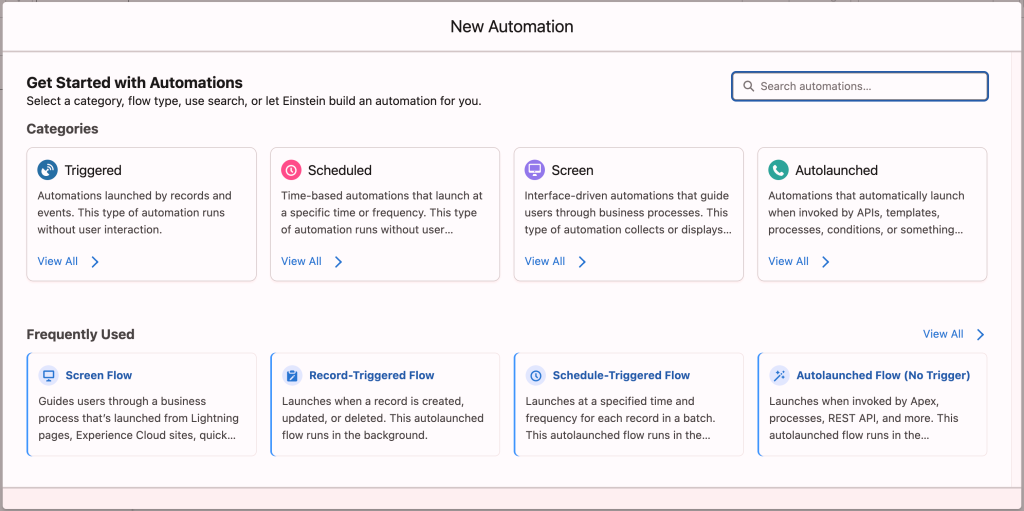
Improve the flow creation experience by allowing users to either build flows with Einstein’s help or choose from categorized flow types and templates. This update makes Flow Builder more user-friendly and scalable by organizing flow types. This is an increasingly important need as more flow options are introduced each year.
In Spring ’25, this new experience was only accessible through the Automation App. Starting in Summer ’25, it will also be available when launching flow creation from Setup.
Additionally, Salesforce is simplifying the configuration experience for anyone using your invocable actions. With the latest improvements, developers can:
-
Organize inputs in a custom order (no more default alphabetical sorting!) and group related inputs into labeled, collapsible sections.

-
Show or hide inputs dynamically based on other input values.
-
Define a specific list of selectable values using dropdowns (enums).
-
Use custom components for individual inputs to deliver a more tailored user experience.
Flow and Slack
Admins will find that Summer ’25 continues to expand the power of Flow with better Slack integration, more entry conditions for record-triggered flows, and potential enhancements to dynamic formulas.

Developers get a boost too: Summer ’25 solidifies support for Dynamic Formulas in Apex and extends Agentforce capabilities into custom-built apps. If you’re building for Slack or planning API-driven AI agents, this is your moment.
Flow Builder Usability
Canvas element icons will be updated to modern canvas cards, adding more functionality on the canvas. Additionally, your trackpad or mouse will be able to control the zoom in Flow Builder.
Furthermore, you can now call the new flow-based approval processes from any flow; not just orchestration-type flows. Thanks to this new invocable action, approval processes can be triggered from anywhere, including your existing flows. Pair this with the new agent invocable action to introduce human-in-the-loop steps for your agents. This release will include a ready-to-use approval process template with a single approver.
Structured Output in Agent Invocable Action
Salesforce is introducing the ability to define the exact output you want an agent to return for use later in the flow. This eliminates the need to write Apex to extract specific fields or details from the agent’s response and ensures a consistent, predictable response structure.
Flow and Email
Salesforce is working to make setting up emails in Flow Builder a more intuitive and user-friendly experience. Expect a new resource picker and a user-friendly design for this action element that can take many inputs.
Screen Flow Updates
The Summer ’25 release takes Screen Flows to the next level. Salesforce is delivering more interactivity, flexibility, and control over how users engage with your automations.
Dynamic Screens with Reactive Actions
If you’ve used Action Buttons in flows before, you’re going to love what’s coming next. Screen flows now support reactive screen actions—a powerful new capability that lets you trigger logic or data retrieval as the user interacts with the screen in real time.
Imagine this: a user starts typing into a search box, and a Data Table immediately updates with relevant records. Or, they make a selection in one picklist, and another one updates based on that choice—no “Next” button required. Reactive screen actions open the door to record-based dependent picklists, live calculations, selection summaries, and more.
Reactive screen actions are in beta for Spring ’25 and are expected to go generally available (GA) in Summer ’25.
Responsive Screen Previews
You’ll also be able to preview how your screen flow will render across different form factors. A new size picker lets you simulate your flow in three screen sizes:
-
Large (default): Full-screen experience or a wide Lightning page region.
-
Medium: Modal windows, like those opened from quick actions.
-
Small: Mobile or utility bar views.
This lets you refine your layout for a consistent, polished experience—no matter where your users run the flow.
Flexible Layouts Without Section Columns
Layout customization has received a major upgrade. You no longer need to rely on columns inside Section components to adjust layout. Now, you can:
-
Set the width of any individual component, Section, or repeater instance.
-
Control vertical alignment for components—helpful when you want cleaner spacing that padding alone can’t provide.
These improvements give you much more precision when designing compact, readable, and mobile-friendly screens.
Compact Repeaters with Custom Widths
Speaking of layout: Repeaters are also more space-efficient in Summer ’25. You can now:
-
Adjust the width of each repeater instance so that multiple instances render side-by-side.
-
Control the width of components within each instance to fine-tune how they appear.
This makes it easier to pack more information into the same screen area—great for comparison tables, mini-forms, or grid-style inputs.
Visual Pickers Now with Icons
Choice resources just got a visual upgrade. You can now associate Salesforce Design System icons with standalone Choices, and then use those in Visual Pickers or Choice Lookups.
The result? A more engaging, tappable, and user-friendly selection experience—especially useful when you want users to quickly understand their options at a glance.
Flow Tests Updates
From SF CLI, you will now be able to run all Flow Tests all at once and get the results back. The command will be likely resemble something like sf flow run test (source).
Sometimes you want to test the opposite of success—like making sure a flow fails the way it’s supposed to. In those cases, you can assert that the flow throws a specific error message when things go wrong.
Flow Debugging
Salesforce is giving the Flow Debugger a major upgrade to help you spot and solve issues faster. Whether you’re working with Record-Triggered, Autolaunched, or Scheduled Flows (with Screen Flows coming soon), the new experience is all about making it easier to find what you need—without digging.
Here’s a sneak peek at what’s coming:
-
Each item in the debugger will now appear as a clean, card-style layout for easier scanning.
-
Records, record collections, and Apex-defined types will use the same readable formatting you know from the Transform element—perfect for parsing large sets of data.
-
We’re expanding the debug panel width up to 80%, giving you way more breathing room to see what’s going on.
-
Search and filter by keyword, with matches clearly highlighted so nothing slips by.
-
Each debug card will now show key summary info right at the top, so you get the big picture faster.
With these updates, debugging flows is about to get a whole lot smoother.
Release Timeline & Key Dates
Mark your calendars:
- Sandbox preview starts: May 9, 2025
- First production upgrade weekend: June 7, 2025
- Second production upgrade weekend: June 14, 2025
You can check your org’s specific upgrade date on trust.salesforce.com.
Don’t forget to refresh your sandboxes before May 9 if you want access to Summer ’25 features early.
Conclusion
Summer ’25 is all about helping you do more with Flow. More interactivity, more intelligence, and more flexibility to build automation that works exactly the way your business needs. With a modernized Flow Builder, new ways to trigger and test your flows, smarter agent interactions, and improved approval processes, this release continues to push Salesforce automation into new territory. As always, be sure to prep your sandboxes ahead of the May 9 preview date and check your org’s upgrade window so you’re ready to take full advantage of everything this release has to offer. Flow on!
Explore related content:
Top 7 Salesforce Spring 25 Flow Features


2 Comments