
Salesforce Winter ’26 Release: Comprehensive Overview of New Flow Features


The Winter ’26 Salesforce Release brings significant improvements to Flow. From generative AI capabilities to stronger integrations, streamlined debugging, and enhanced security, this latest release showcases Salesforce’s ongoing commitment to positioning Flow as the central engine of automation across the platform.

Below, we’ll dig into the major updates, organized by category so you can easily find the changes that matter most to your org.
Flow Builder
Generative AI for Decisions
Decision elements now use generative AI to interpret complex, unstructured data and route it appropriately. For example, a flow can analyze the sentiment and key phrases of an incoming customer email and route it as an experienced service representative would. This goes far beyond simple conditional logic, giving admins smarter and more flexible routing options.
Improved Resource Menu
A redesigned resource menu makes finding what you need in Flow Builder faster and more intuitive. The menu now shows only the resources relevant to your context and includes expanded search capabilities for nested resources.
Immediate Access to New Records
When creating records in a flow, you can now use the fields from that record immediately without adding a separate “Get Records” element. This reduces steps and simplifies design for common patterns like record creation followed by conditional routing.
Nested Loops for Deeper Data Access (Beta)
Nested loops enable deeper traversal of complex data models. For instance, you can now iterate through all cases related to each team member of an account, unlocking use cases that were previously difficult to model in Flow.

File Attachment Triggers (Generally Available)
Flows can now be triggered by file attachments. Admins can specify criteria such as file type, file name, or creator, making it possible to launch automations the moment documents are uploaded. This functionality is available for Automation Event-Triggered flows available in most Orgs.
There is an org permission needed for this flow to become available. I presume this will be added to all Orgs, but if you need the functionality now, open a ticket with Salesforce requesting “AdminAutomationEventPerm org permission for Automation-Event Triggered Flows.”
Flow Orchestration Improvements
The Winter ’26 release continues to strengthen Flow Orchestration:
-
Debugging support is now available in Flow Builder for orchestrations, and flow approvals, reducing deployment risks.
-
External system triggers can now initiate orchestrations via connectors like Jira or NetSuite. This allows Salesforce orchestrations to react to third-party business events, expanding orchestration beyond the Salesforce platform.
Screen Flows
Preview Screen Branding
A new Preview Style feature lets you see exactly how your screen flows will appear with Lightning Experience or Experience Cloud branding before activation.
Data Table Enhancements
Data tables now support Apex-defined collections, enabling richer tabular displays of complex data. Additionally, tables will automatically update to reflect changes in field labels or language settings, reducing manual maintenance.
Watch this video for a demo.
Lightning Web Component (LWC) Local Actions
You can now embed LWC local actions in screen flows. This opens up client-side enhancements such as confirmation toasts or direct record navigation without requiring additional backend steps.
Flow Testing and Debugging
Unified Test View
The new Test Discovery API provides a single interface for all automated flow tests and Apex unit tests. This unified view helps ensure comprehensive testing coverage.
Debugging in Flow Builder
Debugging is now even more powerful:
-
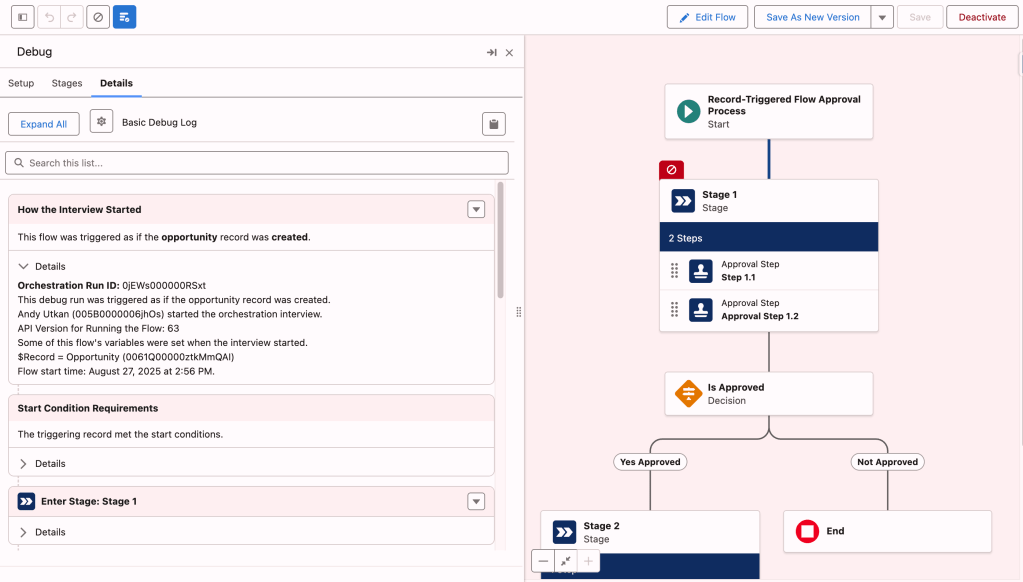
Approval processes can be debugged directly in Flow Builder.
-
You can manually set output values during debugging and view element-by-element details.
-
Rollback can be disabled, allowing you to test approval data changes safely before deployment.
See this short video for visual examples.
Compare Flow Versions to Track Changes More Efficiently
Admins and developers can now directly compare two versions of a flow inside Flow Builder. This makes it easy to track changes, identify issues before deployment, and share comparison results through generated URLs. This feature supports multiple flow types including autolaunched, scheduled-triggered, platform event-triggered, and record-triggered flows.
Enhanced Flow Analytics and Monitoring
Winter ’26 introduces stronger analytics and monitoring capabilities:
-
Deeper performance insights: Segment-triggered and automation event-triggered flows now include performance analytics powered by Tableau Next.
-
Improved troubleshooting: Filter analytics by element or user to understand execution paths and engagement performance more clearly.
-
Persistent logging: Detailed logs are now available for record-triggered and platform event-triggered flows.
-
Standard reports: New report types (FlowRun and FlowElementRun) allow admins to build standard Salesforce reports on flow activity.
-
Data Cloud integration: Flow logs can be accessed directly from the Data Cloud app, providing a seamless view of execution data across environments.
Flow Approval Process Enhancements
-
A new Resource assignee type simplifies assigning steps to users, groups, or queues.This enhancement streamlines the process by replacing the older, more granular assignee types like User Resource, Group Resource, and Queue Resource with a single, unified “Resource” option
-
Generative AI can now be used in Decision elements within approval processes.
-
Approvals can start with a group or queue, not just a single user.Previously, the firstApprover input variable in actions like “Process Simple Approval” only accepted a username or a resource containing a username at runtime. With this update, the firstApprover input variable now also accepts the API names of public groups and queues, or a resource that contains their API names, in addition to usernames.
-
Debugging support for approval flows allows testing before deployment, reducing rollout risks.
Stronger Flow Security (Release Updates)
Security updates in Winter ’26 include:
-
Enforcement of profile and permission set requirements for running flows, replacing the broad FlowSites org-wide access.
-
Enforcement of Apex class permission checks when used in flows. These changes ensure flows run only with intended access, reducing org-wide vulnerabilities.
Upsert a Record for a Person (Marketing Cloud)
This new flow template simplifies maintaining customer data consistency:
-
Functionality: It finds and updates an existing contact or lead. If no record is found, it creates or updates a prospect record. This feature is ideal for marketing form-triggered flow use cases where an incoming prospect needs immediate matching or creation.
-
Benefits: Prevents duplication and ensures prospect data is linked to the right person. When used as a subflow, it also returns the record ID for downstream use. This functionality is available for Marketing Cloud.
Let Flows Decide Whether a Transaction Is Required
Transaction control in Flow just got more flexible:
-
Dynamic transaction decisions: Flows can decide at runtime whether a new transaction is required, giving finer control over complex actions.
-
Expanded scope: Once limited to screen flows, transaction control now applies to flow types that support wait or asynchronous actions. For record-triggered flows, this feature can be applied to async and scheduled paths, not to the immediate path.
-
Benefits: This flexibility reduces errors in complex automations while optimizing transaction boundaries.
Final Thoughts
This release highlights Flow as the shared foundation where admins, developers, and business teams can build smarter automations together. For Orgs investing heavily in Flow, these enhancements represent significant opportunities to build smarter, faster, and safer automations. For even more notes from the new release, visit the Salesforce documentation here.
Explore related content:
Automate Permissions in Salesforce with User Access Policies
Why Is Everyone Talking About Salesforce Flow Approvals?
Getting Started with Salesforce Data Cloud: Your Roadmap to Unified Customer Insights


Is there a particular reason why I may not see the “Compare versions” option in the Version dropdown?
Not avail for all types of flows.
Do you know which types of flows it is available for?
Yes, they are listed in the post.