Why Headless Architecture Is the Foundation Salesforce Teams Need


Customers expect the same seamless experience whether they’re on a phone, a smartwatch, or a voice assistant, and rigid legacy systems struggle to keep up. Headless architecture separates the interface customers see from the data and logic running behind it. For admins and developers building in Salesforce, that separation is quickly becoming the default way to design for scale.

Here’s what we’ll cover: what headless architecture actually means, how APIs and MCP tools make it work, the benefits and real-world use cases, and the trade-offs your team needs to plan for before adopting it.
What Headless Architecture Actually Is
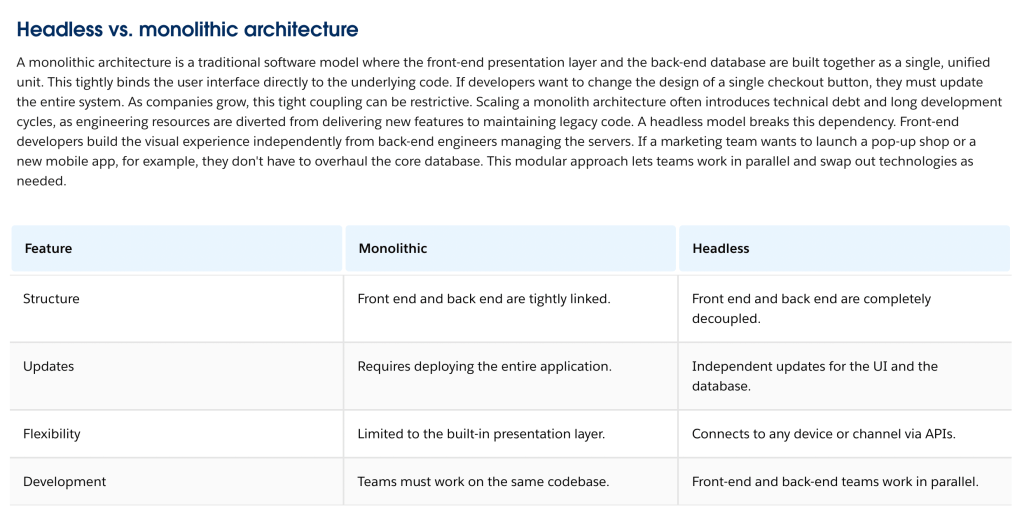
In a traditional, or monolithic, setup, the presentation layer and the database live in the same codebase. They’re built together, deployed together, and updated together. That works fine at a small scale but it gets complicated quickly once a business needs to support more channels.
With headless architecture, the back end stores and manages data in one place. The front end pulls that data through APIs and delivers it however a given channel needs it, whether that’s a website, a mobile app, or an AI agent. Developers build interfaces independently of the database, and teams can update one without touching the other.
Here’s how the two models compare at a glance:
APIs and MCP Tools do the Heavy Lifting
None of this works without a reliable way to move data between the two layers. That’s the job of APIs. They carry information back and forth so a product update in the back end shows up instantly on the front end, no matter which channel is asking for it.

Model Context Protocol, or MCP, tools extend that same idea to AI agents. Agents don’t click through a UI the way a person does. Instead, they call APIs and MCP tools directly to pull data and trigger workflows. A well-built headless system exposes business logic as an API, an MCP tool, or a command line interface, so both developers and agents get direct, programmatic access to the data they need.
What do Salesforce Teams Gain from Decoupling?
Consistent Delivery Across Every Channel
A decoupled back end acts as a single source of truth. Update a product catalog once, and APIs push that change to every connected channel at the same time. Customers get the same accurate information whether they’re shopping on a desktop or a phone.
Faster Releases Without Sacrificing Governance
When data schemas and permissions live centrally at the platform level, IT keeps control of the foundation while other teams build on top of it. Marketing and other stakeholders can move on front-end work without waiting on a backend release cycle. Projects that used to take months can ship in days.
More Room for Developers to Build Well
Monolithic systems often lock engineers into one proprietary template. Headless architecture lets teams pick the frameworks and languages that fit the job, and plug in new tools, including generative AI services, as they emerge. That flexibility helps teams attract strong technical talent and keeps the stack ready for whatever comes next.
Where Headless Architecture Shows Up in Practice
Headless architecture shows up in real workflows across commerce, service, and partner management.
- Omnichannel commerce: A shopper starts checkout on a mobile app and finishes on a smart display. The back end handles inventory and payment while APIs render the right layout for each screen.
- Agentic workflows: AI agents don’t need a visual interface to get work done. Using MCP tools, an agent can check a return policy, update a record, and process a refund in seconds.
- B2B partner portals: Companies pull data from older back-end systems and present it through a modern, lightweight portal, so partners aren’t forced to log into a clunky internal tool.
What Headless Architecture Costs You in Security and Control
Headless architecture isn’t a free upgrade. It shifts real responsibility onto the data layer, and teams need to plan for that shift before they build.
- Security moves to the data layer: Without a UI to mask sensitive fields, engineering teams need to enforce access rules directly at the object and field level. Trigger-based validation becomes essential, not optional.
- Autonomous agents raise the stakes: Agents that reason through a task and call APIs on their own can act faster than a human would catch a mistake. A poorly scoped prompt could trigger a mass update across thousands of records before anyone notices.
- Clean data matters more than ever: An agent or a custom front end is only as good as the data behind it. Messy records or missing context lead to broken experiences and answers that miss the mark.
Why Headless Architecture Needs a Trust Layer
Raw API access alone won’t solve these challenges. An agent connected to a database still needs business context, like a customer’s service history or renewal status, to act correctly. Intelligence without context is just guessing.
That’s where a centralized trust layer matters. Instead of rebuilding permissions for every new app or interface, teams can extend the security model they already have. Agents and external tools inherit those existing guardrails automatically, which keeps records clean and reduces the risk of unauthorized changes.
Start Building on a Headless Foundation
Headless architecture gives Salesforce teams the flexibility to meet buyers wherever they are, without giving up governance or security along the way. Salesforce Headless 360 builds that flexibility on top of the trust and permissions model teams already rely on, so developers and AI agents both get programmatic access to CRM data without starting from scratch.
If your team is weighing a move toward a decoupled architecture, now is a good time to map out where your current setup is holding you back, and where an API-first approach could open things up. For a closer look at how this works, watch Salesforce’s official explainer below.
Explore related content:
8 Dreamforce 2026 Sessions for Every Admin’s Agenda